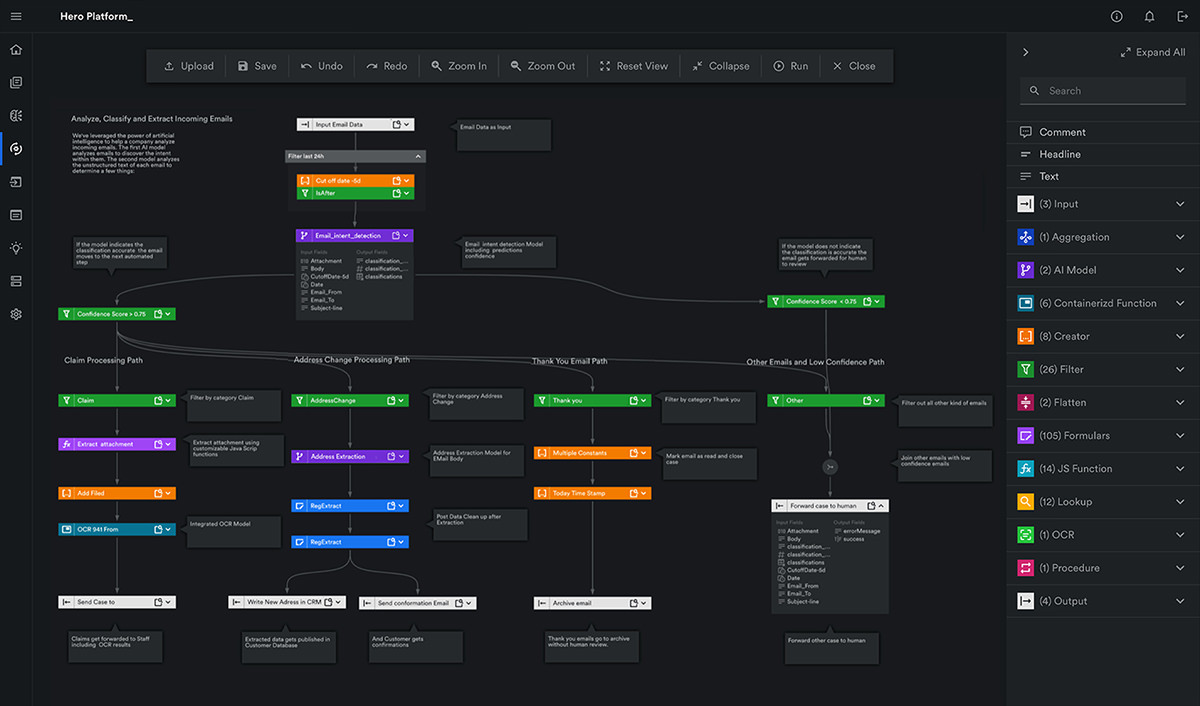
Category: Uncategorized

  • Fireside chat recap: Questions to ask when evaluating IDP vendors

    If you are a business leader looking to streamline document processes for your organization, intelligent document processing (IDP) may be the automation solution your team needs.

    However, sometimes it’s unclear which vendor can deliver the results your organization needs. So, how do you choose the right vendor?

    Mar 14, 2023 by Craig Woolard

    In a recent fireside chat, three Automation Hero leaders discussed the best strategies to evaluate IDP vendors. They covered everything from vendor experience and performance to use cases, technical requirements, implementation strategies, scalability, and cost-effectiveness.

    This blog highlights the top seven questions to ask when evaluating and selecting an IDP vendor. Your current automation might not be optimal for processing documents or unstructured data, so interviewing vendors and asking key questions is essential to finding the best approach for a return on investment (ROI).

    Keep in touch

    By following the insights from these IDP experts, you can make a more informed decision that optimizes your document processing capabilities and takes your organization to the next level.

    The three participants from Automation Hero were:

    • Cynthia Almonte, Director of Product Management
    • Kevin Shepherd, Director of Product Solutions
    • David Danushevsky, Sales Director

    You can read full bios of the speakers at the end of the article, but in the meantime, let’s hear their advice.

    Top 7 questions to ask when evaluating IDP vendors

    1. What is the potential impact of the problem?

    On beginning the automation journey, Cindy Almonte leads the conversation with the following:

    “I like to start by understanding the potential impact of the problem…for example, are we solving a problem for a line of business that has limited impact and probably a smaller issue for a group of people, or is this a problem that affects a lot of people organization-wide?”

    Addressing the question from a product management perspective, Cindy explains how organizations should begin their automation journeys by identifying problems with the highest ROI.

    “Finding something which has a good ROI calculation, whether it’s a small problem in a line of business or a big problem enterprise-wide, is always a really good initial approach because…once you’ve been impressed with automation’s ability to solve these bigger problems and shown the ROI-based calculation of what you’ve saved, it is much easier internally to get buy-in to solve other problems.”

    From her experience guiding organizations through the automation journey, she explains that starting with a minor problem for a particular team may be a good approach. However, in her experience, she concludes that beginning with a more comprehensive enterprise-wide solution frequently impresses stakeholders and increases buy-in for future automation projects.

    2. Are we looking for a short-term or long-term solution?

    We all agree on the ultimate goal of automation: saving money and repurposing resources so humans can focus on work that requires actual thought.

    On getting started, Kevin weighs in with a time-driven approach and considers the short-term and long-term problems that must be addressed before introducing automation into an organization.

    “…as well as the small and big problems…is it just something you know is short-term because of a business strategy change…[or]…is it a really good time to revisit the whole process?”

    Kevin also highlighted the importance of choosing a vendor to collaborate with your team and help you.

    “Is the vendor the type of vendor that can…help you take it back to the whiteboard and say, ‘Okay, just because you’ve been doing it like this for 20 years doesn’t mean that’s the right way.’ How can we utilize the new technology we now have…to the best of its ability rather than just ripping and replacing what you’ve got?”

    Choosing a vendor to help you with this process in the beginning phases is essential. Kevin advises organizations to revisit their strategies holistically before deploying automation that attempts to improve them. He also highlights the importance of internal resourcing and identifying the right team members in your organization who can help drive the project forward:

    “From your business team to your IT team, who are the people who can really help you understand how reimagined processes will have the biggest impact? Identify those people on your team who can help drive automation forward and onboard them in the initial phase of the project. Get them speaking to the vendor and start building up that relationship early on.”

    3. What is the most efficient way to get from A to B?

    From input to output, there are multiple ways to achieve a goal. For example, there are many ways to achieve your automation goals, but we seek the most efficient approach with the best ROI.

    When evaluating vendors, the focus should be finding the best and most efficient way to achieve your desired outcome. Automation Hero Solutions Expert David Danushevsky weighs in on the question with years of experience working with automation clients:

    “With so many vendors out there, there are now multiple ways to get from A to B…but I will say, when you’re asking these questions, what you’re looking for is the best way, so that’s something that absolutely needs to be considered…your current way is probably not great, which is why you’re interviewing vendors, so a lot of these questions are definitely key to finding the most efficient way to grab that coveted ROI.”

    On the most efficient way to get from A to B, Cindy says:

    “I think it’s also really important to understand the capabilities of your resources internally are…[For example,] there are times when it’s just better to engage with services to get a process launched and running within an organization and then have your team supported on an ongoing basis, but not actually build it.”

    Leveraging years of product management experience in the tech industry, Cindy explains the value of accurate personnel assessment and collaboration across departments when helping clients build out automation projects:

    “Every organization is different. Some organizations have deep technical resources and can throw people at the problems and collaborate well with us. But, on the other hand, some organizations aren’t capable of that, and I think it’s beneficial for an organization just to do that assessment upfront.”

    In addition to identifying the resources available, Cindy shares her A to B strategy for efficient implementation:

    “The JavaScript coder who runs your Ops Team might be a good person to run automation on an ongoing basis and consult in the development, but it might be a lot faster to engage with services with the platform that you’re bringing on board and have them do the primary development of the core Automation and just get your bootstrapped to it that much faster.”

    4. What is your organization’s current automation landscape?

    In the automation world, many claims are being made, and it’s not always clear which vendor can deliver the results your organization needs.

    Therefore, when evaluating automation tools, it’s critical to define the success criteria, such as the metrics you will use for measuring the automation’s success, the use cases you might want to automate, and implementation strategies as you navigate the current technology landscape.

    Automation Hero’s David Danushevsky shares his perspective on the current automation landscape:

    “A lot of the prospects I speak to already have automation in-house, but some of these technologies can be dated, or they’re just not doing what the user is necessarily looking for, or again, it’s not the most efficient way to get from A to B.”

    Furthermore, David advocates focusing on a few projects first and observing their ROI:

    “What I try to preach early on is… let’s focus on a project or two and let’s see how it works, and then once that ROI is really starting to take shape…then we have a plethora of opportunities to explore other use cases within the business, and that’s when it gets exciting.”

    5. Who is involved in the decision-making process?

    Whether it’s business people or IT people, it’s essential to understand the technical requirements of your automation and who it will affect. On who should be involved in the decision-making process, Kevin says:

    “It’s crucial to involve everyone in the process and ensure they understand that the goal is not to replace their jobs but to build upon their important contributions. This early involvement is important for successful integration points, smooth implementation, and User Acceptance Testing. Early involvement from the team also helps reduce fear and resistance to the new process.”

    Another action item to consider in your implementation strategy is defining the success criteria early on in the initial phases of a project. Failing to define success criteria that everyone aligns with is a common issue that derails a project.

    This occurs when someone looks at the project and decides that the success criteria need to be increased or changed, even if they were agreed upon earlier. This change can affect the project’s implementation and ROI. Kevin says:

    “If I shave time off here or if I manage to process these things two days faster and achieve the ROI goal that was initially defined, and then all of a sudden someone else looks at it and says ‘no, that needs to be twice as much,’ then that can really derail a project and the implementation, so I think getting both your requirements and your success criteria understood really early and getting everyone in alignment with them is pretty key.”

    While redefining an organization’s success criteria comes up frequently, it can be tackled early to mitigate some of the headaches that slow down progress later. Therefore, it’s crucial to clearly understand the requirements and success criteria from the start of a project. Ensuring everyone’s agreement as early as possible will help avoid any issues.

    6. Who will be implementing the solution? Are you using internal resources, or is an external vendor handling it?

    If your company is considering multiple automations with long-term strategies, adding a partner from the vendor’s ecosystem can also be a tremendous value-add in decision-making.

    Whether it’s from the vendor’s network or a partner that you already engage with, Kevin Shepherd explains how adding an experienced partner can push the project forward into production:

    “Does the vendor already work with a partner base? If you don’t have an in-house team that can manage that, then it’s quite likely that having a partner in the ecosystem will help you really push that project forward.”

    On the topic of who will be implementing the solution, Cindy emphasizes the critical role that project managers play within large-scale enterprise projects:

    “I think for these large-scale enterprise projects, the most unsung hero on successful teams is the project manager…ultimately someone who can manage all aspects of a project.”

    However, Cindy cautions against the assumption that project management is a simple task anyone can handle. Instead, she emphasizes the crucial role experienced project managers play in effectively managing complex projects:

    “A project manager, not just somebody from accounting who runs a spreadsheet with all of the tasks on it, but someone who can literally say this is the definition of phase one based on the requirements from the business and then manage the entire team’s work effort, is worth their weight in gold internally…having someone who is aggressively managing the project is just hugely critical in moving these things into production.”

    Doubling down on the critical role internal project managers play in the implementation strategy, Kevin Shepherd stresses the importance of collaboration between internal and external resources for successful enterprise-scale projects:

    “As we go back to the topic of picking the right vendor…they have project managers, and they have customer success managers…but you need one on the customer side as well…so totally agree, Cynthia, that’s essential.”

    On implementation, David Danushevsky also agrees with the essential role of the internal project manager:

    “I want to echo the project manager’s piece from the rooftops. A project manager that’s calculated, efficient, organized, and has a process to check boxes as they go…is essential in moving the process along, and I’m so glad that you both touched on that.”

    7. What security considerations do we have?

    Security is a crucial concern for nearly every customer these days. Therefore, we recommend defining your security criteria from day one. Addressing security concerns early in the process helps reduce unnecessary hold-ups during your implementation.

    On security topics to consider, Kevin Shepherd emphasizes the importance of defining your security criteria from day one with the following:

    “From the actual implementation side, spinning up cloud environments takes minutes, so we often see customers get environments up and running really quick and then say, ’Actually, we need to tick all these security checkboxes with our security chief or our CISO.’ Again, it could be something really simple like email integration, but because it’s touching the cloud platform, suddenly, you’ve got lots of hoops to jump through, so ideally, you want to start those sorts of questions as early as you know them,m before you’ve even signed the paperwork.”

    Furthermore, vendors are usually willing to address your security concerns and sign NDAs or master agreements before implementation. Doing this as early as possible helps reduce the number of unplanned concerns that tend to arise and hold up the process later. Kevin says:

    “Any vendor out there, including Automation Hero, will be more than happy to run over security problems and make sure that the NDAs are signed at the right levels…because it’s a group business, and that helps everyone expand later…the great thing is you can get those conversations going really early in the process by working with the right vendor.”

    Get started with IDP today

    In conclusion, evaluating automation vendors requires thoroughly analyzing vendor capabilities, technical requirements, and cost-effectiveness.

    The seven questions highlighted in this blog provide a framework for assessing potential automation vendors. As a result, you can select the best automation solution, platform, or technology for your use case.

    We hope the insights from Automation Hero’s AI experts help your organization optimize its document processing workflows, increase efficiency, and drive ROI goals to success.

    We recommend watching the whole discussion in the webinar link to gain further knowledge and insights from our AI experts. Then, with a comprehensive evaluation process, your business can make an informed decision that aligns with your unique goals, large or small.

    Regardless of the scale of your enterprise or use case, we can help you get there. Here are a few ways to get started:

    • Speak with an expert — tell us about your specific use case.
    • Get a personalized demo — schedule a demo, and our Heroes will get in touch!

    Who are the AI experts?

    Cynthia Almonte, Director of Product Management, Automation Hero

    Cindy Almonte is a tech veteran with over 20 years of product leadership experience. She has worked in various leadership roles in big data, search, marketing, and product management at major tech companies. As Automation Hero’s Director of Product Management, Cindy wears many hats and collaborates within and across teams to define, design, develop, and deliver first-class software solutions. Cindy consistently pushes herself and her team to deliver the best possible work. Cindy’s leadership and guidance are a big part of what makes Automation Hero’s work unique. She is an incredible inspiration for our team.

    Kevin Shepherd, Director of Product Solutions, Automation Hero

    Kevin Shepherd brings nearly three decades of tech experience to Automation Hero. Recently promoted from Head of Customer Success to Product Solutions Director, Kevin’s technical acumen in network engineering, consulting, communication, and product go-to-market strategy are critical assets to Automation Hero’s product success. In addition, Kevin says he enjoys making people’s work more enjoyable, productive, efficient, and precise by augmenting human intelligence with intelligent document processing automation.

    David Danushevsky, Sales Director, Automation Hero

    As a skilled sales professional with a diverse background in startups, including SaaS, artificial intelligence, automation, real estate, and hospitality, David has developed a unique perspective on business development’s technical and strategic aspects. Additionally, he brings a passion for mentorship and cultivates sales talent with an ability to think “outside the box” to deliver maximum success.


    Keep in touch

  • Automation Hero revolutionizes document processing for insurers.

    AI transcends traditional robotic process automation. But why should insurance companies adopt new technology now? Because your competitors most likely already have.

    Mar 10, 2023 by Craig Woolard

    The future of insurance automation is transforming the way insurers operate, and it’s becoming essential for providers to remain competitive. By automating time-consuming and repetitive tasks, insurers can improve operational efficiency, reduce costs, and provide faster and more accurate customer service. 

    Implementing automation with AI can help. AI transcends traditional robotic process automation insurance use cases. But why adopt new technology now? A closer inspection reveals that most competitors may already have.

    Keep in touch

    Why is technology important in the insurance industry?

    Technology has become increasingly important in almost every industry today. 

    The insurance industry is no exception. Technology can transform insurance companies’ operations, from policy underwriting and claims processing to customer service and communications. 

    Why should insurance companies adopt new technology now? Because your competitors most likely already have.

    By 2030, McKinsey predicts manual processes, such as manual underwriting, will no longer exist for personal and small-business products across life, property, and casualty insurance. Instead, according to the research, the future of insurance underwriting will be reduced to a few seconds…

    Of course, that doesn’t mean humans will no longer be needed or in the loop. On the contrary, automation creates more opportunities for humans to weigh in and provide higher-level thinking. The future of insurance is bright, and the use of smart technologies to automate repetitive tasks will also enhance decision-making.

    What is insurance automation?

    In short, automation is the use of technology to streamline better customer communication and improve data quality throughout a company’s business processes. There are many opportunities for automation in the insurance industry, and we will examine a few examples.

    But what can be automated in insurance? Insurance automation can include everything — from extracting critical data points inside policy underwriting and claims documents — to automating customer service responses. 

    Insurance automation can range from simple rule-based technology to more complex systems that utilize artificial intelligence (AI) to remove barriers and augment leadership decision-making

    What is robotic process automation in insurance?

    When most people think of insurance automation, they think of robotic process automation (RPA)

    In the early 2000s, screen scraping software was one of the first use cases of RPA in the insurance industry. RPA involves building a series of steps or rules (called a “script”) to accomplish complex screen tasks. 

    Today, RPA in the insurance industry still allows repetitive and rule-based tasks to be quickly automated, but these are generally limited to simple “swivel chair” copy/paste functions. RPA for insurance helps automate data entry, data processing, and triggering responses in other software. 

    In insurance, RPA can help with insurance claims processing, life insurance administration, and benefits automation, but there are limits to where RPA can help providers.

    Unfortunately, whenever there is a change in the software’s graphic user interface (GUI) or when the document layout changes that an RPA template is built on top of — the entire RPA automation breaks. This means automation engineers have to rebuild the process automation all over again. 

    However, this defeats the point of automation. Automation is meant to save insurance companies time and increase efficiency; not easily break when it can’t adapt to change. This can be a major issue in insurance as policies and regulations are constantly changing. 

    As outdated tech, it’s the biggest reason robotic process automation needs an AI upgrade. 

    How can AI help the insurance industry?

    RPA is going on 20 years old, so it’s no longer the shiny, new cutting-edge tech it once was. It’s also severely limited. For example, RPA cannot handle more complex tasks that require human judgment or decision-making — such as underwriting or claims assessment. 

    Additionally, RPA needs help with unstructured data. For example, extracting free-form text-based content from emails or handwriting is nearly impossible to process with legacy rules-based automation technology. 

    To handle the incoming unstructured data, insurance companies need a new type of automation technology with AI and cognitive intelligence more than ever. There are many examples of AI in the insurance industry; however, there is one clear leader: intelligent document processing.

    What is intelligent document processing in insurance?

    Intelligent document processing (IDP) is a new type of automation that directly solves the insurance industry’s most unique challenges with unstructured data.

    IDP has many native applications of deep learning built in that can help the insurance industry transform unstructured data into business value. Using machine learning (ML), natural language processing (NLP), and deep learning (DL) algorithms, insurance companies have many more opportunities for automation compared to legacy RPA. For example, IDP can automate claims processing, analyze customer data, improve underwriting accuracy, and detect and prevent fraud. 

    Here are the five use cases and benefits of using intelligent document processing in insurance:

    Uses of automation in the insurance industry

    1. Policy Underwriting: Automating underwriting processes reduces mistakes and the manual re-work involved to resolve the errors. Automation can help insurers quickly and accurately evaluate risks, speed up the underwriting process, and make higher-quality decisions on policy applications faster.  
    2. Claims Processing: Automating claims processing helps insurers streamline the entire claims handling process, from initial reporting to the final settlement. A more efficient policyholder management process end-to-end can reduce costs, improve turnaround times, and provide faster and more accurate customer service.
    3. Customer Service: Automated email responses and routing can help insurers provide 24/7 customer service and support to customer inquiries. By leveraging natural language processing (NLP) and machine learning (ML), Automated Email Classification and Processing systems, such as Automation Hero’s Hero Platform_ can answer common customer questions, resolve simple issues, and even escalate more complex inquiries to the appropriate department or agent whenever the “human touch” is needed.
    4. Fraud Detection: Automated fraud detection systems can help insurers identify and prevent false claims, identity theft, and premium evasion. Automation can help insurers proactively detect and mitigate risks by analyzing large volumes of documents. Some automation platforms, such as Automation Hero’s Hero Platform_ use an API that allows existing fraud models to flag the claims needing human intervention for quick batch review before payout.
    5. Data Analytics: Automated data analytics systems can help insurers control data quality for compliance and gain deeper insights into customer behavior or preferences, market trends, and risk factors. By analyzing vast amounts of structured and unstructured data, insurers could make more informed business decisions and deliver better products and services to policyholders. For example, Hero Platform can help identify cross-selling and upselling opportunities for existing policyholders. Our platform assesses policyholder information, compares it to others with similar data, and alerts a sales rep or a broker of the cross-sell opportunity.  

    Insurance automation ideas for optimizing your business

    Insurance companies can increase efficiency, reduce costs, and improve customer experience by implementing these automation ideas.

    1. Use AI to classify insurance documents.

    Automation Hero’s patent-pending Context-aware OCR scans and understands the intent of any human message. Then, based on the intent, our intelligent document processing platform can automatically classify the attached documents and even automate a response to the request or route the email to the proper department — reducing manual tasks in claims processing so policyholders get service faster.

    2. Data extraction and data input 

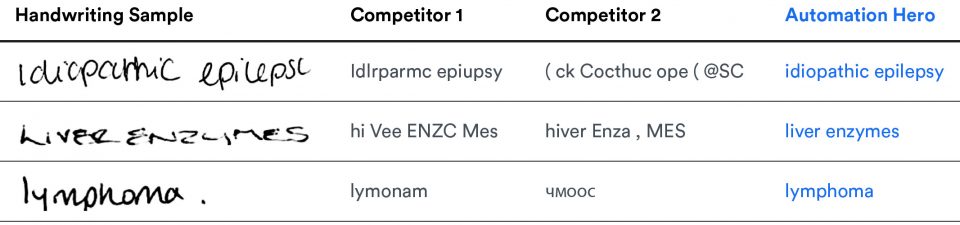
    Automation Heros’ Context-aware OCR can also handle text extraction better than the leading competitor. In fact, our intelligent OCR is 281% more accurate at handwriting recognition than the leading competitor’s — and more than 90% accurate at cursive recognition. 

    When you focus this much attention on improving handwriting recognition, performance and accuracy go up for all machine-typed documents too. With industry-leading Context-aware OCR, claims adjusters can turn the unstructured data in handwritten notes, email requests, and receipts into usable business data that automatically gets entered into an internal database. 

    3. Compare documents instantly

    The best CRMs, document management software, and policy administration platforms need help managing the data points stuck in unstructured documents. However, Hero Platform_’s IDP is adept at comparing data points from multiple sources and analyzing them with above-human accuracy. For example, data quality teams typically check policies against outside sources to verify insurance company records are correct — such as property records and other databases. Hero Platform_ validates all of these data points in one go, reducing the amount of human error in the process.

    4. Fraud prevention

    Underwriters can’t assess the risks of new customers if the data they have on them (or their assets) remain stuck inside inaccessible documents. Likewise, claims adjusters mitigate similar risks to prevent paying out money on fraudulent claims. 

    Hero Platform_ can look up account information stored in other places and compare the historical data with documents customers submit — speeding up data input and output throughout the underwriting and claims processes.

    Our platform can even incorporate existing fraud models triggered by high claim amounts or fatalities. In addition, our human-in-the-loop attended automation will flag the claims that need human intervention for quick batch review before payout.

    5. Optimizing Sales Outreach

    Hero Platform_ can assess policyholder information, compare it to others with similar data, and alert a sales rep or a broker of a cross-sell opportunity. For example, our intelligent document processing platform can help your marketing team reuse the existing data in your company’s CRM and policy management platform to show sales agents all relevant details of a customer’s record, such as age, past purchase history, and the next best product that might interest them.

    6. Process proof of prior insurance documents

    One of the most common steps in onboarding new insurance customers is checking for proof of prior insurance. For example, customers interested in new car insurance might submit several policy declaration documents to prove they had insurance through another carrier. These might include ID cards, current carrier reports, renewal billing notices, or cancel/non-renewal statements.

    7. Canceling or renewing an insurance policy automatically

    Since Hero Platform_’s AI detects intent, it can determine if the email request is a renewal or a cancellation request. This means using our Context-aware OCR to extract relevant information from the email or attachment for essential details like the policy number, customer’s name, send date, and sender name. 

    Hero Platform_ then performs a series of checks verifying that the sender’s identity matches the policy. If everything lines up, Hero Platform_ alerts your ticketing system to close or renew the policy and even sends a billing notification with the appropriate reply.

    Conclusion

    Insurance is highly regulated, and even the most prominent providers hesitate to adopt new technology. But this results in an industry buried in outdated document processes that gum up an organization’s ability to adapt.

    For example, processing claims fast is one of the most critical parts of policyholder satisfaction and insurer reputation. But, if your adjusters are buried in documents during a natural disaster, they can’t focus on the most sensitive cases. 

    Hero Platform_’s AI reduces the time dedicated to processing each claim, freeing up adjusters to bring their A-games to the highest-risk policies. Automation Hero can help you too.

    Get started with insurance automation today

    Learn how we helped, Markerstudy reduce their claims processing time by 40%. Additionally, learn how we reduced total claim processing time by 80% for another multinational insurance partner — cutting down manual tasks from 10 minutes to just two minutes per claim.

    • Speak with an expert — tell us about your specific use case.
    • Get a personalized demo — schedule a demo, and our Heroes will get in touch!
  • Learn about ESG reporting & how AI automates ESG compliance.

    Environmental, Social, and Governance (ESG) has become indispensable to our global economy. ESG reporting is a complex process, but AI can help enterprises reach their ESG goals faster.

    Feb 07, 2023 by Craig Woolard

    ESG Reporting AutomationESG reporting: what is it, why it’s important & how to automate it with AI

    Since ESG compliance can give you a giant leap ahead of the competition, this guide will cover everything you need to know about ESG reporting, why it’s essential, and how AI can help you automate an ESG strategy for a competitive advantage. 

    Keep in touch

    What is ESG reporting?

    ESG is an abbreviation for “Environmental, Social, and Governance.” It refers to a form of risk management that addresses sustainability issues — including environmental and social issues. 

    Essentially, ESG reporting is an organization’s effort to meet its environmental, social, and governance goals and disclose its performance to stakeholders. The information in ESG reports can include:

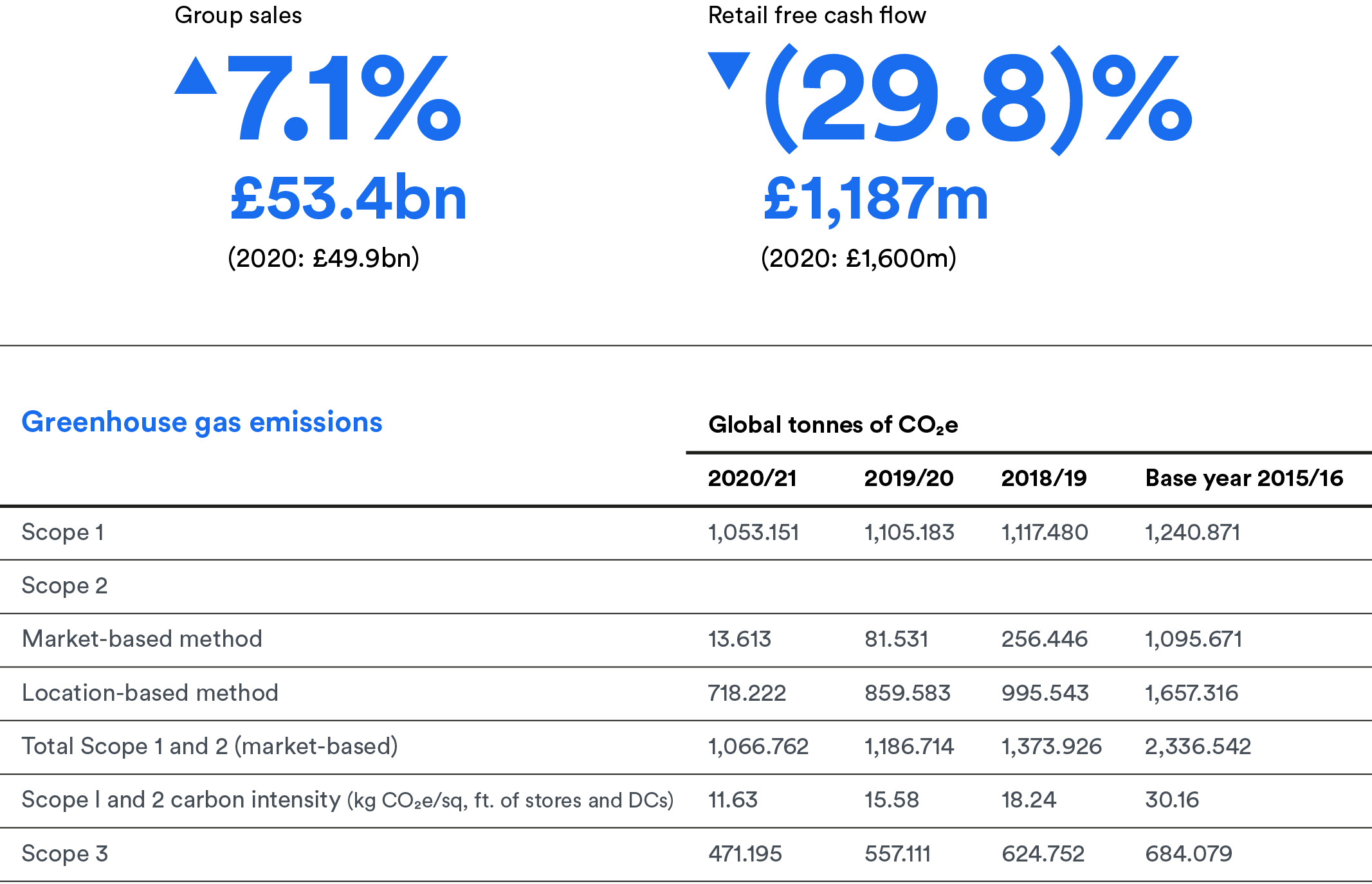
    • Details about a company’s carbon emissions.
    • Waste management practices.
    • Employee diversity/inclusivity policies.
    • Anti-corruption safeguards in place.

    What do ESG reports include?

    The main goal of ESG reporting is to provide investors, customers, and other stakeholders with a clear and transparent picture of a company’s overall sustainability goals and performance. So, companies can include a wide range of information in their reports.

    ESG reports generally focus on three “performance” pillars:

    1. Environmental performance: This could be the company’s efforts to reduce its environmental impact through renewable energy, recycling programs, and responsible use of resources in the supply chain.
    2. Social performance: This could involve special community involvement activities and ethnic or gender diversity/LGBTQ+ policies in place that nurture people in the workplace.
    3. Governance performance: This may include safeguards, special audit committees, or whistleblower programs that prevent corruption, fraud, and other criminal activities. 

    Currently, companies have a lot of flexibility when it comes to disclosing information about ESG performance. Companies can present the data in any format they consider helpful to their investors and stakeholders. Unfortunately, this makes it challenging for investment firms to find the most critical data points. 

    However, several global organizations have established ESG reporting frameworks to regulate the process. Today, the European Union (EU) offers the most mature framework for ESG regulations — created to advance Europe’s commitment to climate change through the EU Green deal. 

    Why is ESG reporting important?

    ESG reporting is essential for many reasons: 

    1. ESG reporting provides transparency into an organization’s activities (good or bad) regarding its sustainability initiatives. 
    1. Investors are increasingly interested in how companies address sustainability issues. ESG reporting demonstrates a company’s investment in how it impacts society and the environment — and this instills trust in the company that can also raise its profile in the public domain. 
    1. ESG reporting is a legal requirement in certain countries. Organizations can conduct ESG reporting voluntarily, or laws may require it. Companies might also be required to disclose ESG performance in their financial reports or specialized reporting frameworks — such as the Sustainability Accounting Standards Board (SASB) or the Global Reporting Initiative (GRI). 

    How automation assists with ESG reporting 

    The problem for investors, however, is a need for more consistency in ESG data reporting methods and how organizations ultimately decide to present ESG data. 

    Presently, companies have a long leash when it comes to disclosing ESG. Some companies may publish ESG data in various semi-structured formats — such as the company’s website, a PDF report, or even machine-printed paperwork — making it nearly impossible to evaluate and compare ESG scores for an array of organizations. 

    Since there is no standardized format, method, or framework for reporting ESG information, financial institutions and investors must manually read various unstructured documents to find the key data points that reliably evaluate a company’s ESG impact. And for companies following ESG guidelines, the data collection process for ESG compliance can be time-consuming and labor-intensive. 

    Adding to the complexity of ESG compliance, ESG scores can vary between providers and may not align. Many third-party organizations — such as rating agencies, research firms, and index providers- assign ESG scores to companies. 

    Each of these agencies uses a different set of criteria to assign ESG scores, so it’s worth mentioning that some ESG scores are based on publicly available information, such as the open-source unstructured data on the company’s website or the engagement on its social media channels. Others are based on additional research, data, and interviews with the company. 

    Since there is no standardized scoring system nor a single standard for ESG regulation, it’s essential to consider the methods, data sources, and scope of the ESG score when evaluating ESG performance. There must be a better way.

    Fortunately, intelligent document processing (IDP) can help solve these problems and much more.

    Using intelligent automation to ensure ESG compliance

    Using intelligent automation to ensure ESG compliance

    Intelligent automation technologies can improve the accuracy and efficiency of ESG reporting, reducing manual data entry errors and freeing up time for more in-depth analysis.

    Automation can also help companies monitor and communicate their ESG performance more effectively, so they can focus on providing stakeholders with reliable, real-time data.

    Next-gen intelligent automation technologies with advanced AI/cognitive capabilities, such as intelligent document processing, can completely automate many tedious steps in ESG reporting. 

    Here are seven key opportunities IDP can automate: 

    Key opportunities for ESG automation 

    1. Collecting and managing ESG data:

    Collecting data is one of the biggest challenges for any organization. Since intelligent document processing reads and understands documents, end-to-end IDP platforms can automate every tedious step in the data collection process. Our IDP platform uses an advanced AI model to automatically sort documents into categories, making document management for ESG reporting a streamlined process. For example, when a new email comes in that is related to ESG, Hero Platform_ uses a classification AI model to classify the intent of the message. Is the email an energy, gas, or water utility bill? Hero Platform_ detects the intent and intelligently sorts the email into an appropriate category for the department overseeing the collection of ESG materials. Additionally, our API makes it easy to connect to any existing REST API and quickly extract the necessary data. As a result, you can immediately start using Automation Hero’s built-in intelligent document processing to build an automated infrastructure that speeds up tasks at every step of the way. 

    2. Extracting ESG data points accurately:

    The key data points you are looking for can be buried within invoices, contracts, emails, reports, and other semi-structured documents. Since nearly all data points essential to ESG reporting are locked away in various documents, manually capturing the unstructured data from them is tedious and time-consuming. Fortunately, Hero Platform_’s intelligent document processing (IDP) is a proven solution that unlocks this unstructured data and turns it into valuable, actionable data for ESG reporting. Hero Platform_ uses a Context-aware OCR model that improves data extraction speed and accuracy. It can even read and extract handwriting 281% more accurately than the leading competitor’s OCR — making it a viable solution for organizations that still use paper applications but want to improve processing speed significantly. 

    3. Integrating ESG data with other tools:

    Once extracted, intelligent document processing can read the data in multiple languages. If you have operations in different countries — this allows you to reuse the data for ESG reporting standards in multiple regions. Furthermore, intelligent document processing technology can enter the data into accounting software or an internal database — such as your ERP, ECM, or CRM system. With the ESG criteria extracted, Hero Platform_ can look up information in another system and verify it — helping your organization comply with the ESG reporting framework in your region. Additionally, Automation Hero is the only end-to-end platform that allows automations and document AI processes to be deployed as highly scalable, highly reliable microservices. Hero Platform_ is a modern platform that supports calling external microservices; it can also be called as a microservice by other platforms. For processes stuck under a mountain of unstructured data — such as ESG reporting — our API will serve as an intelligence “fabric” that connects all of your microservices together with other business process automation systems and existing internal data systems.

    4. Augmenting existing systems:

    According to a survey conducted by Enterprise Strategy Group, most well-established enterprises drove their early digital transformation initiatives in the 2010s by successfully implementing Robotic Processing Automation (RPA) across several business processes to help automate ESG compliance. However, this automation requires hundreds, if not thousands, of RPA bots. Today, they have progressed to the next level of digital transformation by leveraging the power of “Hyperautomation” through machine learning and AI-integrated RPA solutions. For organizations invested in RPA and other legacy tools — or required to migrate incrementally from older technology — Automation Hero can integrate with pre-existing systems to further augment ESG processes. For example, many companies still extract data using simple, legacy OCR solutions. However, Automation Hero supports a “Business-Process-as-a-Service “architecture, allowing organizations to improve workflow speed, accuracy, and performance quickly and easily without “ripping and replacing,” which reduces cost and overhead for your company. Automation Hero’s API can serve as a connective fabric between systems to fill in the gaps — creating cohesion between your databases and existing software tools. Even better, Hero Platform_ provides a central enterprise dashboard to manage all interlinked automation workflows.

    5. Validating data for ESG compliance:

    With an end-to-end intelligent document processing platform to automate ESG reporting, organizations can have more accurate and actionable insight into their ESG metrics. For example, an IDP platform, such as Automation Hero’s Hero Platform_ is particularly adept at comparing information from various unstructured documents and verifying the key data points for ESG compliance with above-human accuracy. In addition, since measuring KPIs with a traditional ESG framework is cumbersome, an IDP platform, such as Automation Hero’s Hero Plaftorm_  provides an “intelligence” framework that allows companies to compare documents and validate ESG performance for future risks and opportunities. 

    6. Driving efficiency while meeting ESG goals:

    Each compliance requirement, including ESG, can cost large organizations 10,000 hours of work. Data breaches — either from scammers or human error — are costly to companies and their reputations. Since automation removes human error from many business processes, including ESG, there is less likelihood of a leak or corrupt employees having easy access to sensitive data that could result in identity theft or other problems. Automated systems are also more accessible to log and audit. For example, if a company wants to do an ESG audit of its vendors or supply chain, intelligent document processing can help. This allows the company to easily track data from all departments and provide more effective oversight. Likewise, if an investor or a bank wants to compile ESG data from multiple companies simultaneously, then IDP is extremely beneficial in this use case.  

    7. Enhancing security and compliance:

    ESG risks — such as human rights violations or weak governance practices that oversee executive board members and compensation policies — can significantly impact an organization’s reputation. The right programs, policies, procedures, and technologies can help companies protect themselves against fraud, bribery, and other criminal activities. ESG reporting is one of the safeguards that companies have to identify, assess and manage these risks. But, companies need to be armed with the right automation platform to minimize mistakes so they can reliably protect their long-term viability. Unfortunately, the World Economic Forum reported — only 9% of companies worldwide leverage technology for data collection, analysis, and ESG reporting, which is an alarming concern. IDP is the most secure safeguard companies can incorporate to reach ESG compliance goals.

    Automation is a valuable asset in an ESG reporting framework. But what does it look like in practice?

    Automated ESG reporting in action

    Hero Platform_ reads documents — including handwritten documents — the same way as humans. It uses next-gen AI to extract essential ESG criteria locked away in semi-structured and unstructured emails, websites, interview transcripts, or annual reports. Then, it transforms it into business value for ESG compliance. 

    Once unlocked, Hero Platform_’s intelligent document processing can read the data in multiple languages. If you have operations in different countries — this allows you to reuse the data for ESG reporting standards in various regions. 

    Likewise, intelligent document processing technology can enter the data into accounting software or an internal database — such as an ERP or HCM system. Then, with the ESG criteria extracted, Hero Platform_ can look up information in another system and verify it — helping your organization comply with your chosen ESG reporting framework in your region.

    Automated ESG reporting in action

    Using IDP to automate ESG reporting

    Element22 found a use case for Automation Hero’s intelligent document processing for its own ESG reporting tool. Element22 is a data analytics consultancy firm that provides a software solution to help financial institutions and investment firms find and benchmark ESG ratings. Their online platform is used by investment groups to collect and aggregate ESG-related data from multiple companies.

    Since many data points that financial institutions and investors look for when evaluating a company’s ESG are found on its website or in semi-structured annual reports, the data is challenging to locate. Element22 recognized the lack of accurate data collection and extraction solutions for its ESG reporting system, so it reached out to Automation Hero to fill in the gap.

    Using IDP to automate ESG reporting

    Element22 turned to Automation Hero’s IDP for help pulling in the data from a vast array of ESG reports to extract the essential data points for input into its platform. Using Hero Platform_’s Application Programming Interface (API), Element22 pulls ESG information from hundreds of semi-structured reports. Then, it analyzes the data within its software platform for its clientele. 

    Before they reached out to Automation Hero, Element22 manually entered the data into their platform. After integrating IDP through our platform’s API, they reduced their average handling time from three weeks to less than three days.

    IDP has many use cases in the banking and finance sector — including ESG compliance and evaluation. Watch the ESG use case with Element22 and discover how our intelligent document processing platform’s API completely automates the process for fast and accurate ESG evaluation.

    Start automating ESG reporting today:

    The laws and regulations pertaining to ESG compliance change fast, and keeping up with them is not only a challenge — it’s simply impossible. However, that’s where artificial intelligence (AI), specifically intelligent document processing (IDP), can help.

    • Learn how IDP works — our guide to IDP will guide you every step of the way.
    • See how IDP works — watch dozens of use cases. Filter by industry and see what IDP can do.
    • Speak with an expert — tell us about your specific use case.
    • Get a personalized demo — schedule a demo, and our Heroes will get in touch!
  • Learn about ESG reporting, why it’s important, and how it works

    With ESG reporting standards becoming mandatory in many countries, it’s only a matter of time before businesses worldwide will have to address the ESG reporting requirements in their region. So will yours be next, and if not — why is ESG important?

    Feb 01, 2023 by Craig Woolard

    Graphic art about ESG reporting explaining what ESG reporting is and why it is important.

    There are many advantages to starting the process early before ESG reporting becomes mandatory. This guide will cover everything you need to know about ESG reporting and why kickstarting the process can give you a leg up on the competition.

    Before we jump in, let’s start with a basic understanding of what ESG is — and what it’s not. 

    Keep in touch

    Understanding ESG

    First, ESG reporting is not the same as sustainability reporting — although it is related. 

    ESG is the abbreviation for “Environmental, Social, and Governance” — and this refers to a form of risk management that addresses a set of sustainability issues, including environmental and social issues. 

    What are ESG regulations?

    ESG regulations are the guidelines to mitigate any adverse impacts their business operations could have on the environment or society. 

    For example — these regulations might include requirements for reducing greenhouse gas emissions, promoting workplace diversity and inclusion, and implementing ethical corporate governance practices. 

    Additionally, ESG regulations encourage companies to operate ethically, sustainably, and responsibly.

    ESG and sustainability reporting

    The terms “ESG” and “sustainability” are often used interchangeably, but they have slightly different meanings. 

    What’s the difference between ESG and sustainability? 

    Sustainability is a broad term that covers many “green” and environmentally friendly topics on corporate responsibility. However, for many investors, “ESG” has become the preferred term. 

    The key distinction between sustainability and ESG reporting lies in the stakeholders each report focuses on. ESG is a framework that investors use to assess a company’s performance and risk profile — and the increased focus on the three pillars of ESG (environmental, social, and governance) has shifted the way companies disclose their ESG performance to investors. 

    On the other hand, sustainability has a broader stakeholder focus and refers to a wide range of issues that factor into an organization’s long-term viability. Sustainability reporting accounts for employees, customers, and shareholders; but can also include ESG factors, such as innovation, community engagement, and resilience. 

    As an umbrella term, sustainability covers a broad range of economic, social, and environmental issues. In contrast to ESG reporting, sustainability standards focus more on scientific data.

    ESG frameworks and standards: what’s the difference?

    Understanding the difference between ESG frameworks and standards is essential before deciding which to use. Essentially, frameworks could be voluntary, but standards are likely to be a requirement.

    1. ESG framework: A framework helps guide compliance with ESG standards whenever a well-defined standard does not exist. Therefore, ESG frameworks are useful as a general set of principles that help guide ESG reporting. Frameworks can be voluntary.
    1. ESG standard: Standards make frameworks actionable. ESG standards are detailed criteria for ESG reporting and provide a method for collecting and reporting information. The details in ESG standards could include steps outlining how data is collected — ensuring comparable, consistent, and reliable disclosure. Standards may be required.

    What is ESG reporting?

    ESG reporting discloses a company’s environmental, social, and governance performance goals and practices to stakeholders.

    This information can include details about a company’s carbon emissions, waste management practices, employee diversity, and inclusivity policies, such as its gender and LGBTQ+ human rights initiatives or anti-corruption efforts. 

    Presently, companies have a lot of freedom when it comes to disclosing information about their ESG performance. Companies can present this data in any way they consider to be the most useful to investors and stakeholders. 

    However, ESG reporting frameworks have been established by the following organizations:

    Organizations can conduct ESG reporting voluntarily, or laws may require it. Companies might also be required to disclose ESG performance in financial reports or specialized reporting frameworks — such as the Sustainability Accounting Standards Board (SASB) or the Global Reporting Initiative (GRI). 

    The main goal of ESG reporting is to provide investors, customers, and other stakeholders with a clear and transparent picture of a company’s overall sustainability goals and performance.

    What do ESG reports include?

    ESG reports generally focus on quantitative and qualitative details about the practices around environmental, social, and governance issues. The key pillars that ESG reports focus on are:

    • Environmental performance: This can include information about a company’s carbon emissions, energy, and water consumption, and waste management practices. For example: what is the organization doing to be a good steward of the environment? This details the company’s efforts to reduce its impact on the environment through renewable energy, recycling programs, and responsible use of resources in the supply chain.
    • Social performance: This ESG reporting can include information about a company’s labor standards, including ethnic or gender diversity/LGBTQ+ policies that nurture people in the workplace and community engagement activities. For example: what is the organization doing to improve the lives of the communities it serves? This includes special community involvement activities, employee satisfaction surveys, and investments in the community.
    • Governance performance: This can include information about the company’s internal controls, such as procedures governing executive board members and compensation policies. For example: what is the organization doing to safeguard itself and mitigate the risks of corruption or conflicts of interest? Examples may include efforts to prevent corruption through special audit committees or whistleblower programs to protect companies from fraud and other criminal activities. 

    Currently, there is no standardized format for reporting ESG information. Companies could publish ESG reports in structured, semi-structured, or a wide variety of unstructured formats — such as a company’s website, PDF report, or scanned images of machine-printed paperwork. 

    Since the information layout varies in structure, finding the key data points to reliably evaluate ESG could be an ongoing challenge for many investors and organizations. 

    Who assigns ESG scores? 

    Investors use ESG scores as a criterion for evaluating the risks and opportunities associated with an organization’s impact on the planet and society. Capital market investors and analysts are example groups who use ESG scores to evaluate a company’s performance regarding its environmental, social, and governance practices. 

    Many third-party organizations, including rating agencies, research firms, and index providers, also assign ESG scores. 

    Some notable organizations include: 

    • Bloomberg — ESG Data Services 
    • Sustainalytics — ESG Risk Ratings
    • Dow Jones — Sustainability Index Family
    • RepRisk 

    These rating agencies are the most common ESG score providers. They use a diversity of methods, procedures, and data sources to calculate scores based on ESG metrics.

    Since each of these agencies use a different set of criteria to develop ESG scores, it’s worth mentioning that some ESG scores are based on publicly available information, such as the open-source unstructured data on a company’s website or the engagement on its social media channels. Others are based on additional research, data, and interviews with the company. 

    Adding to the complexity of ESG compliance, scores can vary between providers and may not always align. Since there is no standardized scoring system or standard ESG regulation, it’s essential to consider the methods, data sources, and scope of the ESG score when evaluating ESG performance.

    How to get a good ESG score

    A good ESG score grades an organization on its ESG efforts and shows investors that the company can meet its commitments. As ESG becomes a global priority for investors and companies, solid compliance will significantly impact a company’s valuation in the future.

    Organizations can improve their ESG scores by implementing and communicating sustainable business practices and complying with the key steps outlined in their ESG reporting framework. Automation technology can play a key role in how companies improve their ESG scores.

    Since so much ESG reporting is based on quantitative data in annual reports and qualitative data from customer surveys, emails, interview transcripts, or even open-source information on the web, next-gen artificial intelligence can help companies collect key data points from these various unstructured documents and improve their ESG scores. 

    For example, an end-to-end intelligent document processing (IDP) platform, such as Automation Hero’s Hero Platform_ is particularly adept at comparing information from various unstructured documents and verifying the key data points for ESG compliance with above-human accuracy. 

    Why Is ESG reporting important?

    ESG reporting is important for several reasons:

    1. ESG is required in certain countries 

    Many countries and regions have implemented regulations and guidelines that require companies to disclose their ESG performance, such as the EU Non-Financial Reporting (NFR) Directive and the Task Force on Climate-related Financial Disclosures (TCFD). Multinational companies may also be required to report ESG in countries where they do business, even if they’re not based there. ESG reporting frameworks can help organizations to comply with these regulations and guidelines.

    2. ESG reporting helps mitigate risks

    ESG risks, such as climate change, human rights abuses, and weak governance practices, can have a significant impact on an organization’s operations and reputation. ESG reporting allows organizations to identify, assess and manage these risks — which can also help to protect their long-term viability and resilience.

    3. ESG promotes transparency, accountability & integrity

    When companies report their ESG goals, it demonstrates transparency, accountability, and ethical integrity to multiple stakeholders. 

    By holding themselves accountable, ESG-compliant companies promote transparency and goodwill to employees, customers, and investors — which could also raise a company’s profile in the public domain and increase its economic evaluation. 

    Additionally, ESG reporting demonstrates a vested interest in society and the environment — and this instills trust in ESG-compliant companies. 

    4. ESG meets stakeholder expectations 

    Investors and customers are increasingly interested in the environmental and social impact of the companies they invest in or buy from. ESG reporting can help organizations meet these expectations and build trust with stakeholders. 

    Consequently, ESG reporting is a critical opportunity for a company to communicate its environmental, social, and governance goals for attracting and winning new investors. 

    5. ESG reporting is good for business

    Savvy investors know “goodwill” is one of the most valuable intangible assets on the balance sheet. While goodwill represents many things that are not easily quantified, its value can give another acquiring company a competitive advantage. 

    For example, the value of a company’s brand, reputation, built-in customer base, and employee relations all factor into the premium one company may pay to acquire another. 

    Since ESG compliance is an ethical decision, reporting ESG performance can potentially increase a company’s valuation. While ESG reporting is optional in many regions, it’s also good for business, and that’s what makes it such an important investment decision.

    Organizations that implement sustainable business practices and disclose their ESG performance may be better positioned to manage risks, access capital, and attract and retain customers and employees. This can ultimately lead to improved financial performance.

    Ready to take the next step?

    Learn how the right tool can automate ESG reporting:

    The laws and regulations around ESG compliance change fast. Keeping up with them is not only a challenge — it’s simply impossible.

    However, that’s where artificial intelligence (AI), specifically intelligent document processing (IDP), can help.

    • See how IDP works — watch dozens of use cases. Filter by industry and see what IDP can do.
    • Speak with an expert — tell us about your specific use case.
    • Get a personalized demo — schedule a demo, and our Heroes will get in touch!
  • How to save hours with email intent classification | Automation Hero

    How often have you contacted a business only to wait 72 hours for a response? Studies show that the average email response time is 42 hours. The problem with long delays? They’re so frustrating!

    Today, customers want requests handled quickly and with round-the-clock support. As a result, businesses must identify consumer intents efficiently and respond appropriately to stay competitive in a digitally transformed landscape.

    Jan 10, 2023 by Craig Woolard

    A photo showing employees working in front of a computer.

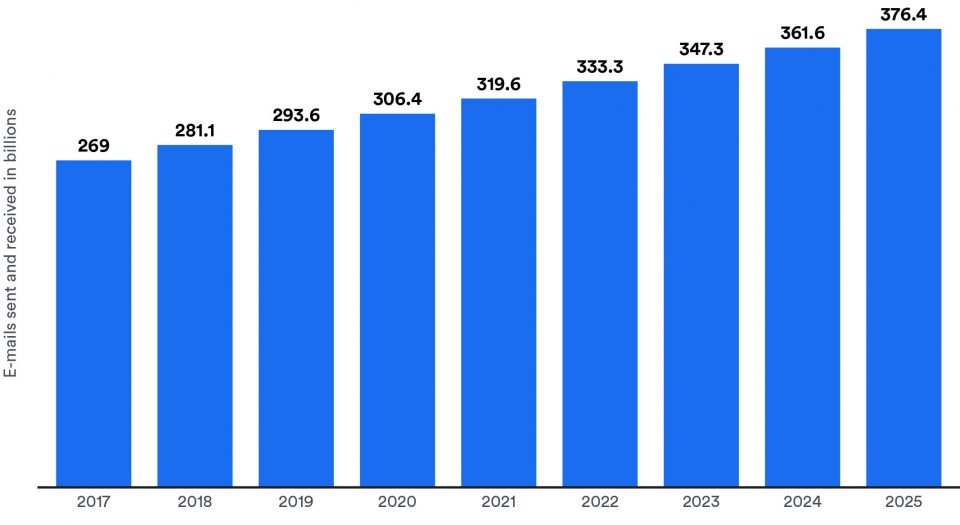
    Despite the frustrations that come along with overflowing inboxes, the reality is that email is ultra convenient. Customers use email for all kinds of requests — and sometimes — they could have more than one. It’s interesting to know that for every 24 hours, there are more than 3 billion business emails sent and received worldwide.

    Email classification graph showing the number of daily emails sent and received worldwide (in billions).

    Moreover, global data experts forecast daily email traffic will grow to over 4.5 billion by 2025. Wouldn’t it be nice to have an email classification system that categorizes emails for us, so we can focus on more revenue generating tasks?

    How do you categorize emails?

    Your organization likely receives emails that serve many different purposes.

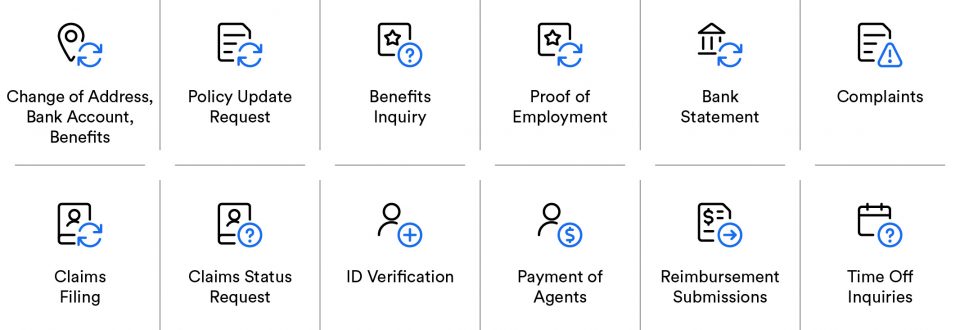
    For example, in the insurance industry, you’ll handle a wide variety of request emails — including requests to file a claim, status requests, policy update requests, and requests for information on eligibility and coverage. Insurance professionals also handle reimbursement submissions with critical information stuck inside file attachments — such as PDFs or images with handwritten text. 

    When a natural disaster strikes, claims adjusters have to juggle dozens of claims emails that could contain attached photos of receipts and other unstructured policyholder documents.

    Likewise, banking institutions handle a high volume of emails that primarily come with additional information locked away in supporting documents — such as ID verification emails, proof of employment, change of address requests, and other documents critical to the KYC process.

    Keep in touch

    But manually reading and sorting emails is labor-intensive work that gums up internal systems and leads to losses in productivity and revenue. Instead, intent recognition AI could automatically sort incoming emails and intelligently categorize customers for a big boost in efficiency — especially when time is critical.

    Furthermore, there is often organizational confusion surrounding “which department handles what?” This leads to more delayed responses, unfulfilled requests, frustrated customers, and a poor customer service experience. 

    However, an end-to-end intelligent document processing (IDP) platform with intent classification built-in creates a highly accurate email processing system that saves hours of manual work. Learning how AI and automation combine to unlock hard-to-reach data will ensure customers receive the help they request. 

    This guide will discuss intent classification, how it works, and why it’s essential in an effective email processing system. Then, we will show how intelligent document processing can provide this automation as a complete end-to-end solution that transforms unstructured data from emails into business value.     

    Email classification graphic illustrating types of documents that can be attached to emails.

    What is email intent classification?

    In the artificial intelligence (AI) world, intent classification is the technology that identifies the purpose or goal behind incoming messages and automatically categorizes them into groups. 

    Intent classification uses machine learning (ML) and natural language processing (NLP) to automatically identify the purpose or intention behind a piece of text.  

    In intent classification, a natural language processing (NLP) model reads the incoming text from emails and understands the meaning. Next, a machine learning (ML) model learns what to do with the meaning that NLP understands. Based on the way you train it — it intelligently sorts the emails into categories. 

    Think of it like your first day in a mailroom. You already know how to read the envelopes (NLP) but you need to learn which floor or office all the departments are in (ML training). Once you learn that, you can organize and route all the incoming mail.

    What is customer intent?

    Customers interact with companies for a variety of reasons. The customer’s “intention” can be identified as one of many goals they want to achieve when interacting with companies. 

    For example, a potential sales prospect might reach out with a pricing question. At the same time, a current customer may seek help with a problem that needs a solution — indicating a customer service or technical support issue. 

    Customers want their requests answered quickly and as efficiently as possible. Companies that fail to meet this primary consumer demand risk losing to the competition. 

    An image of a man expressing concern that his business doesn't have a way to classify emails based on intent detection.

    The challenges with traditional intent classification

    Manually categorizing each type of email based on its content and responding with the right message takes hours of precious company time. It also slows down response times. 

    In the big data world, emails are a type of “semi-structured” or “unstructured” document. The text in the body and subject field of an email is completely free-form and typically lacks a fixed “structure.” Consequently, building rules that can sort incoming unstructured email messages reliably is very challenging.

    Now, let’s consider the challenge at scale. How many emails does your team receive daily? Is it in the hundreds? Perhaps in the thousands? Now, how many have attachments — such as PDFs — or even images of handwritten text? 

    Of course, attachments amplify the complexities of email further. However, even at just a base level, simply sorting the free-form text in emails into categories of intents is a complex task requiring humans or sophisticated AI. 

    Additionally, the attached documents could contain relevant information to the customer’s goal — making it difficult for legacy rules-based approaches to sort customer requests accurately. 

    Furthermore, the complexity compounds with shared inboxes — such as shared “contact@,” “help@,” or “support@” email addresses — so conventional triaging approaches yield inconsistent results that are marginal at best.

    How does intent classification work?

    Intent classification helps businesses rapidly and intelligently categorize emails.

    Intent classification uses natural language processing (NLP) and other AI models to analyze the incoming text data from multiple communication channels, including emails, social media posts, or other textual messages.

    Then, it automatically segments the data stream into predefined categories, representing “intents” (or the reasons) customers send messages.

    Intent classification uses examples of human language to understand the whole context of an email message. For example, with training, a machine learning algorithm can eventually recognize that certain words or phrases — such as “buy” or “interested” — might signal a customer’s intent to purchase

    However, advanced NLP models trained on many examples of human language can take this capability much further. For example, the word “want” could appear in every customer email — making it nearly impossible to match the keyword with the right intent. 

    Nevertheless, an advanced NLP model trained on millions of human language samples will understand the nuances between “I saw your ad offering X, and I want it” vs. “I want you to make it right.” 

    In the first statement, “I want it,” there is an interest in buying something, whereas the latter is probably a support request. Similarly, “I want to see X” is likely an intent to provide product feedback. 

    Two employees classifying emails on a computer screen.

    How do you identify customer intent?

    An intent classifier is a category (or tag) that automation designers assign to groups of incoming messages. For example, you could create labels such as “Interested,” “Ready to buy,” or “Needs more information” to classify more specific examples of customer intents within your sales process. 

    Each time you classify emails, the AI model’s ability to accurately understand customer intent could improve (as long as the user adds correct training data to the system). Doing so trains the machine learning model to recognize new customer emails as potential prospects. 

    On the other hand, if you add incorrect training data to a system, you will make the results worse, not better. So to ensure the most accurate results, intelligent document processing platforms like Automation Hero’s Hero Platform_ allow users to review the AI’s output before re-training the system.  

    Characterizing types of intents in email

    Since customers use email to interact with companies for different reasons, tagging emails with intent classifiers can automatically sort emails, triage them, and send a rapid response. 

    For example, tagging incoming email requests as “price quote requests,” “product demo requests,” or “purchase order requests” could help your business identify the source of potential leads. It could also provide insight into their position in your sales funnel and how close they are to completing a purchase.

    Depending on how “ready-to-buy” potential customers are, intent classifiers can help identify the leads showing a “high intent” to purchase. Intelligent document processing platforms with classification built-in can automate rapid responses along with the appropriate message to engage. It could also forward the email to the best individual or team to handle the request.

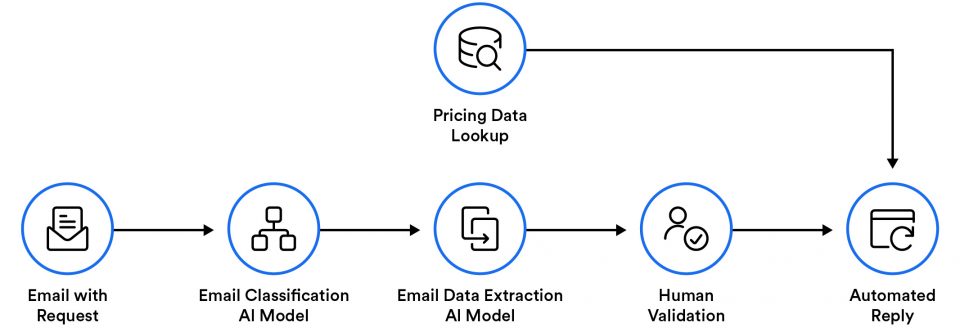
    Email classification image illustrating how emails can be triaged with intelligent document processing automation platform.

    With explicit intents recognized in sales and marketing analytics, you could quickly generate reports based on the intent data and provide business insights on conversion rates, interest levels, upsell opportunities, and much more.

    The more examples you provide the model, the better it will identify these patterns.

    How to classify emails

    Specific intent classifiers can also separate “ready to purchase” emails from other non-sales-related emails, such as “customer service requests.”

    Training your AI model with more specific intent classifiers refines the overall email classification strategy — accurately triaging requests for technical support vs. customer service and segmenting all sales leads to the appropriate departments for speedy, efficient handling. 

    Automation Hero combines AI with next-gen patent-pending OCR to classify documents. Our AI can read and understand customer intents so that mishandled emails are a thing of the past.

    Additionally, our platform triages emails and extracts essential information from the email content directly — along with the data locked inside unstructured email attachments.

    Our email processing automation solution is an end-to-end intelligent document processing (IDP) platform with next-gen AI that’s capable of detecting the intent from any document.

    Hero Platform_ can automatically sort emails (including attachments) and even sends an automated responses if clarification or supporting documents are needed.

    Email classification graphic illustrating how in intelligent document processing can bring advanced intent analysis to email processing automation.

    Advanced intent analysis

    Businesses frequently need to extract critical data from a wide variety of unstructured email attachments — such as PDFs, forms, spreadsheets, infographics, slides, text files, and even photos of handwritten text. These attachments often contain vital information necessary for a business to understand and reply to its customers. 

    However, extracting unstructured data from emails is challenging due to the amorphous layout of content in emails and attachments. So, how can businesses extract the essential data that provides even more insight into customer intents from emailed attachments?

    Advanced text extraction technologies (such as those automated by intelligent document processing) go deeper than traditional email classification tools.

    For example, intelligent document processing can read email attachments and extract critical data related to customer intent from unstructured documents — including location data, dates, and handwritten signatures. 

    IDP platforms like Automation Hero’s Hero Platform_ apply next-level intelligent document processing technology to unlock unstructured data stuck inside emailed images and pdf files — reaching customer intent locked in emails on a deeper level than previously possible. 

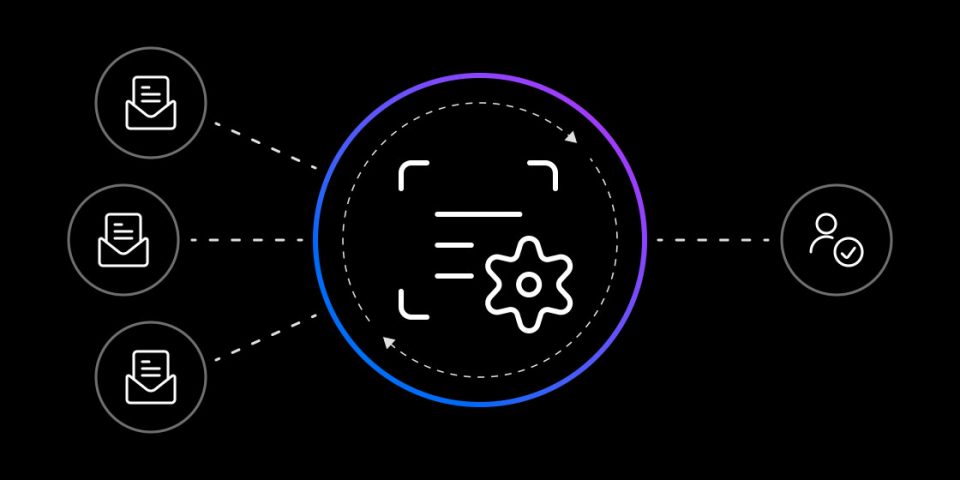
    The image symbolizes the process of intelligent document processing that can handle email classification.

    Why is intent classification useful?

    Intent classification allows businesses to adopt a more customer-centric approach — especially in customer service and sales. When companies respond quickly and appropriately, customers will trust your business to support them. 

    The business impact of intent classification

    Because customers get the help they are looking for from the appropriate department quickly, the faster response times lead to interdepartmental improvements that can impact customer retention, loyalty, and satisfaction across the entire organization.

    Everything improves — from responding to leads faster to handling higher volumes of incoming queries and offering more personalized services. 

    Graphic image showing a man increasing customer satisfaction with email classification.

    Seven ways to use intent classification with examples

    Incorporating intent classification into a well-designed email processing automation system can save hours of company time which also improves the customer experience.

    However, an end-to-end intelligent document processing platform that reads documents the same way as humans is the most accurate and effective way to classify emails based on intent.

    Here are seven ways to use intent classification with an IDP platform to automate email processing:

    1. Boost sales with intent classification

    Streamlined processes directly impact your team’s ability to focus on higher-value tasks — such as generating more revenue.

    Due to the instant gratification customers are used to, some prospects expect a response in less than 6 hours. So, the faster sales teams can detect and respond to leads that signal an intent to purchase, the greater their odds of closing a contract.

    For example, financial auditors have a short time to assess a prospect during the KYC process.  However, financial institutions can’t know their customers if most of the data they have about them is stuck inside inaccessible documents. 

    With an intent classifier, you could rapidly identify an interested client and contact them to increase sales. Having a way to classify unstructured data from incoming leads streamlines customer onboarding processes — such as those in the underwriting process. This will be a significant boost to sales efficiency when time is critical.

    2. Unlock critical data stuck in emails

    Automation and AI can help you streamline the information that flows into employees’ inboxes, using optical character recognition (OCR) and natural language processing (NLP) to classify emails and documents. 

    In insurance, OCR might sort which emails and attached documents are part of a claim. For example, an email about a claim could come with a standard printed form, or it might include a handwritten note or a photograph of a wrecked motorcycle. Our OCR extracts the critical information from these document types in seconds.

    But what if customers have separate car and home insurance policies with the same carrier? A natural disaster will potentially damage both assets, so when claims come in, you could have a workflow that scans through the attachments and determines if they are from auto mechanics vs. contractors. Then, the flow automatically puts the documents in the right place.

    Unlock critical data stuck in emails

    Context-aware OCR is a patent-pending technology that extracts critical information from handwritten documents.

    Since email attachments come in various formats — from PDFs to printed receipts to scanned paper images of handwritten text and jpeg files, we custom-built the most accurate OCR on the market that reads emails and documents just like a human — especially handwriting. 

    3. Enrich the customer experience

    A leading European financial services company was experiencing higher volumes of customer emails than it could handle. With a limited number of sales and customer service representatives, they needed a way to accelerate turnaround time.

    Using machine learning and Natural Language Processing (NLP) intent analysis, we focused on intent detection in customer emails that resulted in email responses that were three times faster.

    See how we helped a global logistics company automate responses to 60% of incoming inquiries — leading to an 80% workload reduction that cut response time down to seconds.

    4. Streamline email triaging

    Email triage — quickly sorting through a clogged inbox — is daunting no matter what business you’re in. What is the email’s main topic? What type of request is the customer making? Does the information need to be validated by an internal database or an employee?

    These and more are addressed and turned into actions with an accurate understanding of the sender’s intent — automating email triage, so employees aren’t constantly in over their heads.

    IDP tools with end-to-end capabilities are ideal for claims processing in the insurance industry, where complex customer service environments work with support tickets. 

    As claims come in, IDP platforms can automatically identify who the customer is and what the claim is for, then route it to the correct departments for further action.

    Our IDP platform can handle every step of the claims management process — including document classification, data extraction, routing, and even data entry. Our platform will even automate invoice payments and notify customers that their claim has been closed.

    5. Reduced workload alleviates employee burnout

    Reading and responding to emails is time-consuming, especially for customer service professionals.

    IDP can automatically route incoming emails to the correct department and extract essential information — such as support ticket numbers, addresses, and other data each department needs to begin processing that email quickly.

    For example, e-commerce platforms can help customer service reps respond more quickly since the first round of processing is completely done for them.

    Since the AI can automatically extract relevant information from the email and determine the intent of requests, customer service reps can immediately start working on the request. 

    When properly trained and set up, the IDP platform can understand when an email is requesting a refund, associate the correct order, automatically know the amount, and route this information to the finance department for further processing.

    6. Accelerate email classification (with a human touch)

    Hero Platform_ flags all the emails that need employee review. Our human-in-the-loop interface provides user-friendly attended automation for employees to review batches of flagged emails needing the human touch. 

    Our no-code environment is highly configurable and provides all the relevant information employees need to make decisions quickly.

    For example, employees in the shipping and logistics industry can add new routes and assign shipping costs — and all input feeds back into the system — cutting down on the need for human interaction in the future.

    7. Transform business data into actions

    Finally, the information is available for further processing after the essential data stuck inside unstructured email attachments is transformed into structured data.

    IDP can enter the data into accounting software or an internal database — such as an ERP, ECM, or CRM system. Then — with the data extracted and unlocked — our end-to-end IDP platform can also look up information in another system, verify it, and automatically compose and send a reply to customers with the appropriate response.

    For example, validating the data is especially useful in compliance use cases where industries are subject to increasingly complex regulations and shorter timeframes to meet them.

    IDP can streamline compliance by quickly responding to requests from regulators and pulling appropriate information or documents from databases with less manual intervention.

    This use case has proven especially useful in Europe for GDPR Subject Access Requests — which require companies to respond within 30 days to save time and avoid fines. 

    Email classification image symbolizing the AI technology known as "intelligent document processing" (IDP).

    How to start classifying email intent with IDP

    Intent classification can be your best ally if you want to convert leads into customers. 

    Using the power of AI to your advantage, you can analyze interactions with potential customers and automatically identify the topics of each one. You can quickly reach out to the most qualified leads by automating this process. 

    If you are interested in using intent classification to organize your customer data, you can request a demo, and our team will assist you in getting started.

    Start classifying intent today:

    • Learn how IDP works — our guide to IDP will guide you every step of the way.
    • See how IDP works — watch dozens of use cases. Filter by industry and see what IDP can do.
    • Speak with an expert — tell us about your specific use case.
    • Get a personalized demo— schedule a demo, and our Heroes will get in touch!
  • What’s the difference between RPA and IDP? | Automation Hero

    Businesses are always looking for technology that can make their teams more efficient. For the past decade, robotic process automation (RPA) has helped with this — but there are limits.

    Intelligent document processing (IDP) brings advanced technologies such as AI and machine learning (ML) to the table to handle the most challenging areas of modern business that RPA cannot reach.

    Dec 15, 2022 by Craig Woolard

    152-what-is-the-difference-between-rpa-and-idp

    With so many documents required to operate and adhere to compliances, the need for capturing data accurately and quickly — especially unstructured data — is rapidly growing. Unfortunately, this is one area traditional RPA falls short.

    As a result, businesses are looking at sophisticated data extraction solutions like intelligent document processing (IDP) to “unlock” valuable data in unstructured documents.

    Keep in touch

    What is robotic process automation (RPA)?

    Robotic process automation (RPA) is legacy software that mimics the keyboarding and manual click-work performed by human knowledge workers. RPA records simple mouse movements and keystrokes that perform autonomous tasks without supervision or intervention using the UI. 

    Until recently, most automation software has been robotic process automation. Since the user records what they do in their day-to-day job, the RPA robot handles all the clicking and mouse movements to complete the task.

    The difference between RPA and IDP

    What can RPA do?

    RPA involves a series of steps or rules (also called a “script”) to accomplish its more complex screen tasks. Robotic process automation requires a GUI or developer window to operate. This outdated approach limits RPA to only automating simple screen-related tasks.  

    These tasks include data entry, data processing, and triggering responses in other software tools. In the early 2000s, screen scraping software was one of the first use cases of RPA. It also served as a “bridge” or a “band-aid” between newer and incompatible legacy systems.

    In these early use cases, RPA was quite literally slapped on top of existing software like a bandaid to automate user interface clicks. Consequently, the earliest investments in RPA were driven by the need to integrate legacy systems that didn’t have APIs.

    Unfortunately, script-based approaches have real-world limitations that still pervade the industry today. This is what drives so much disillusionment about RPA as a “brittle” and unreliable technology.

    Tasks RPA can automate:

    • Data migration
    • Trade execution
    • Data validation
    • Data updates
    • Any “swivel chair” — or copy/paste function

    Today, RPA still allows users to configure one or more scripts to replicate specific keystrokes and repetitive mouse movements. These scripts are “rules-based” templates that automate each task. Scripts can operate in isolation as a single task — or overlaid on top of multiple software applications to support a more complex workflow.

    Where does RPA fall short?

    RPA has several shortcomings. For one, it is a legacy tool. RPA is built for “bots” that use a graphical user interface (GUI) to work. Therefore, it only mimics movements and clicks.

    Here are three major weak points RPA has:

    1. RPA is not built for modern system-to-system integrations. Deploying RPA to integrate different systems is a lot like setting up a bucket brigade to put out a fire instead of using a firehose. The bot approach makes things much harder to build, manage, and price. There are even companies out there that sell tracking solutions for all of your RPA bots, so you can check if you have too many. 

    2. It breaks easily. When there is a change in the GUI or when an update changes the user interface design for a software application that an RPA template is built on top of — the entire automation breaks.

    3. It’s outdated. RPA relies on a legacy Optical Character Recognition (OCR) that can only follow input rules and commands. Each only adds a patchwork solution on top of the already existing patchwork. These all break just as easily as GUI-based approaches.  

    Their solution? Slap on an ineffective AI “bandaid.”

    RPA vendors are aware of the limitations of RPA technology. As a result, they are looking to expand their capabilities to include some “off-the-shelf” OCR and artificial intelligence (AI) solutions made by third-party vendors. But these are tacked on like “duct tape” to an already brittle RPA implementation.  

    Like most off-the-shelf AI solutions out there — not all OCR solutions on the market are created the same. Since the 1980s, legacy OCR technology still lacks the sophistication to recognize handwriting accurately. Even with the best scanners and document quality, you will be lucky to get 60% accuracy with legacy OCR before it eventually hits the wall. 

    These technological limitations block 82% of enterprises from accessing their most valuable asset. While RPA frees people from performing the most mind-numbing work behind critical business processes, the technology’s most significant road blocker is the lack of native AI document understanding needed to unlock unstructured data. 

    Where does RPA fall short

    What is intelligent document processing (IDP)?     

    Enter IDP. As a next-gen automation technology, IDP has evolved from the need to go beyond RPA’s limitations.

    Intelligent document processing (IDP) is a new type of business workflow automation that uses state-of-the-art AI to read documents the same way as humans. IDP technology reads, extracts, categorizes, organizes, converts, and outputs information into practical formats from streams of data (usually documents) that different databases and departments can use. 

     IDP solves business problems that need hard-to-reach data. Since IDP does not follow traditional rules-based approaches, it’s flexible, cuts down on more costs, and unlocks the hard-to-reach unstructured data that RPA cannot reach.

    How does intelligent document processing work?

    IDP consists of three fundamental elements—classification, extraction & validation. 

    First, IDP uses cutting-edge AI technologies to classify, extract and validate essential information from unstructured documents. For this, IDP combines Optical Character Recognition (OCR), machine learning (ML), Deep Learning (DL), and Natural Language Processing (NLP) — to unlock valuable data inside unstructured documents and related document workflows.

    Then, IDP turns the information it extracts into workflows for other automation tools and data analysis. When IDP scans documents, it understands context — with above-human accuracy — which helps organizations streamline the entire document process and the flow of essential information between different database systems, software applications, and departments.

    Check out the intelligent document processing (IDP) guide for more.

    RPA vs. IDP

    RPA vs. IDP

    In the automation world, we often refer to RPA as “the hands” and AI as “the brains.” 

    The most important thing to understand about RPA vs. IDP is that robotic process automation does not have native AI intelligence. As standalone technology, RPA cannot read, understand, or interpret data on its own. It is outdated technology that still needs humans (or sophisticated AI) to transform data into practical actions.  

    By mimicking the tedious, repeatable actions we perform on computer screens with a keyboard and a mouse, RPA removes the “heavy lifting” of everyday processes — but, unfortunately, this limits RPA to tasks that do not involve high-level decision-making. 

    Intelligent document processing, on the other hand, takes automation to the next level, and this is where the market is heading. IDP not only automates documents — it ingests and understands data — making it actionable.

    What are the differences between IDP, OCR, and RPA?

    RPA is a “rules-based” technology that relies on an outdated template approach and other technologies, including legacy OCR, to help compensate for RPA’s weak points. In the early days, legacy OCR was used to build templates as a “pre-AI” solution for document extraction problems.

    Templates (or scripts) are helpful for tasks with a well-defined structure — but once a design element in the user interface (UI) or the documents themselves change — the template breaks. The changes mean you have to re-design the automation all over again. 

    Unlike RPA and OCR, Intelligent document processing is flexible. Since IDP has AI, rules-based approaches do not limit IDP’s ability to extract data. IDP reads the contents of documents and even learns from their contents just like humans — so it improves with every use. IDP can complement legacy point-and-click RPA tools for tedious screen tasks. However, with an AI engine at its core, end-to-end IDP platforms like Automation Hero can replace the RPA robots.  

    What are the benefits of automated document processing?

    Intelligent document processing transforms unstructured content into data that is easy to use. IDP automates content that lacks structure and turns it into structured data for other business processes. Here are a few high-level tasks intelligent document processing can do:

    1. IDP can read documents in every format

    Business documents come in every format — including paper forms, PDFs, images, and email. IDP reads them all with clear understanding of every word.

    2. IDP transforms unstructured documents

    Unstructured documents do not follow templates, fixed layouts, or rules — which is why RPA doesn’t cut it. Instead, IDP takes the data captured by OCR and applies rules to contextualize and route it for further processing. IDP platforms like Automation Hero’s Hero Platform_ utilize advanced deep learning and machine learning AI to do this accurately, even if the document’s layout changes. 

     3. IDP understands handwriting & signatures

    Object, or Optical Character Recognition (OCR), is the technology that recognizes characters, letters, and numbers — regardless of font. OCR also recognizes cursive handwriting. But legacy OCR does not recognize handwriting very accurately. Automation Hero has a patent-pending Context-aware OCR that converts text — even handwriting — 281% more accurately

    4. IDP drives orchestration, natively

    IDP can streamline an entire document-centric workflow (without needing anything else). 

    Some IDP solutions include automation to manage the output of data streams into workflows. Other IDP vendors only focus on intelligent data extraction. With some of the more limited IDP tools, automation designers will have to figure out how to manage the outputs themselves.

    Most automation vendors charge extra for orchestration capabilities that can add intelligence to their automation. However, end-to-end automation platforms like Automation Hero’s Hero Platform_ already have orchestration and workflow integration built-in — no extra charge.

    4 Benefits of enhancing RPA with intelligent document processing (IDP)

    When Henry Ford was asked about customer input in the development of the Ford Model T, Ford famously answered — “If I had asked people what they wanted, they would have said faster horses.” Similarly, if you ask most automation designers and RPA users what they want today, they’d probably ask for a better-performing RPA. Adding advanced AI to RPA is more than just the faster horse.

    Here are four reasons why you should augment your current RPA with IDP:

    1. Unlimited integrations

    The use of multiple software systems and different databases is often the result of mergers and acquisitions. Any attempt to streamline operations with a single (or upgraded) solution could be disruptive. Whatever the reason for inefficient back-end processes, intelligent automation is a viable option. 

    After IDP captures information from documents, it processes it into structured data for software applications, micro-services, and even third-party digital workflow services (via API). 

    Automation Hero can connect with virtually any API and seamlessly transfer data without formatting or oversight. This can provide one of the most significant productivity boosts since it enables full end-to-end automation for nearly any process. The possibilities are unlimited.  

    2. IDP hyper-automates

    IDP technology operates standalone but also integrates with existing workflow automation tools. Even though IDP can stream an entire automation workflow, IDP integrates seamlessly with existing RPA — augmenting it with new abilities without changing its core functionality. 

    For example, intelligent document processing could integrate as a sub-process that augments existing RPA tasks with AI/cognitive capabilities — an excellent solution for organizations limited on resources to make sweeping changes. 

    When combined with legacy automation tools such as RPA, intelligent document processing brings next-level AI intelligence to critical business processes — creating the most advanced hyper-automation solution to navigate the global challenges of rapidly growing unstructured data.

    3. More capabilities — less IT

    Legacy RPA systems have long and costly implementation timeframes. This process requires months of planning and testing by IT experts to ensure templates and workflows are programmed just right. With a modern end-to-end IDP platform like Automation Hero’s, any user can design new patches and workflows wherever there’s a gap in the RPA performance. In fact, the Hero Platform_ is so intuitive there is no need for coding experience or IT support.

    4. Improved KYC processes

    Even when it’s tied to the limits of an old RPA system, IDP can help users see the potential of holistic enterprise AI. For example, financial institutions can’t know their customers if most of the data they have about them is stuck in inaccessible documents. Automation Hero’s API can serve as the IDP “fabric” connecting every process and system it’s a part of.

    As an end-to-end IDP platform, Automation Hero’s API is flexible — connecting all workflow services with other business process automation systems to extract hard-to-reach data from unstructured documents. You could integrate multiple APIs into a unique KYC process that preps the information for data analysis — helping to further refine and streamline critical business processes.

    RPA plus IDP

    How to hyper-automate RPA with IDP

    Leaving behind an institutionalized technology like RPA can be daunting, but thanks to the versatility of IDP, companies don’t have to delete their old software to reap the benefits. 

    Hyperautomaton with IDP will rapidly automate documents plus many business processes simultaneously — streamlining the entire data intake process across departments and augmenting people’s roles more than ever.

    When shopping for an intelligent document processing solution to augment a current RPA implementation, choosing the right IDP that will fit your organization’s needs is critical.

    How to get started hyper-automating today:

    • Learn how IDP works — our guide to IDP will guide you every step of the way.
    • See how IDP works — filter by industry and see what IDP can do.
    • Speak with an expert — tell us about your specific use case.
    • Get a personalized demo— schedule a demo, and our Heroes will get in touch!
  • Learn the business issues intelligent document processing solves.

    Dec 07, 2022 by Craig Woolard

    What is intelligent document processing (IDP)?

    Intelligent document processing (IDP) is a next-gen technology that helps organizations resolve problems that need hard-to-reach data. IDP reads, extracts, categorizes, organizes, converts, and outputs information from any document and turns it into practical business formats. 

    IDP increases speed, decreases cost, and unlocks the valuable insights stuck inside structured, semi-structured, and unstructured documents from a wide variety of sources.

    Keep in touch

    How does IDP compare to RPA?

    What truly sets intelligent document processing apart from legacy automation technologies is that it can perform practical and valuable tasks with the information it reads without tacking additional automation solutions onto it. IDP can function as a completely standalone technology or integrate with existing workflow automation tools to augment legacy RPA tasks.

    With built-in AI intelligence, IDP reads the data within any document — even handwriting — and turns it into a usable format the same way a human would. 

    Even though intelligent document processing can streamline an entire business automation workflow end-to-end (without needing anything else), IDP plays nicely with existing workflow automation software — including Robotic Process Automation (RPA). For more, check out our other article on the differences between RPA vs. IDP.

    When combined with legacy automation tools such as RPA, intelligent document processing brings next-level AI/cognitive capabilities to these critical business processes — creating the most advanced solution for the global challenges of rapidly growing unstructured data.

    Some IDP solutions include automation features (also called hyper-automation) to manage the output into a workflow, while other IDP vendors only focus on the intelligent data extraction step. With these more limited IDP products, automation engineers and designers must take the output elsewhere and manage it themselves.

    How does document processing work?

    Simply put, IDP has AI that can “read” documents the same way as humans. 

    IDP uses Optical Character Recognition (OCR), machine learning (ML), Deep Learning (DL), and Natural Language Processing (NLP) — to capture the valuable data locked away inside documents and their related document workflows.

    As a next-gen technology, intelligent document processing consists of fundamental elements (classification, extraction, and validation).

    It’s important to mention not all IDP vendors approach these elements the same way, nor do they solve the same problems. For example, some IDP solutions include automation to manage the output into a workflow, while others only focus on intelligent data extraction — forcing the user to configure or manage the output.

    1. Classification

    The classification stage in intelligent document processing uses OCR technology to identify, capture, convert and organize information streams. Some IDP platforms combine Al, machine learning, and OCR to convert text more accurately. However, Automation Hero is the only end-to-end IDP platform with a special patent-pending Context-aware OCR that converts text — even handwriting — significantly more accurately than other IDP vendors.

    2. Extraction

    Extraction applies trained AI models to target specific elements of interest. For example — addresses, tax details, monetary values, technical specifications about products, or hard-to-find clauses in legal contracts. Unlike legacy approaches, intelligent document processing uses AI to extract these elements of interest without building complex, fragile templates for each document.

    3. Validation

    The validation stage in IDP performs data analysis on the extracted information. For example, applicant addresses extracted from application forms could be compared with addresses on utility bills and bank statements. Another example could be validating the accuracy of invoice totals by comparing details in purchase orders. Attended automation can exist as “human-in-the-loop” to provide an extra layer of validation assurance for employees to approve decisions.

    4. Human-in-the-loop

    Some IDP vendors like Automation Hero provide a human-in-the-loop environment with a no-code interface, allowing users to approve validations and correct errors before they occur. Automation Hero’s attended automation goes several steps further. It allows automation designers to have dedicated audit interfaces in-between tasks based on business rules — which helps close the gap between people and automation. 

    As a bonus, Automation Hero’s human-in-the-loop also fine-tunes the training of AI algorithms used in the data capture, extraction, and classification stages.

    5. Workflow integration

    After an IDP platform captures the information from documents, it processes it as valuable data that can be used by other software applications, microservices, and even third-party digital workflow services (via API) — helping organizations streamline the data intake process across different departments. Most automation vendors charge extra for orchestration capabilities that add intelligence to their automation solutions.

    However, workflow integration and orchestration come built-in with Automation Hero — so it scans documents and brings the hard-to-reach data into critical business processes — at no extra charge.

    Where IDP can help

    IDP captures all the essential data locked away in emails, text documents, scanned paper PDFs, and photos containing text used in business processes. No matter what documents your organization handles, cutting-edge AI models in IDP can process any document with above-human accuracy.

    1. “Reads” all file formats

    Documents aren’t just paper forms and PDFs. Business documents come in all formats. This includes images, emails, text messages, online form submissions, and even code. Intelligent document processing can read all formats — with a clear understanding of every word — faster and more accurately than traditional automation software. 

    2. “Unlocks” unstructured documents

    Essential data can be stored in many ways, which presents several challenges. There are documents with structure, and there are documents with less structure. Structured documents, such as forms, require less advanced technology. Semi-structured and unstructured documents, such as long-form content or images of blurry text, require more sophisticated AI. 

    Unstructured documents are completely “unfixed,” so they don’t follow rules or fixed layouts that computer software applications typically use to identify them. No matter which type of document your organization handles, intelligent document processing uses next-gen AI technology to scan content and interpret context from any structured, semi-structured, or unstructured document.

    3. Extracts handwriting and signatures

    Handwriting has always been tricky. OCR is the technology that will recognize the characters, letters, and numbers in images of text — regardless of font. OCR also recognizes cursive in multiple languages.

    As a legacy technology, OCR does not recognize handwriting accurately. However, handwriting and signature recognition significantly improve when OCR and AI are combined within IDP. 

    4. Reads scanned paper documents

    Low-quality documents are more common as people rely on smartphone cameras instead of scanners to digitize paper. Humans can use context clues to read and understand muddy text, but legacy OCR and traditional automation technologies do not have this reasoning capability.

    If a letter or word is too blurry for the software to recognize, legacy OCR will skip it over without realizing it missed anything. This is especially true with handwriting. However, IDP can classify, extract, convert, and process business-critical information locked away in archives of unstructured documents — even if the scan quality is blurry or the handwriting is illegible.

    Why is intelligent document processing important?

    Document processing is one of the trickiest problems in business. Over half of enterprise knowledge workers say their business applications fail to automate their document-based processes — or they report that their different systems and software do not talk to each other.

    Legacy automation technologies aren’t enough 

    Until now, most automation software has been robotic process automation (RPA) — which has helped streamline mundane, non-document-centric tasks performed on computer screens. Unfortunately, RPA’s capabilities are limited to tasks that do not involve high-level decision-making. Legacy approaches have to build complex, fragile templates for each document. For example, the entire automation breaks when there is a change in either the GUI or a document that an RPA template is built on.

    Unstructured data is proliferating

    As new customer information comes through emails, text messages, social media, photos, PDFs, and scanned documents with handwritten text — most new data businesses collect and produce is “unstructured.” Companies need a fast, efficient, and reliable way to transform the unstructured information hiding in documents into structured data that they can easily use. IDP provides the essential document understanding of unstructured data that frees people to focus on the more critical aspects of their business.

    IDP in action — industry use cases

    Any industry reliant on document processes can achieve digital transformation using IDP. However, industries such as — finance, healthcare, and insurance — handling thousands of structured or unstructured forms from a wide variety of different institutions are the industries that will benefit the most.

    For example, insurance companies deal with various incoming documents to support an insurance claim from multiple institutions. These could be any documents or paperwork from institutions doing business with their customers. These industries are not the direct customers of those companies, so they don’t have the power to standardize those documents.

    Here is a short list of top industry use cases for intelligent document processing.

    Top industries for intelligent document processing (IDP)

    IDP for Insurance

    Insurance claims typically consist of paper forms signed by claimants, and there can be a lot of supporting documentation. They might be handwritten doctor’s notes, photos of sick pets, or property damages. The increased volume of claims — plus supporting documents such as invoices and receipts — can be daunting. 

    With a wide range of documents, from life insurance applications to auto accident claims, disability forms, change of beneficiary forms, and annuity account forms, IDP replaces this labor-intensive and error-prone process with an automated workflow. 

    IDP for Banking & Financial Services

    Financial institutions must perform KYC and customer due diligence checks (CDD). But, financial institutions can’t know their customers if most of the data they have about them is stuck in inaccessible documents.

    For example, loan officers must navigate large volumes of KYC documents to verify signatures before clearing payments. Delays in these KYC processes undermine underwriters’ abilities to mitigate risks and react quickly.

    Automation Hero’s IDP will make historical data readily available for KYC review. It also makes this data accessible to different departments and third-party Fintech services — fast-tracking the customer journey. 

    IDP for Logistics

    Shipping and logistics companies can benefit from IDP too. Let’s say you’re a shipping company with business in 35 countries. You need tools that provide real-time updates when government agencies or regulatory entities change their policies around flights, freight restrictions, customs requirements, taxes, or tariffs.

    For example, suppose Mexico raises its freight limits on imported goods. In that case, an IDP automation instantly re-calculates how this affects your operations across the board — and automatically updates all affected systems.

    Shipping companies handle all kinds of documents. These include — identifying shipments with hazardous material indicators on shipping documents, capturing annotations about damages from delivery receipts, processing contracts for volume discounts or making reasonable clauses, and cross-referencing with billing and incident systems to identify points for renegotiation with suppliers.

    The benefits of intelligent document processing

    Increased efficiency isn’t the only reason to implement intelligent document processing. Any enterprise with business processes stuck under a heap of documents will immediately see the benefits of IDP. Here are a few of the most common benefits:

    1. IDP is highly scalable

    Enterprises need a flexible, straightforward path to scale products and services. Automating these document-intensive processes allows your business to scale your response without needing to scale your human team to the same degree.

    For example, if you get a seasonal surge of claims or applications, you need a seasonal team of workers to handle the additional load. That is a management task all by itself. It gets even worse if it is unpredictable (like trying to predict where to assign your claims adjusters during natural disaster seasons).

    Automation gives your skilled workers more leverage to handle an unexpected increase in volume — giving you more time to assign additional personnel after seeing where they will have the most impact. Whether scaling up or down, the platform your business depends on needs to be built for rock-solid, stable performance. Automation Hero’s Hero Platform_ is the only product in the IDP and automation space with built-in fault tolerance at the platform’s core.

    2. IDP integrates with existing solutions

    Intelligent document processing is incredibly flexible and integrates seamlessly with internal and external databases, ERP systems, invoice processing platforms, and other accounts receivable (AR) software.

    Many popular data systems don’t have AI/cognitive capabilities — so adding IDP dramatically improves accuracy and production efficiency. IDP can also integrate with robotic process automation to augment RPA tasks as sub-processes with AI capabilities.

    3. IDP’s ultra-precise accuracy ensures compliance

    Data extraction eliminates typos and other human errors from manual data entry tasks. However, IDP extracts data from documents with above-human accuracy, eliminating the need for laborious review processes.

    Data extraction in IDP formats critical information into forms other computer systems can use, so the information is immediately available for analysis. For example, IDP is particularly adept at comparing information from different sources to assess whether you’re staying in compliance. 

    4. IDP lowers costs and increases ROI

    Any time automation achieves greater efficiency, it cuts down on costs. Because automation allows organizations to make more money with less time and labor, it improves the bottom line. 

    IDP’s native AI decreases the bottom line even more while increasing profitability. Since standalone OCR and other legacy automation tools lack AI, they make many mistakes — increasing the work needed to manually review the errors. 

    However, IDP substantially reduces the workload caused by human errors, allowing companies to expand their bandwidth for new leads, customers, sales, and other revenue-generating opportunities that further improve profitability. 

    5. IDP cuts down on paper waste

    Enterprise runs on documents, but automation and AI need data. Companies need an easy way to extract essential data from paper documents to improve the efficiency of their document processes. IDP platforms like Automation Hero have native AI that captures information from paper documents. Blurry scans and chicken scratch handwriting won’t be a problem for our IDP.

    Get started with IDP

    If you are shopping for an intelligent document processing solution, choosing the right IDP platform that will fit your organization’s needs is important.

    We offer a few strategies to get started:

    • Read our IDP guide — our complete guide to IDP will guide you every step of the way.
    • See how it works — our IDP platform has dozens of use cases. Filter by industry and see what it can do.
    • Speak with an expert — tell us about your specific use case.
    • Get a personalized demo — schedule a demo, and our Heroes will get in touch!
  • Guide to intelligent document processing (2022)

    start new section

    These days, there is an acronym for nearly everything. In the automation world, “IDP” falls under the umbrella of “Intelligent Process Automation” (IPA). In the artificial intelligence field, IDP means “Intelligent Document Processing.” However, this type of intelligent document processing automation has native AI intelligence built-in — so it processes any kind of document with above-human accuracy.

    Nov 09, 2022 by Craig Woolard

    What is intelligent document processing?

    Intelligent document processing is a type of business workflow automation that uses artificial intelligence (AI) to read documents the same way that humans do. IDP is a next-generation automation technology that brings AI/cognitive capabilities to workflow automation software — creating the most advanced solution for the global challenges of rapidly growing unstructured data.

    How does intelligent document processing automation work?

    IDP uses AI technologies to capture, categorize, extract and validate essential data in emails, text documents, scanned documents, and even photos that can be turned into workflows for data analysis and automation software.

    Intelligent document processing leverages AI, machine learning (ML), Deep Learning (DL), Optical Character Recognition (OCR), and natural language processing (NLP) to read and understand the context of the information it captures from documents.

    IDP scans the contents of these documents and interprets context — along with the intent — to help organizations efficiently manage documents and streamline a substantially more intelligent document processing automation.

    Understanding intelligent document processing

    The first step to understanding intelligent document processing is to understand the big picture. 

    As new customer information increasingly comes through email, text messages, social media, photos, PDFs, and handwritten scanned documents — most of the new data we collect and produce today is “unstructured.” 

    In fact, data researchers at the Everest Group surveying the intelligent document processing market found that unstructured data grows between 55-65% every year. These researchers also determined the growth of unstructured data is growing three times faster than structured data. 

    But what is unstructured data, and why is it growing so fast?

    Documents with structured vs unstructured data

    Essential data can be organized in a variety of ways and this presents all kinds of challenges. In the world of big data, there are two ways information is organized: structured and less structured. 

    Structured documents require less advanced technology. Less structured documents require sophisticated AI.  Less structured documents could be semi-structured — or they might be completely free-form — with no structure at all. In either case, documents with less structure are messy and traditionally require the help of human experts to interpret their contents to work with them.

    What is unstructured data?

    Unstructured documents are “unfixed” and do not follow a template, a fixed layout or a set of rules.

    Gartner defines unstructured data as any content — machine-printed or handwritten — that lacks predefined rules or guidelines that computers typically use to classify and identify it. Unstructured data could be textual or non-textual — such as a photo containing handwritten text — but it could also exist in a non-relational database such as NoSQL. 

    Some common documents with unstructured data examples include:

    • images 
    • articles 
    • memos 
    • emails
    • websites 
    • legal contracts
    • simple text files 
    • customer chats
    • discussion forums 
    • scientific research
    • social media posts
    • SMS text messages
    • handwritten letters
    • call center transcripts
    • internal Slack message threads 
    • some programming/scripting languages

    Research estimates unstructured data accounts for a whopping 80-90% of all new enterprise data — yet only 18% of organizations are taking advantage of it. The other 82% are not even utilizing their most valuable resource.

    Information contained in these documents does not follow a set of rules, templates, or structures, so their contents are “hidden” from computers. Traditionally, unstructured data could only be read by humans, and therefore required repetitive manual data entry before it could be used for data analysis.

    What is semi structured data?

    Documents with semi-structured data conform to a template, but the layout of information is not rigid and likely varies from document to document. 

    Since the layout of semi-structured documents is not standardized, organizations receiving these documents may not be able to accurately predict where the information of interest is located in a variety of incoming documents. 
    Examples of semi-structured data include invoices, purchase orders, bill-of-materials (BOM), receipts, and loan applications. Since emails have some fixed properties, some sources categorize emails as semi-structured documents, however, the body of emails is where valuable information is contained, and this essential data is generally unstructured.

    What is structured data?

    Structured documents conform to a rigid template that does not vary. 

    Examples of structured documents include identification documents, such as passports, identity cards, and driver’s licenses — plus fixed forms — such as tax forms, surveys, questionnaires, tests, and insurance claims forms that were designed to be scanned by computers.
    Researchers at the IDC recently discovered more than half of the documents enterprises process have structured layouts.

    What can intelligent document processing do for your business?

    Businesses are under constant market pressure to deliver more efficiently and offer better customer experiences than the competition. 

    Nearly all business transactions and customer interactions are taking place on some kind of digital platform. Today, interactions between customers and businesses are happening online more than ever before. As more Gen Zers embrace wearable devices, augmented reality, and even the metaverse, their expectations will continue to evolve as well. 

    With the bulk of new customer information coming from emails, text messages, social media posts, PDFs, and even handwritten scanned documents — not having a method to mine the most valuable data hiding in unstructured documents will limit an organization’s ability to adapt quickly to changed market conditions. 

    In highly regulated organizations where latent value remains untapped inside older, heritage document processes — inaccessibility to essential business data poses a real barrier to digital transformation.

    Adding to the friction, unstructured documents require repetitive manual data entry and even translation if the text is in another language. These mind-numbing tasks deflate employee morale and leave room for typos and other human errors that are costly to fix. 

    As a result, companies need a fast, efficient, and accurate way to transform the unstructured data hiding in documents into structured data that businesses can use. IDP provides the essential document understanding of unstructured data — freeing people to focus on the more critical aspects of their business.

    Intelligent document processing use cases

    No matter which type your organization handles, intelligent document processing uses cutting-edge AI models to scan the content and interpret the context — along with the intent — from any document. Here are a few use cases of what intelligent document processing can do.

    Different file formats

    Business documents come in every format — including paper forms, PDFs, images, and emails. The AI deployed in intelligent document processing can read all of them — with clear understanding of every word — and with greater accuracy and speed than traditional automation software can offer. 

    Scanned documents

    Companies around the globe struggle to extract information from scanned PDFs. This is especially the case with handwriting. IDP can intelligently classify, extract and process stockpiles of business-critical data locked away in archives of scanned unstructured documents — regardless of the quality of the scan, file type, language, or handwriting legibility.

    Handwriting and signatures

    Object or Optical Character Recognition (OCR) is the technology that recognizes characters, letters, and numbers — regardless of font — it also recognizes cursive. As a standalone technology, OCR does not recognize handwriting accurately. But, when integrated with AI, handwriting & signature recognition significantly improves with IDP.

    IDP vs. optical character recognition (OCR)

    Even though intelligent document processing is AI-focused, optical character recognition (OCR) plays an important role in IDP’s ability to provide end-to-end document processing. OCR is one of many architectural components of intelligent document processing. Interestingly, not all OCR solutions on the market are the same.

    All sorts of companies have sprung up around the technology capable of recognizing machine-printed characters and handwriting. Legacy vendors started tackling Optical Character Recognition in the 1980s. Even after decades of research, most off-the-shelf OCR technologies still lack the sophistication to accurately recognize handwriting today. Even with the best quality scanners and document quality, you only get 60% accuracy with OCR before it eventually hits a wall. 

    Intelligent document processing is significantly more advanced than standalone OCR technology. IDP delivers a full stack of AI models that process and manage entire collections of machine-printed documents and handwritten texts. OCR is just one of the tactical steps IDP takes to accomplish this high-level task. 

    Within the IDP stack, OCR specifically recognizes letters, numbers, and symbols in sources. Since OCR specializes in recognizing both handwriting and machine-printed texts from images, PDFs, and scanned paper documents, OCR is traditionally one of the first steps to digital transformation. 

    For example, OCR is the main technology IDP employs to classify documents into appropriate categories. OCR works by analyzing the light and dark areas in the source material looking for clues about the kind of document it is scanning. 

    If one of the AI models in intelligent document processing classifies the contents of a PDF as data relevant to “invoices” — or even the contents of specific pages containing signature in a longer PDF, OCR will work to identify the light areas as backgrounds and the dark areas as either handwriting or machine-printed characters. OCR then turns the binary data it scans from the source into glyphs, characters, numbers, and symbols that IDP can use for further processing. 

    As the final step, OCR converts the characters it detects from either the handwriting or printed texts into a data format IDP can use in document extraction software for the next processing phase. Even though OCR is decades-old technology, it plays an essential role in IDP.

    IDP vs RPA vs OCR

    Intelligent document processing is extremely different compared to older automated data processing systems. IDP can read and understand the context of the information it captures from documents — allowing organizations to automate a much deeper “stack” of document-related tasks than previously possible. 

    Until now, most automation software has been robotic process automation (RPA). RPA works by recording simple point-and-click mouse movements to automate repeatable tasks using the UI. RPA requires a series of steps (called a “template”) to accomplish its more complex screen tasks. In the early 2000s, screen scraping software was one of the first use cases of RPA as a “band-aid” to create a “bridge” in between newer systems and incompatible legacy systems.

    Today, RPA helps streamline some mundane, non-document-centric tasks performed on computer screens. Unfortunately, RPA tools and OCR are both limited to tasks that do not involve high-level decision-making. The biggest differences between RPA, OCR, and IDP are native AI intelligence and essential document understanding with expert-level context awareness. IDP is next-gen automation technology that has evolved from the need to go beyond RPA’s limited capabilities.

    Both RPA and OCR are rules-based technologies that rely on traditional template approaches. Templates are useful for tasks and documents with well-defined structures, but once a design element of the user interface changes in either the software or the documents that a template is built on top of, the template breaks, and the automation has to be re-designed all over again. 

    Since IDP is based on AI, data extraction is not limited by a rules-based approach. Intelligent document processing reads the contents of documents and learns from their contents just like humans, so it improves with every use. IDP can complement legacy point-and-click RPA tools for tedious screen tasks — but with an AI engine at its core, IDP is powerful enough to replace your RPA robots, entirely.

    Key benefits of intelligent document processing

    There are several reasons organizations should incorporate IDP. Here are some of the key benefits of intelligent document processing within modern workflow automation.

    • RPA technology still relies on artificial intelligence, screen scraping, and workflow automation to accomplish anything greater than simple, screen-related tasks. Intelligent document processing has native AI built-in, so it learns and improves with every use.
    • IDP will capture, classify, and extract essential data from structured, semi-structured, and unstructured documents. It then intelligently processes data with above-human accuracy.
    • Intelligent document processing can integrate with traditional RPA as a sub-process to augment RPA tasks. When dealing with vast amounts of essential information hiding in documents, IDP is the ideal choice to manage it all.
    • Legacy automation systems like RPA can’t keep up with the growth of unstructured data, nor can they accurately handle the hidden context of such data. Intelligent document processing unlocks all of the essential data hiding in these unstructured documents.
    • Having access to unstructured data provides valuable feedback about customers and the experience of doing business with your organization. It also removes barriers in the way of critical document processes that create friction in the customer experience.
    • Within a related workflow or automated task, IDP is non-invasive and easily integrates with internal applications, systems, and automation platforms.
    • With IDP, organizations can begin speeding up their document-driven processes without compromising the quality of their service. With intelligent document processing, everyone wins.

    The 7 steps of document processing automation

    Data ingestion

    1. The first step in intelligent document processing is intaking data from different sources. One way IDP ingests data is through a process called “data capture.”
    2. For example, if your original document was a paper document, you might digitally preserve documents as binary image data in a few different ways. You could use a scanner to capture your data as a PDF file — or you could use your camera to capture the document as an image.
    3. Regardless of the source, these digital copies can serve as legal original copies, making the data in digital records management systems even more valuable.
    4. In document management systems augmented by intelligent document processing, data capture involves more than just scanning paper documents and taking photos. In an IDP workflow, document capture can automatically process collections of electronic documents in multiple versions and formats — allowing your records management system to become source agnostic.
    5. For example, you might want to store the original Word document and have access to a PDF version for future reference. Integrating Intelligent document processing in digital archives gives immediate access to important information in documents from the very moment of data capture.

    Data classification

    1. The second step in IDP figures out the type of data being processed.
    2. Document classification begins by identifying the beginning and the ending of the source material — and then analyzes the content in between. In intelligent document processing, this involves classifying document types — such as invoices, purchase orders, identification documents, contracts, bills, resumés, letters, etc.
    3. If the source is a PDF document or a scanned image of a document, an OCR algorithm trained in nearly 190 languages interprets the data by capturing characters, numbers, and symbols from the data it scans.

    Data extraction

    1. Once IDP has classified the file type and analyzed the format of the data source, the most important step in intelligent document processing is text extraction.
    2. Intelligent document processing applies trained AI models — using natural language processing (NLP), machine learning (ML), and Deep Learning (DL) algorithms — to extract valuable context from the source. Document extraction targets specific elements of interest — such as addresses, tax details, monetary values, technical specifications about products, or hard-to-find clauses in legal contracts.
    3. Intelligent document processing then enters the data it captures into a database or stores it for future use.
    4. From here, the data could be translated into another language, processed in a different format, or automatically entered into any number of enterprise application databases.
      • E.g., spreadsheets, accounting systems, Enterprise Resource Planning (ERP) systems, Enterprise Content Management (ECM) systems, Customer Relationship Management (CRM) systems
      • Complementary technologies — such as Robotic Process Automation (RPA), and cloud SaaS services to augment your current business workflow automation.

    Intelligent search

    • This process uses inferred logic in the user’s search criteria rather than exacting search terms to retrieve essential details from a collection of documents that share similar characteristics.
      • For example, if searching for “early-payment discounting clauses, ” intelligent document processing will find all of the early-payment discounting clauses across all of the relevant contracts.

    Document validation

    • This important step takes specific elements within documents and compares those details with other documents.
      • For example, applicant addresses extracted from an application form can be compared to all addresses on utility bills and bank statements. Another example might be validating that invoice totals are accurate by comparing details in matching purchase orders.
      • Some IDP vendors like Automation Hero may offer a human-in-the-loop environment with a no/low-code interface to let users approve validations and correct errors before they occur — closing the gap between people and the automation. As a bonus, this will also fine-tune the training of AI algorithms used in the data capture, extraction, and classification stages.

    Data analysis

    1. This process performs data analysis on documents by breaking down the information and even document processes into separate component parts.
    2. An AI model then looks at the relationships between parts and analyzes how they are interconnected to provide a deeper insight into their contents and related document processing workflows.

    Automation Hero’s Hero Platform_ provides a beautiful dashboard to display these document workflow metrics.

    Workflow integration

    1. The final step of intelligent document processing is exporting the information to internal data systems and integrating other business process workflows.
    2. After the data is released to your internal data systems, the information is immediately available to be accessed by other departments — freeing up your entire organization to focus on taking quick action and providing efficient service to customers.
    3. From here, intelligent document processing could be integrated with RPA systems as a sub-process to augment RPA tasks with AI/cognitive capabilities.
    4. Automation Hero’s API will serve as a “fabric” connecting all workflow services together with other business process automation systems. And once you have created your automation, it can be offered via an application programming interface (API) as a service for other departments to use. 

    With Automation Hero as the IDP fabric integrating multiple APIs into a unique business process — you will have an infrastructure that open-banking APIs, FinTechs, and other third parties can use.

    Getting started with IDP

    When introducing new technology into your business workflow automation, it makes sense to introduce IDP technology on a limited basis so you can test how it works, first. 

    If you are shopping for an intelligent document processing solution, it’s important to choose the right IDP technology that can fit all of the needs your organization and your people will have. 

    We offer a few suggestions to get started:

    1. Research — get exclusive access to ebooks, guides & more in our free resource center.
    2. Read our blog — our AI experts have written articles to guide you every step of the way.
    3. Learn about Automation Hero — our IDP platform has dozens of use cases. Filter by industry to see what it can do for your organization.
    4. Try Automation Hero — our free trial is the first step in your digital transformation.
    5. Speak with an expert — tell a sales expert about your use case now.
    6. Get a personalized demo — schedule a demonstration and our Heroes will get in touch!

    In the meantime, start planning how you might use Automation Hero’s built-in intelligence to address multiple use cases across your entire company. Our Human-in-the-loop attended automation provides security for employees to approve any automation that also trains your AI model. Just imagine training your AI model with the wisdom of your company’s top experts!

  • Guide to intelligent document processing (2023)

    These days, there is an acronym for nearly everything. In the automation world, “IDP” falls under the umbrella of “Intelligent Process Automation” (IPA). In the artificial intelligence field, IDP means “Intelligent Document Processing.”

    However, this type of intelligent document processing automation has native AI intelligence built-in — so it processes any kind of document with above-human accuracy.

    Nov 09, 2022 by Craig Woolard

    What is intelligent document processing?

    Intelligent document processing is a type of business workflow automation that uses artificial intelligence (AI) to read documents the same way that humans do. IDP is a next-generation automation technology that brings AI/cognitive capabilities to workflow automation software — creating the most advanced solution for the global challenges of rapidly growing unstructured data.

    Keep in touch

    How does intelligent document processing automation work?

    IDP uses AI technologies to capture, categorize, extract and validate essential data in emails, text documents, scanned documents, and even photos that can be turned into workflows for data analysis and automation software.

    Intelligent document processing leverages AI, machine learning (ML), Deep Learning (DL), Optical Character Recognition (OCR), and natural language processing (NLP) to read and understand the context of the information it captures from documents.

    IDP scans the contents of these documents and interprets context — along with the intent — to help organizations efficiently manage documents and streamline a substantially more intelligent document processing automation.

    Understanding intelligent document processing

    The first step to understanding intelligent document processing is to understand the big picture. 

    As new customer information increasingly comes through email, text messages, social media, photos, PDFs, and handwritten scanned documents — most of the new data we collect and produce today is “unstructured.” 

    In fact, data researchers at the Everest Group surveying the intelligent document processing market found that unstructured data grows between 55-65% every year. These researchers also determined the growth of unstructured data is growing three times faster than structured data. 

    But what is unstructured data, and why is it growing so fast?

    Documents with structured vs unstructured data

    Essential data can be organized in a variety of ways and this presents all kinds of challenges. In the world of big data, there are two ways information is organized: structured and less structured. 

    Structured documents require less advanced technology. Less structured documents require sophisticated AI.  Less structured documents could be semi-structured — or they might be completely free-form — with no structure at all. In either case, documents with less structure are messy and traditionally require the help of human experts to interpret their contents to work with them.

    What is unstructured data?

    Unstructured documents are “unfixed” and do not follow a template, a fixed layout or a set of rules.

    Gartner defines unstructured data as machine-printed or handwritten content lacking predefined rules or guidelines that computers typically use to classify and identify. Unstructured data could be textual or non-textual — such as a photo containing handwritten text — but it could also exist in a non-relational database such as NoSQL. 

    Common documents with unstructured data examples include:

    • images 
    • articles 
    • memos 
    • emails
    • websites 
    • legal contracts
    • simple text files 
    • customer chats
    • discussion forums 
    • scientific research
    • social media posts
    • SMS text messages
    • handwritten letters
    • call center transcripts
    • internal Slack message threads 
    • some programming/scripting languages

    Research estimates unstructured data accounts for a whopping 80-90% of all new enterprise data — yet only 18% of organizations are taking advantage of it.

    The other 82% are not even utilizing their most valuable resource.

    Information contained in these documents does not follow a set of rules, templates, or structures, so their contents are “hidden” from computers. Traditionally, unstructured data could only be read by humans, and therefore required repetitive manual data entry before it could be used for data analysis.

    What is semi structured data?

    Documents with semi-structured data conform to a template, but the layout of information is not rigid and likely varies from document to document. 

    Because semi-structured documents do not have a standardized layout, organizations handling them may need help predicting where the information of interest is located. Examples of semi-structured data include — invoices, purchase orders, bill-of-materials (BOM), receipts, and loan applications.

    Emails have some fixed properties, so they could be considered semi-structured documents; however, the body of emails is where valuable information is contained, and this essential data is generally unstructured.

    What is structured data?

    Structured documents conform to a rigid template that does not vary. 

    Examples of structured documents include identification documents, such as passports, identity cards, and driver’s licenses — plus fixed forms — such as tax forms, surveys, questionnaires, tests, and insurance claims forms that were designed to be scanned by computers.
    Researchers at the IDC recently discovered more than half of the documents enterprises process have structured layouts.

    What can intelligent document processing do for your business?

    Businesses are under constant market pressure to deliver more efficiently and offer better customer experiences than the competition. 

    Nearly all business transactions and customer interactions are taking place on some kind of digital platform. Today, interactions between customers and businesses are happening online more than ever before. As more Gen Zers embrace wearable devices, augmented reality, and even the metaverse, their expectations will continue to evolve as well. 

    With the bulk of new customer information coming from emails, text messages, social media posts, PDFs, and even handwritten scanned documents — not having a method to mine the most valuable data hiding in unstructured documents will limit an organization’s ability to adapt quickly to changed market conditions. 

    In highly regulated organizations where latent value remains untapped inside older, heritage document processes — inaccessibility to essential business data poses a real barrier to digital transformation.

    Adding to the friction, unstructured documents require repetitive manual data entry and even translation if the text is in another language. These mind-numbing tasks deflate employee morale and leave room for typos and other human errors that are costly to fix. 

    As a result, companies need a fast, efficient, and accurate way to transform the unstructured data hiding in documents into structured data that businesses can use. IDP provides the essential document understanding of unstructured data — freeing people to focus on the more critical aspects of their business.

    Intelligent document processing use cases

    No matter which type your organization handles, intelligent document processing uses cutting-edge AI models to scan the content and interpret the context — along with the intent — from any document. Here are a few use cases of what intelligent document processing can do.

    Different file formats

    Business documents come in every format — including paper forms, PDFs, images, and emails. The AI deployed in intelligent document processing can read all of them — with clear understanding of every word — and with greater accuracy and speed than traditional automation software can offer. 

    Scanned documents

    Companies around the globe struggle to extract information from scanned PDFs. This is especially the case with handwriting. IDP can intelligently classify, extract and process stockpiles of business-critical data locked away in archives of scanned unstructured documents — regardless of the quality of the scan, file type, language, or handwriting legibility.

    Handwriting and signatures

    Object or Optical Character Recognition (OCR) is the technology that recognizes characters, letters, and numbers — regardless of font — it also recognizes cursive. As a standalone technology, OCR does not recognize handwriting accurately. But, when integrated with AI, handwriting & signature recognition significantly improves with IDP.

    IDP vs. optical character recognition (OCR)

    Even though intelligent document processing is AI-focused, optical character recognition (OCR) plays an important role in IDP’s ability to provide end-to-end document processing. OCR is one of many architectural components of intelligent document processing. Interestingly, not all OCR solutions on the market are the same.

    All sorts of companies have sprung up around the technology capable of recognizing machine-printed characters and handwriting. Legacy vendors started tackling Optical Character Recognition in the 1980s. Even after decades of research, most off-the-shelf OCR technologies still lack the sophistication to accurately recognize handwriting today. Even with the best quality scanners and document quality, you only get 60% accuracy with OCR before it eventually hits a wall. 

    Intelligent document processing is significantly more advanced than standalone OCR technology. IDP delivers a full stack of AI models that process and manage entire collections of machine-printed documents and handwritten texts. OCR is just one of the tactical steps IDP takes to accomplish this high-level task. 

    Within the IDP stack, OCR specifically recognizes letters, numbers, and symbols in sources. Since OCR specializes in recognizing both handwriting and machine-printed texts from images, PDFs, and scanned paper documents, OCR is traditionally one of the first steps to digital transformation. 

    For example, OCR is the main technology IDP employs to classify documents into appropriate categories. OCR works by analyzing the light and dark areas in the source material looking for clues about the kind of document it is scanning. 

    If one of the AI models in intelligent document processing classifies the contents of a PDF as data relevant to “invoices” — or even the contents of specific pages containing signature in a longer PDF, OCR will work to identify the light areas as backgrounds and the dark areas as either handwriting or machine-printed characters. OCR then turns the binary data it scans from the source into glyphs, characters, numbers, and symbols that IDP can use for further processing. 

    As the final step, OCR converts the characters it detects from either the handwriting or printed texts into a data format IDP can use in document extraction software for the next processing phase. Even though OCR is decades-old technology, it plays an essential role in IDP.

    IDP vs RPA vs OCR

    Intelligent document processing is extremely different compared to older automated data processing systems. IDP can read and understand the context of the information it captures from documents — allowing organizations to automate a much deeper “stack” of document-related tasks than previously possible. 

    Until now, most automation software has been robotic process automation (RPA). RPA works by recording simple point-and-click mouse movements to automate repeatable tasks using the UI. RPA requires a series of steps (called a “template”) to accomplish its more complex screen tasks. In the early 2000s, screen scraping software was one of the first use cases of RPA as a “band-aid” to create a “bridge” in between newer systems and incompatible legacy systems.

    Today, RPA helps streamline some mundane, non-document-centric tasks performed on computer screens. Unfortunately, RPA tools and OCR are both limited to tasks that do not involve high-level decision-making. The biggest differences between RPA, OCR, and IDP are native AI intelligence and essential document understanding with expert-level context awareness. IDP is next-gen automation technology that has evolved from the need to go beyond RPA’s limited capabilities.

    Both RPA and OCR are rules-based technologies that rely on traditional template approaches. Templates are useful for tasks and documents with well-defined structures, but once a design element of the user interface changes in either the software or the documents that a template is built on top of, the template breaks, and the automation has to be re-designed all over again. 

    Since IDP is based on AI, data extraction is not limited by a rules-based approach. Intelligent document processing reads the contents of documents and learns from their contents just like humans, so it improves with every use. IDP can complement legacy point-and-click RPA tools for tedious screen tasks — but with an AI engine at its core, IDP is powerful enough to replace your RPA robots, entirely.

    Key benefits of intelligent document processing

    There are several reasons organizations should incorporate IDP. Here are some of the key benefits of intelligent document processing within modern workflow automation.

    • RPA technology still relies on artificial intelligence, screen scraping, and workflow automation to accomplish anything greater than simple, screen-related tasks. Intelligent document processing has native AI built-in, so it learns and improves with every use.
    • IDP will capture, classify, and extract essential data from structured, semi-structured, and unstructured documents. It then intelligently processes data with above-human accuracy.
    • Intelligent document processing can integrate with traditional RPA as a sub-process to augment RPA tasks. When dealing with vast amounts of essential information hiding in documents, IDP is the ideal choice to manage it all.
    • Legacy automation systems like RPA can’t keep up with the growth of unstructured data, nor can they accurately handle the hidden context of such data. Intelligent document processing unlocks all of the essential data hiding in these unstructured documents.
    • Having access to unstructured data provides valuable feedback about customers and the experience of doing business with your organization. It also removes barriers in the way of critical document processes that create friction in the customer experience.
    • Within a related workflow or automated task, IDP is non-invasive and easily integrates with internal applications, systems, and automation platforms.
    • With IDP, organizations can begin speeding up their document-driven processes without compromising the quality of their service. With intelligent document processing, everyone wins.

    The 7 steps of document processing automation

    Data ingestion

    1. The first step in intelligent document processing is intaking data from different sources. One way IDP ingests data is through a process called “data capture.”
    2. For example, if your original document was a paper document, you might digitally preserve documents as binary image data in a few different ways. You could use a scanner to capture your data as a PDF file — or you could use your camera to capture the document as an image.
    3. Regardless of the source, these digital copies can serve as legal original copies, making the data in digital records management systems even more valuable.
    4. In document management systems augmented by intelligent document processing, data capture involves more than just scanning paper documents and taking photos. In an IDP workflow, document capture can automatically process collections of electronic documents in multiple versions and formats — allowing your records management system to become source agnostic.
    5. For example, you might want to store the original Word document and have access to a PDF version for future reference. Integrating Intelligent document processing in digital archives gives immediate access to important information in documents from the very moment of data capture.

    Data classification

    1. The second step in IDP figures out the type of data being processed.
    2. Document classification begins by identifying the beginning and the ending of the source material — and then analyzes the content in between. In intelligent document processing, this involves classifying document types — such as invoices, purchase orders, identification documents, contracts, bills, resumés, letters, etc.
    3. If the source is a PDF document or a scanned image of a document, an OCR algorithm trained in nearly 190 languages interprets the data by capturing characters, numbers, and symbols from the data it scans.

    Data extraction

    1. Once IDP has classified the file type and analyzed the format of the data source, the most important step in intelligent document processing is text extraction.
    2. Intelligent document processing applies trained AI models — using natural language processing (NLP), machine learning (ML), and Deep Learning (DL) algorithms — to extract valuable context from the source. Document extraction targets specific elements of interest — such as addresses, tax details, monetary values, technical specifications about products, or hard-to-find clauses in legal contracts.
    3. Intelligent document processing then enters the data it captures into a database or stores it for future use.
    4. From here, the data could be translated into another language, processed in a different format, or automatically entered into any number of enterprise application databases.
      • E.g., spreadsheets, accounting systems, Enterprise Resource Planning (ERP) systems, Enterprise Content Management (ECM) systems, Customer Relationship Management (CRM) systems
      • Complementary technologies — such as Robotic Process Automation (RPA), and cloud SaaS services to augment your current business workflow automation.

    Intelligent search

    • This process uses inferred logic in the user’s search criteria rather than exacting search terms to retrieve essential details from a collection of documents that share similar characteristics.
      • For example, if searching for “early-payment discounting clauses, ” intelligent document processing will find all of the early-payment discounting clauses across all of the relevant contracts.

    Document validation

    • This important step takes specific elements within documents and compares those details with other documents.
      • For example, applicant addresses extracted from an application form can be compared to all addresses on utility bills and bank statements. Another example might be validating that invoice totals are accurate by comparing details in matching purchase orders.
      • Some IDP vendors like Automation Hero may offer a human-in-the-loop environment with a no/low-code interface to let users approve validations and correct errors before they occur — closing the gap between people and the automation. As a bonus, this will also fine-tune the training of AI algorithms used in the data capture, extraction, and classification stages.

    Data analysis

    1. This process performs data analysis on documents by breaking down the information and even document processes into separate component parts.
    2. An AI model then looks at the relationships between parts and analyzes how they are interconnected to provide a deeper insight into their contents and related document processing workflows.

    Automation Hero’s Hero Platform_ provides a beautiful dashboard to display these document workflow metrics.

    Workflow integration

    1. The final step of intelligent document processing is exporting the information to internal data systems and integrating other business process workflows.
    2. After the data is released to your internal data systems, the information is immediately available to be accessed by other departments — freeing up your entire organization to focus on taking quick action and providing efficient service to customers.
    3. From here, intelligent document processing could be integrated with RPA systems as a sub-process to augment RPA tasks with AI/cognitive capabilities.
    4. Automation Hero’s API will serve as a “fabric” connecting all workflow services together with other business process automation systems. And once you have created your automation, it can be offered via an application programming interface (API) as a service for other departments to use. 

    With Automation Hero as the IDP fabric integrating multiple APIs into a unique business process — you will have an infrastructure that open-banking APIs, FinTechs, and other third parties can use.

    Getting started with IDP

    When introducing new technology into your business workflow automation, it makes sense to introduce IDP technology on a limited basis so you can test how it works, first. 

    If you are shopping for an intelligent document processing solution, it’s important to choose the right IDP technology that can fit all of the needs your organization and your people will have. 

    We offer a few suggestions to get started:

    1. Research — get exclusive access to ebooks, guides & more in our free resource center.
    2. Read our blog — our AI experts have written articles to guide you every step of the way.
    3. Learn about Automation Hero — our IDP platform has dozens of use cases. Filter by industry to see what it can do for your organization.
    4. Speak with an expert — tell a sales expert about your use case now.
    5. Get a personalized demo — schedule a demonstration and our Heroes will get in touch!

    In the meantime, start planning how you might use Automation Hero’s built-in intelligence to address multiple use cases across your entire company. Our Human-in-the-loop attended automation provides security for employees to approve any automation that also trains your AI model. Just imagine training your AI model with the wisdom of your company’s top experts!

  • How AI adds efficiency & control to invoice processing

    When working on process improvement, it is essential to always have your key success metrics in place. But what are these metrics, and what should the focus be?

    Nov 09, 2022 by Kevin Shepherd

    When working on process improvement, it is essential to always have your key success metrics in place. But what are these metrics, and what should the focus be?

    For example, do you focus on the technology you are implementing? Or should the focus be on the process and how to automate each element? You might also want to consider the people who will see the change you implement into a given process.

    Finally, you will want to look at the overall bigger picture and the efficiencies everyone involved will gain from any of the controls you add.

    Keep in touch

    Use case: automate invoice processing 

    Of course, all of this will depend on the process you are automating — so let’s imagine an accounts payable team with thousands of invoices to process each month.

    Streamline your document processing automation

    In terms of efficiency, automation engineers have the following to address in this use case:

    • Faster invoice entry to the ERP with automated data extraction.
    • Immediate account matching and coding.
    • Near-instantaneous approval processes with automated document routing and minimal steps for end-users to follow.

    Control the entire workflow automation

    On the control side, automation engineers will have to manage where invoices are stored, so that Accounts Payable can see all approval statuses for each invoice at any given time — without introducing human errors into the approver allocation process.

    The technology behind this automation will require advanced intelligence that accurately recognizes incoming documents as “invoices” — and we will want the technology involved to also extract critical information of interest as soon as it identifies the documents as such.

    Our optical character recognition (OCR) has context-awareness

    Automation Hero’s built-in AI intelligence applies custom context-aware OCR technology with native intelligent document processing (IDP) to instantly analyze, classify, extract, and sort documents by type into the appropriate categories.

    The data extracted from these invoices could then be automatically entered into the fields for the proper financial software — which greatly speeds up tedious, manual data processes.

    But is there more to consider than just these benefits?

    Validate invoices with above-human accuracy

    Absolutely! Once our automation has extracted the essential information from the invoice, we need it to analyze and validate this data with expert document understanding.

    For example, we may want the technology in this automation to intelligently look up account information stored in other places and compare it against historical purchase order data for comparative analysis and quality assurance purposes.

    Some IDP vendors like Automation Hero may offer a human-in-the-loop environment that allows users to approve validations and correct errors before they occur.

    As a bonus, this will also fine-tune the training of AI algorithms used in the data capture, extraction, and classification stages of your invoice workflow automation.

    Workflow integration, seamlessly

    Finally, your automation could run through some approval logic that sends the document — or just the essential data extracted — to your current business workflow automation — such as a Robotic Process Automation (RPA), a cloud SaaS service, or another complementary technology for further processing.

    From here, intelligent document processing (IDP) could be integrated with RPA systems as a sub-process to augment your current RPA tasks with AI/cognitive capabilities. Your workflow automation could even send the invoices through different approvers and departments depending on its coding.

    Guarantee a layer of security with our attended automation

    For this, we could use a human-in-the-loop element again for an extra layer of security and quality assurance. Automation Hero offers a human-in-the-loop skill builder with a no/low-code environment that closes the gap between people and your automation.

    The human element in our platform dynamically manages all aspects of the automation — which allows you to implement dedicated approval or audit stages in-between tasks that are based on rules you define. This enables users interacting with your automation to correct errors before they occur. Human-in-the-loop also fine-tunes AI algorithms used in the capture, extraction, and document classifications.

    After the data is released to your internal data systems, the information is immediately available to your other departments — freeing up your entire organization to focus on taking quick action and providing efficient service to customers. Imagine making your invoice entry and approval processes 5x more efficient while knowing all of the approval stages for every invoice at every step of the QA process!

    Doesn’t that sound nice?

    Case study: how human-in-the-loop improved the customer journey 

    Now, you could argue that some data-driven processes don’t actually need any human element, interaction, or knowledge — and that intelligent automation is all about the technology and whether it can solve a particular problem or not. However, we recommend considering this argument from an Efficiency and Control strategy point of view.

    A client using our Hero Platform_ to replace older, legacy middleware recently reduced their per-record throughput from around 20 minutes to less than 2 seconds!

    This huge efficiency boost allowed the client to process more invoices in record time with a return on investment that paid off in dividends. Their record-breaking boost in performance accelerated the data to their Order Management system — which streamlined not only a better document organization process — but the entire customer experience of ordering and doing business with them as well. Customers were happier and employees could finally focus on higher-level business initiatives rather than on tedious, mind-numbing tasks. 

    With intelligent document processing in your automation, your organization could begin speeding up its document-driven processes for any type of document without compromising the quality or the security of its services — so everyone wins!

    At Automation Hero, we recommend first looking at the bigger picture across your entire organization. Start by planning how you might use Automation Hero’s built-in intelligence to address multiple use cases across your company. Next, take inventory of where your data sits, the skilled workers using it, and the tasks they must complete with the data. Finally, can you add Efficiency and Control to any of these processes?

    Just imagine teaching your AI model with the wisdom of your company’s top experts!

    Next steps

    We offer a few ways for you to get started:

    • Speak with an Expert — Tell a sales expert about your specific use case now.
    • Get a Personalized Demo — Schedule a demo & our Heroes will get in touch!