
Category: Uncategorized

  • What is robotic process automation software? | Automation Hero

    For most organizations, Robotic Process Automation, or “RPA,” has become an industry standard and a “first step” into digital transformation.

    It also offers an exciting opportunity for business leaders and their teams to dip their toes into the many benefits of automation.

    May 19, 2023 by Automation Hero

    RPA has helped with this for the past decade, but there are limits to this legacy technology.

    To understand these limits, it is crucial to understand how RPA works and how new, more advanced tools are building upon the original promise of RPA. In this comprehensive guide, we delve into the world of RPA and how it differs from its evolved version—Intelligent Document Processing (IDP).

    Keep in touch

    What is Robotic Process Automation?

    Robotic Process Automation is a technology that employs software robots, or “bots,” to automate routine, “rules-based” business tasks. RPA bots are like a computer program that can copy the actions of a human worker. 

    How RPA Software Works

    RPA mimics the manual click work and keyboarding performed by human knowledge workers to carry out tasks on its own without needing humans to intervene or manage them.

    “RPA bots are like a computer program that can copy the actions of a human worker.” 

    RPA involves a series of steps or rules (also called a “script”) to accomplish its more complex screen tasks and requires a Graphical User Interface (GUI) or a developer window to operate. 

    The technology runs on top of computer software systems, where users can then record simple mouse movements and keystrokes that perform screen automations without supervision.

    RPA Capabilities

    RPA is a legacy technology with a broad spectrum of applications. It can automate tasks ranging from simple to more complex. For instance, it can handle tasks like data entry and form filling, which, although simple, are time-consuming when done manually. Since the user records what they do in their day-to-day job, the RPA robot handles all the clicking and mouse movements to complete the task. 

    Additionally, RPA can automate some more complex tasks that involve multiple software systems, such as triggering responses in accounting software to automate transactions and migrating or updating data into another database.

    Applications of RPA

    RPA can automate repetitive, rules-based tasks, regardless of the industry. Some common applications of RPA include:

    • Data migration
    • Trade execution
    • Data validation
    • Data updates

    Moreover, RPA is industry-agnostic, finding applications in sectors as diverse as finance, healthcare, retail, and more. For example, RPA is great for: 

    • Automating routine, rule-based tasks that previously required human intervention including data entry, filling out forms, and automatically moving files and folders to other database systems. 
    • Connecting different systems that were not initially designed to interact with each other, enabling automated data transfer and synchronization. 
    • Managing complex tasks involving any “swivel chair,” or copy/paste interaction with multiple systems.

    These capabilities are scalable and can be adjusted to handle increased workloads, providing companies with more flexibility to manage their operations.

    Benefits of RPA

    Automation through RPA offers several benefits. One of its primary advantages is increased efficiency. By automating repetitive tasks, RPA reduces the time taken to perform these tasks and helps enhance accuracy by reducing human error. This can lead to significant cost savings as companies can achieve more with fewer resources.

    “By automating repetitive tasks, RPA reduces the time taken to perform these tasks and helps enhance accuracy by reducing human error.”

    Moreover, RPA is scalable. Bots can be easily replicated to manage an increased workload during peak periods. RPA is also non-invasive. This enables RPA to work on top of existing systems and applications, reducing the need for complex IT projects and minimizing disruptions to existing operations.

    The limits of RPA

    While Robotic Process Automation offers immense potential, it is not without its limitations. The primary one is that RPA can only handle rules-based, repetitive tasks. It also has limitations with tasks that require judgment, creativity, and complex decision-making. 

    For example, RPA would not be suitable for tasks requiring strategic decision-making, handling unstructured, ambiguous information, or those that involve human emotions. RPA is also limited in its ability to learn from experience; the bots can only do what they are programmed to do and do not improve or adapt over time without human intervention.

    “RPA can only handle rules-based, repetitive tasks.”

    The most important limitation to consider is RPA’s dependency on stable environments and structured processes. Any change in the layout of a document or a webpage , or modifications in the underlying systems it runs on top of, can disrupt an RPA bot’s operation, requiring reconfiguration or redesign. This also extends to process changes; if the steps in a process change, even slightly, the bot will need to be re-programmed. 

    “Any change in the layout of a document or a webpage, or modifications in the underlying systems it runs on top of, can disrupt an RPA bot’s operation, requiring reconfiguration or redesign.”

    This inherent lack of adaptability can potentially increase maintenance costs and limit the long-term effectiveness of RPA solutions. Additionally, while RPA is useful for reducing manual labor for repetitive tasks, it doesn’t contribute to process optimization. Instead, it can sometimes lead to the automation of inefficient processes without addressing the root cause of the inefficiency.

    Finally, with so many documents required for compliance regulations, the need for capturing data accurately and quickly—especially unstructured data—is rapidly growing. Unfortunately, this is the most significant area where traditional RPA falls short.

    As a result, businesses are looking at sophisticated data extraction solutions like intelligent document processing (IDP) to “unlock” valuable data in unstructured documents.

    How AI and RPA Relate

    Artificial Intelligence (AI) and RPA, although separate technologies, can form a powerful duo. While RPA handles routine, repetitive tasks, AI adds a layer of intelligence to the automation process. 

    In the early 2000s, RPA was quite literally slapped on top of existing software like a “bandage” to automate user interface clicks. Consequently, the earliest investments in RPA were driven by the need to integrate legacy systems that didn’t have APIs. 

    “Artificial Intelligence (AI) and RPA, although separate technologies, can form a powerful duo. While RPA handles routine, repetitive tasks, AI adds a layer of intelligence to the automation process.” 

    As an older technology, RPA on its own will struggle to keep up with the needs of today’s business environments. But AI technologies, such as those already built into next-gen intelligent document processing (IDP) solutions, are extremely useful for augmenting RPA’s limited capabilities.  

    Machine Learning (ML), Natural Language Processing (NLP), and Optical Character Recognition (OCR) can be integrated with RPA to create Intelligent Process Automation (IPA) workflows. This combination of AI and RPA allows for the automation of not just simple, rules-based tasks, but also tasks that require understanding, reasoning, and learning.

    Differences between RPA and IDP

    While RPA and Intelligent Document Processing are both forms of software automation technology, they serve different purposes and have distinct capabilities. RPA is primarily used to automate routine, rules-based tasks. Since RPA users record what they do in their day-to-day job, the RPA robot handles all the clicking and mouse movements to complete the task. As a simple screen automation, it interacts with digital systems in a similar way a human would, performing rote tasks such as data entry, form filling, and triggering responses in other software.

    IDP, on the other hand, takes automation a giant leap further. IDP reads, interprets, extracts, and processes data from unstructured sources such as photos, emails, PDFs, invoices, and other semi-structured document types. IDP leverages advanced technologies such as AI, ML, and OCR to understand, categorize, and process this data. 

    “RPA is primarily used to automate routine, rules-based tasks…IDP, on the other hand, takes automation a giant leap further.”

    RPA can be difficult to update in an ever-changing business environment and is often seen as a “brittle” and unreliable technology relative to the pace of modern business. Savvy organizations take an understanding of RPA and build upon it with newer, more adaptable tools like Automation Hero’s IDP platform.

    In essence, IDP can handle complex, unstructured data and capture all of the potential value from it, thereby making IDP more flexible and scalable than traditional RPA. IDP doesn’t just automate tasks; it brings a level of intelligence to the process, enabling it to understand documents at the semantic level.

    Read our other article to learn more about the differences between software automation and AI

    RPA and hyper-automation

    When organizations upgrade their current RPA with AI-driven automation, such as intelligent document processing, they can unlock data stuck in unstructured documents that goes well beyond the limits of traditional RPA.

    Hyper-automation represents the future of automation. This involves the application of advanced technologies that use AI, ML, and NLP, in conjunction with RPA to automate complex tasks. 

    “Hyper-automation represents the future of automation.”

    Hyper-automation goes beyond simply automating tasks and aims to create an orchestration of interconnected technologies working together to automate end-to-end business operations with above-human accuracy. This level of automation not only increases efficiency but also enables businesses to adapt quickly to changing business needs and market conditions.

    Why is IDP better than RPA?

    It’s important to consider that while RPA is a powerful tool, it’s not a one-size-fits-all solution and often fails to grow or adapt as a business’s needs change. 

    In many cases, Intelligent Document Processing (IDP) will offer a more comprehensive solution, especially when dealing with unstructured data and complex processes. Understanding the capabilities and limitations of RPA vs IDP is key to making an informed decision about which technology is the best fit for your organization’s unique needs.

    How RPA Factors Into the Future

    As an outdated technology, Robotic Process Automation software is still a useful tool with the potential to streamline business operations across industries. By mimicking human interactions with digital systems, it can automate repetitive, rule-based tasks, leading to significant improvements in efficiency, accuracy, and productivity. 

    Unfortunately, this outdated approach is limited to only automating simple screen-related tasks. Script-based approaches like RPA have real-world limitations that pervade the industry today, which is why agile enterprises will need modern AI to drive their business processes in the future.

    “Script-based approaches like RPA have real-world limitations that pervade the industry today, which is why agile enterprises will need modern AI to drive their business processes in the future.”

    The implementation of RPA involves identifying suitable processes for automation, defining the automation workflow, configuring the RPA bot, integrating it with existing systems, and ongoing monitoring and maintenance. While the initial setup may require a certain level of expertise, the return on investment can be significant, especially when you add AI-driven automation with next-gen intelligent document processing to overcome the traditional challenges of RPA. 

    Some IDP solutions include automation features to manage the output into a workflow, while other IDP vendors only focus on the intelligent data extraction step. With these more limited IDP products, automation engineers and designers must take the output elsewhere and manage it themselves. 

    Automation Hero offers an end-to-end full-service hyper-automation IDP platform that plays nicely with your existing automation software—with benefits that include cost savings, time savings, error reduction, and the ability to free up human resources for more strategic tasks.

    Join the hyper-automation revolution with Automation Hero

    To learn more about how IDP can fit into your organization, contact our team at Automation Hero. Our expertise in AI-driven hyper-automation and intelligent document processing platform means we can customize the right automation solution to fit your needs, your budget, and your strategic plans. Click here to schedule a demo of Automation Hero today.

    • Speak with an expert — tell us about your specific use case.
    • Get a personalized demo — schedule a demo, and our Heroes will get in touch!
  • How to optimize loan processing with modern AI | Automation Hero

    Financial institutions of all shapes and sizes must perform KYC and due diligence checks. Both help verify the identity of new clients and any risks involved with doing business with them.

    However, this can involve a long, tedious exchange of documents. So, how can that exchange be shorter and less time-consuming? The answer often depends on how savvy a finance company has been at using automation.

    May 15, 2023 by Craig Woolard

    Applying for a loan is one of the most complicated processes borrowers will experience. It’s not exactly a walk in the park for lenders, either. Many banks are stuck in traditional, manual processes. Employees spend hours on laborious, repetitive computer tasks.

    Let’s look at a common example—the car loan application: 

    1. A potential client applies for a car loan. First, a bank associate enters the client’s data into a database and assesses the risk of taking out the loan. 
    2. If approved, the customer sends the vehicle details to the bank. 
    3. Next, the money is processed and wired to the dealership. 
    4. Finally, the customer provides proof of insurance and registration, which is again manually entered into the bank’s database. 

    Keep in touch

    This is just one example of an inefficient process. Most banks offer several different loans that are handled manually across various departments. 

    Maintaining a database requires hundreds of steps that are painfully manual. These tasks usually involve going back and forth between different systems (or “chair-swiveling”). The extra steps delay the loan application process and severely impact the client’s experience. This is where automation can play a major role.

    Technology that can eliminate manual copying and pasting between applications is a significant value proposition for legacy lenders. An automated loan processing system does away with chair-swiveling, data entry, manual document reviews, and many other tedious steps in the workflow. With automation, KYC, CDD checks, and customer onboarding processes are on the fast track.

    In this post, we will cover what loan processing automation is and how legacy lenders can automate and optimize loan processing with artificial intelligence (AI). We will detail use cases for intelligent document processing (IDP) in the loan application process, where it can be applied, and why this technology is changing how traditional banks operate. 

    At the end of the post, you will understand IDP and how it can cut down on loan processing times in your own financial institution.

    What is automated loan processing?

    Automated loan processing refers to software and technology that can streamline the lending process, from the initial application to the final loan approval. 

    With minimal human intervention, an automated loan processing system can automate many manual tasks involved in processing a loan, including data entry, credit checks, underwriting, and document validation.

    Implementing a loan automation system into a banking institution’s underwriting process reduces the time and resources required to process loans. Overall, automation improves accuracy and efficiency throughout the entire loan processing workflow.

    Who benefits from loan lending process automation?

    Customers 

    Loan automation doesn’t just help financial institutions. In addition to improving the efficiency of the loan processing workflow, this technology provides borrowers with a more convenient loan application experience. Faster access to funds is what it’s all about for customers. Less friction in the onboarding process enhances the customer journey and improves customer satisfaction. 

    Financial institutions

    Successfully processing each application involves extracting hundreds of data points and analyzing all of them to assess financial risk. With the proliferation of online lenders like Rocket Loans and other fintech startups, consumers expect near-instantaneous application approvals. But according to research by Ellie Mae—legacy lenders average 52 days to process a mortgage manually—from the date the application is submitted to the date the loan is disbursed. 

    Banking employees

    The main goal of loan automation is to streamline the lending process, making it faster, more accurate, and more efficient for both lenders and borrowers. The technology behind automation can also help employees.

    Loan officers handle many documents with data about a borrower’s income. Additionally, underwriters can review 20–30 data points per document. These all involve pay stubs, tax documents, bank statements, and even open-source content available on social media for a complete picture of all associated risks. Loan automation eliminates all of this manual work, allowing bank employees to focus on higher-value work that generates more revenue. 

    Applying for a mortgage is one of the most complicated and frustrating processes homeowners will ever go through. It’s not exactly a cakewalk for lenders, either. So why not make the journey less painful for both parties? In the next section, let’s discover what makes loan automation possible and how it can offer above-human accuracy.

    What makes automated loan processing possible?

    Advancements in technology—such as artificial intelligence (AI), machine learning (ML), optical character recognition (OCR), and data analysis—all make it possible for lenders to process loan applications and other financial services faster and more accurately than humans. 

    Combining these technologies drives most of the automation solutions currently on the market. For example, OCR leads the way, which can read any document just like a human underwriter would. However, when augmented with AI, OCR can extract information into usable data and even learn to process it far more efficiently and accurately than humans. 

    OCR is often used with several other automation solutions, such as robotic process automation (RPA), which automates repetitive actions humans perform on computers. Combined with AI, this enables intelligent document processing (IDP) capabilities, which mimic how humans understand information and make decisions. 

    Additionally, the availability of cloud-based software solutions and Application Programming Interfaces (API) enables lenders to integrate their loan processing systems with other digital platforms and services, such as online banking and mobile apps, creating a more seamless and efficient lending experience for borrowers.

    What are the limits of existing loan automation solutions?

    Some older, legacy automation technologies—such as RPA—rely on simple “point-and-click” screen automations that replicate the manual click-work and keyboarding of human underwriters. 

    By mimicking repetitive human-performed tasks, legacy RPA “bot” technology removes some of the rote busywork and human error in underwriting. However, RPA breaks easily and is difficult to update whenever modern, evolving workflow processes change.

    Underwriting, KYC, CDD checks, and customer onboarding are all complex processes that  require a thorough review of large amounts of incoming data from unstructured documents. The loan application process is a major area where traditional RPA falls short and requires significant human intervention. Watch this demo to learn more about where RPA falls short.

    Traditional RPA bots run on top of existing IT systems as a complementary solution. Since legacy RPA uses a “rules-based” template, it struggles to capture critical data from documents that do not follow a fixed layout. RPA, a legacy technology, has a reputation in the banking world for being “fragile,” inflexible, and difficult to maintain—driving much of the disillusionment about RPA as a “brittle” and unreliable technology. 

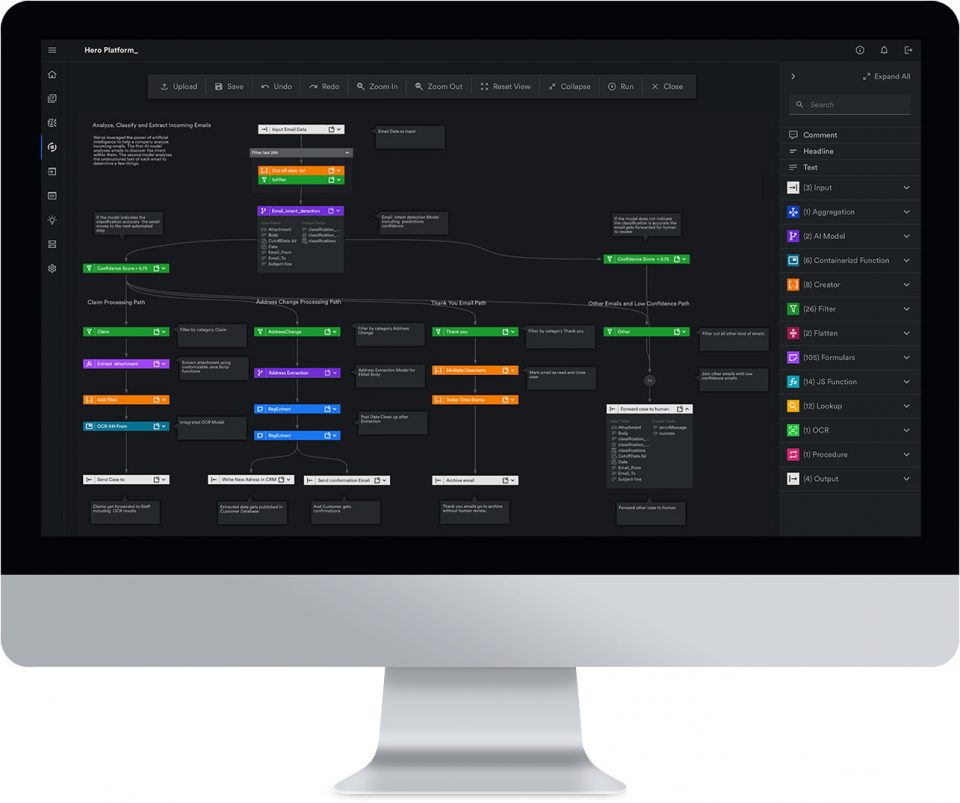
    The image shows a desktop computer with a Automation Hero's intelligent document processing platform on the screen to automate loan processing for a large enterprise.

    Why loan processing automation needs modern AI

    In traditional banking institutions, providing 24-hour support, responding to customer emails, approving applications, and organizing paperwork are all crucial to winning and retaining customers.

    Fintech apps are changing the lending industry by offering faster, more accessible, and more responsive front-end processes. Unfortunately, legacy lenders who are stuck in legacy document workflows prone to manual errors and RPA weak points really struggle to keep up with these technological advancements. 

    This gives a competitive edge to newer fintech startups. However, lenders that can digitally transform their loan application processes will be able to provide a seamless and frictionless lending experience. Therefore, what traditional lenders need more than ever is a modern AI-driven automation technology that brings financial services like the loan process into the digital era.

    In traditional banking institutions, providing 24-hour support, responding to customer emails, approving applications, and organizing paperwork is crucial to winning and retaining customers. Automated loan processing systems—with next-gen AI/cognitive document understanding—will close the gaps. 

    With intelligent document processing, legacy lenders are back in the driver’s seat.   

    How intelligent document processing (IDP) closes the gaps

    Next-wave loan automation platforms like Automation Hero streamline data extraction with above-human accuracy. For example, Automation Hero’s patent-pending context-aware optical character recognition (OCR) “reads” every kind of document (including images), extracts data, and formats it for processing by users or RPA bots. 

    Full-service intelligent document processing (IDP) platforms like Automation Hero’s Hero Platform_ can fully automate the entire loan application workflow—from document input to data output—with significantly higher accuracy than human underwriters.

    Regardless of the structure or layout of information, Hero Platform_ extracts essential data from documents, including PDFs, emails, Word documents, scanned contracts, digital forms, and more. This lends the platform to several use cases in an automated loan processing system: 

    • Pre-approvals
    • Appraisals
    • Underwriting
    • Closing
    • Cross-selling and upselling
    • Credit analysis 
    • Portfolio risk management

    Benefits of modern automated loan processing systems

    Higher-quality banking data

    With so many manual tasks for underwriters to perform, there’s a risk of bad data quality entering your system. Bad data quality introduces risks in areas where high accuracy is needed. By removing manual steps in data entry and loan application reviews, the potential for human error is reduced, if not completely eliminated. Mistakes due to human error are expensive to fix. A modern loan processing system that uses industry-leading IDP streamlines loan processing times with above-human accuracy and significantly reduces the work of underwriting.

    Faster customer onboarding

    Opening an account can take up to 90 days. Long application delays are frustrating, and banks are under constant pressure to deliver services faster than the Fintech competition. The rise of digital loans, like the digital mortgage, and faster competition will leave legacy lenders behind. Modern loan automation solutions leveraging intelligent document processing can streamline customer onboarding and enhance the customer experience.

    Shorter application processes

    Loan officers handle many documents with critical information about a borrower’s income. This involves pay stubs, tax documents, bank statements, and even open-source content available on social media for a complete picture of all associated risks. In a modern loan automation system equipped with IDP, banking processes stuck under a mountain of unstructured documents—such as those essential to underwriting—can be streamlined with just one click.

    Enhanced KYC compliance

    Banks can’t know their customers if the data they have on them is stuck inside inaccessible documents. IDP unlocks essential data locked away in documents and mitigates the risks of customer onboarding. Hero Platform_’s IDP is particularly adept at comparing data points from multiple sources and analyzing them with above-human accuracy. Meet regulatory standards for KYC compliance, mitigate the associated risks with customer due diligence (CDD) checks, and fast-track every onboarding step throughout the customer journey.

    Find new revenue opportunities

    With IDP, lenders can gain insights into customer behavior and preferences, enabling them to deliver better services to customers that are tailored to meet their specific needs. For example, acquiring a new customer costs a bank $7,700. In addition, IDP helps bankers find new revenue streams from existing customers by offering cross-selling recommendations tailored to their specific needs. Ultimately, this can increase customer satisfaction and loyalty, which are critical in a highly competitive industry.

    Automate common customer requests

    IDP accelerates contactless banking by understanding the intent of email messages. Automation Hero’s intent classification automatically triages emails and tailors a perfect response for a first-class customer service experience. 

    For example, is the email a change of address request, proof of employment update, submission of ID verification materials, or a complaint? Hero Platform_ can detect intent in email messages. Using the extracted data, Hero Platform_ can look up information in another system, verify it, and automatically send replies to common inquiries—saving underwriters time and effort.

    Join the digital loan processing revolution with Automation Hero

    When RCBC decided to scale the use of AI, it knew the only way to increase its competitiveness was to optimize its customer onboarding experience. Learn how we helped one of the most trusted commercial banks in the Philippines increase its underwriting production 3x faster by reducing loan processing time from 25 days to just eight days using IDP. 

    • Speak with an expert — tell us about your specific use case.
    • Get a personalized demo — schedule a demo, and our Heroes will get in touch!

    • Access our Ebook — Learn how OCR and advanced AI can save legacy lenders.
  • How does intelligent document processing work? | Automation Hero

    The vast amounts of information and data flowing through businesses today represent a golden age of opportunity.

    That opportunity, however, only comes to those who put their data to work. From predictive analytics to business process optimization, leveraging data sets in actionable ways is the key to a business not just surviving, but thriving.

    Apr 28, 2023 by Automation Hero

    Yet the same data that presents so many opportunities can also be a burden. Having so much information to comb through and put to work can make it challenging to efficiently process, manage, and extract meaningful insights. Fortunately, with the advent of intelligent document processing (IDP), businesses now have a powerful tool that can help them streamline their document management and data extraction processes.

    In this post, we will cover what IDP is and, crucially, what it is not.

    We will detail use cases of IDP, where it can be applied, and why this technology is changing the way businesses operate. At the end of the post, you will have a complete understanding of IDP as well as a vision for how intelligent document processing can benefit your own organization.

    Keep in touch

    What is intelligent document processing?

    Intelligent Document Processing is “a type of business workflow automation that uses artificial intelligence (AI) to read documents the same way that humans do.”

    IDP can work with various types of documents, such as invoices, purchase orders, financial statements, medical records, and more. The technology can extract information from unstructured data sources such as scanned documents, PDFs, and images, which are traditionally difficult to process using conventional methods.

    IDP can be used in conjunction with Robotic Process Automation (RPA), which automates repetitive tasks, to create an end-to-end automation solution for businesses. When IDP and RPA work together, entire business processes can be optimized from start to finish, reducing the need for manual intervention and allowing employees to focus on more strategic tasks.

    What IDP is not

    It’s important to clarify what IDP is not to dispel any misconceptions about its capabilities.

    Firstly, IDP is not the same as Optical Character Recognition (OCR) or document scanning. OCR technology scans images of text or writing into files that can then be edited. OCR can certainly help businesses digitize their paper records, but it cannot understand the context of the document or extract meaningful insights from it. To be clear, OCR is one of the tactical steps that make up IDP. Furthermore, just as not all IDP solutions on the market are the same, not all OCR solutions on the market are the same.

    Find the right OCR solution for you in our OCR Buyer’s Guide.

    IDP is also not document scanning. Document scanning can be very useful for a business, but in and of itself, it does not extract business intelligence. Furthermore, document scanning does not create workflows or automate processes the way IDP does. While document scanning can make it easier to access and share documents, it does not enable businesses to extract insights from the data within the document.

    It’s also worth noting that IDP is not limited to a specific industry or use case. While it is commonly used for tasks such as invoice processing or contract management, it can be applied to any industry or business process that involves large volumes of unstructured data. This includes areas such as healthcare, legal, and financial services, among others.

    In summary, while OCR and document scanning can be helpful for digitizing documents, they cannot provide the same level of insight as IDP. IDP is not limited to a specific industry or use case and has the ability to extract meaningful insights from unstructured data.

    How does IDP work?

    IDP uses a combination of computer vision, natural language processing (NLP), and machine learning (ML) algorithms to analyze and extract data from unstructured documents. It is a complex and multi-step process that involves the following stages. 

    1. Data extraction: The first step in the IDP process is data extraction. This involves scanning documents and extracting relevant data points using OCR technology. OCR converts scanned images into machine-readable text, which can then be used to identify and extract relevant information.
    2. Data validation: After the data has been extracted, it needs to be verified and validated to confirm that it is accurate and correct. This involves comparing the extracted data to check for inconsistencies and errors. Errors and inaccuracies are marked for review so they can be corrected and fed back into the automation.
    3. Data classification: Once the data has been extracted and validated, it is classified based on its type and relevance. For example, if the document is a receipt from a business expense, the relevant data points may include the receipt number, date, vendor name or location, and total amount. Since the layout of information in receipts is unstructured and totally dependent on the merchant, IDP software can be trained to recognize different types of documents as “receipts” and classify them accordingly.
    4. Data enrichment: After the data has passed through each of these steps, it can be further enriched by adding additional information from external sources. This could include adding data from other documents or databases, performing calculations, or conducting sentiment analysis.
    5. Data export: Finally, the enriched data can be exported to other systems or applications, such as an Enterprise Resource Planning (ERP) system or a Customer Relationship Management (CRM) system.

    Overall, the goal of IDP is to automate the entire document processing workflow, from document ingestion to data export. By automating these tasks, businesses can save time and money while reducing the risk of errors and improving data accuracy.

    Where can IDP be applied?

    IDP has numerous applications across various industries, enabling organizations to improve efficiency, reduce costs, and improve the accuracy of their document processing workflows. While IDP is popular and can be used in many industries, three places where it is most prevalent are the finance, healthcare, and legal sectors.

    Finance & Banking

    In the finance sector, IDP can automate the processing of invoices, receipts, and other financial documents. This can result in faster processing times, reduced costs, and improved accuracy. IDP can also enable these financial services organizations to gain insights from their financial data, informing decisions made based on data instead of guesswork.

    Insurance 

    In the insurance sector, IDP can help process claims more efficiently and accurately. Insurance companies deal with a large volume of paper-based documents, such as claim forms, policies, and contracts. IDP can be used to extract important information from these documents, such as policy numbers, claim amounts, and customer details, which can be used to automate the claims processing workflow. This can result in faster turnaround times, reduced errors, and improved customer satisfaction. Additionally, IDP can help insurance companies identify potential fraud cases by comparing data from different sources and flagging any inconsistencies.

    Manufacturing

    For manufacturers, IDP can help automate the processing of invoices, purchase orders, and other financial documents. This can help streamline the supply chain process and improve the accuracy of financial data. Additionally, IDP can be used to digitize paper-based manufacturing records, such as production logs and quality control reports. This can help manufacturers track their operations more efficiently, identify bottlenecks in the production process, and improve overall productivity.

    Shipping & Logistics

    Many times, people don’t think about the role IDP can play in less-visible industries like shipping. Automation Hero works with businesses in the shipping sector to help automate the processing of bills of lading, customs forms, and other shipping documents. This can help shipping companies reduce errors and delays in the processing of shipments, resulting in faster delivery times and improved customer satisfaction. 

    Additionally, IDP can be used to extract data from shipping documents, such as shipment weights and dimensions, which can be used to optimize shipping routes and reduce transportation costs. IDP can also help shipping companies comply with regulatory requirements, such as customs regulations and international trade laws, by ensuring that all necessary documentation is complete and accurate.

    Healthcare & HR

    In the healthcare industry, IDP can handle processing medical records, cataloging prescriptions, and submitting insurance claims. This improves the accuracy and pace of processing claims, which can result in faster payments and improved patient satisfaction. Additionally, IDP can help reduce errors and fraud in the processing of medical records, improving the overall quality of care. 

    In the legal industry, IDP can be used to automate the processing of contracts and legal documents, resulting in faster turnaround times and reduced costs. It can also help ensure compliance with legal and regulatory requirements, reducing the risk of errors and penalties. 

    Benefits of IDP

    The benefits of IDP are numerous and include not just improved productivity but also reduced costs. With IDP, businesses can automate time-consuming and error-prone manual tasks, freeing up employees to spend their time, energy, and intellect on strategic initiatives and more meaninfgul tasks. 

    Consider the following benefits of leveraging intelligent document processing technology.

    Improved data accuracy

    One of the main benefits of IDP is improved data accuracy. By automating data extraction and validation, IDP eliminates the risk of manual data entry errors, ensuring that data is accurate and reliable.

    Increased Efficiency

    IDP streamlines the automated document processing workflow, enabling organizations to process documents faster and with less manual intervention. This reduces the time and resources required for document processing, freeing employees to focus on more strategic tasks.

    Reduced Costs

    By automating document processing tasks, IDP can reduce the cost of manual labor and the risk of errors, resulting in cost savings for organizations.

    Improved Compliance

    IDP can help organizations comply with industry regulations and standards by ensuring that documents are processed accurately and in a timely manner.

    Enhanced customer experience

    IDP can help organizations improve the customer experience by enabling faster and more accurate processing of customer documents, such as loan applications or insurance claims. IDP can also be integrated with customer relationship management (CRM) systems or an email server to automate common customer requests and sort incoming emails based on intent classification.

    Increased data insights

    IDP can provide organizations with valuable data insights hidden in their documents. This can help organizations make more informed business decisions and identify areas for process improvement.

    Scalability

    IDP is scalable, meaning that it can be used to process large volumes of documents without requiring additional manual labor or resources.

    Why invest in IDP?

    Investing in IDP can bring significant benefits to businesses of all sizes. When used correctly, the return on an investment in IDP can be a boon for a business, regardless of size.

    One benefit is improved data accuracy. IDP automates the extraction and validation of data from documents, reducing the risk of manual data entry errors and ensuring reliable data. This can lead to better decision-making and an overall improvement in data quality.

    Another benefit is increased productivity. IDP automates manual document processing tasks, freeing up employees to focus on more valuable tasks. This can result in cost savings, increased efficiency, and better allocation of resources.

    IDP can also reduce costs associated with document processing, such as labor costs, by automating manual tasks. This can provide organizations with a significant return on investment, freeing up those resources to focus on more strategic initiatives.

    Improved compliance is another benefit of IDP. By ensuring accurate and timely document processing, IDP can help organizations meet regulatory requirements and avoid fines or other penalties.

    IDP can also give organizations a competitive advantage by enabling faster, more efficient, and more accurate document processing. This can lead to improved customer satisfaction, loyalty, and revenue growth.

    Lastly, IDP can provide valuable data insights by extracting and analyzing data from documents. This can help organizations make informed business decisions, identify areas for process improvement, and gain a deeper understanding of customer needs.

    Expand your business potential with IDP

    By investing in IDP, businesses can stay competitive, improve compliance, and automate time-consuming and error-prone manual tasks.

    By automating manual document processing tasks, IDP enables businesses to focus on more valuable tasks, leading to cost savings, increased efficiency, and a better allocation of resources. Furthermore, IDP can provide valuable data insights by extracting and analyzing data from documents, helping organizations make informed business decisions.

    Automation Hero is a leading provider of IDP technology, using artificial intelligence and machine learning algorithms to automate the processing of unstructured documents. Our platform enables businesses to streamline document processing workflows and gain a competitive edge by improving efficiency and accuracy. 

    Unlock the business intelligence in documents with AI-driven IDP today

    In a world where automated document processing is an essential part of business operations, Automation Hero’s IDP technology can revolutionize the way organizations manage their documents. By leveraging the power of AI and machine learning, Automation Hero is helping businesses improve their efficiency and productivity while minimizing the risk of manual errors. For more information on how Automation Hero can transform your document processing workflows, contact us HERE.

    • Speak with an expert — tell us about your specific use case.
    • Get a personalized demo — schedule a demo, and our Heroes will get in touch!

  • AI vs software automation: what’s the difference? | Automation Hero

    In recent years, the terms “automation” and “artificial intelligence” have become buzzwords in the tech industry. While both technologies can potentially revolutionize business operations, they are not the same thing.

    Understanding the differences between software automation and artificial intelligence is crucial for businesses looking to implement either of these technologies in their operations.

    Apr 28, 2023 by Automation Hero

    the image represents a group of people collaborating and using technology to work more efficiently and effectively. The laptop and the Automation Hero software running on it automate various tasks, allowing the group to focus on more complex and creative work. While artificial intelligence can perform many tasks that were previously done by humans. The people in the image are using technology to work together and achieve their goals, highlighting the importance of both software automation and artificial intelligence in modern work environments.

    Automation involves the use of technology to automate repetitive and often menial tasks, such as data entry or form filling. The goal of automation software is to improve efficiency while reducing costs.  Even more, automation can help eliminate manual data-entry errors.

    On the other hand, artificial intelligence involves developing algorithms that can learn over time, improving their performance as they are “trained.” The goal of AI is to create algorithms to perform complex tasks, such as processing language, recognizing things in images, or even making decisions. 

    Keep in touch

    In this blog post, we will explore the differences between Automation and AI. We will also explore the benefits and risks of each. Finally, we will discuss the concept of automated artificial intelligence or “intelligent automation,” which combines the power of automation with the intelligence of AI. 

    Whether you are a business owner looking to streamline your operations or a technology enthusiast interested in the latest trends, this post will provide valuable insights into the world of automation and AI.

    What is “Automation”?

    Automation is the use of technology to perform tasks that were historically performed by a person or a team of people. Automation process software can range from simple rule-based software that automates repetitive tasks to complex systems that can handle specific business processes within a workflow faster and more accurately than a person can. Automation software is great for handling data entry or form filling, as examples. 

    One of the more commonly known and used forms of automation is Robotic Process Automation (RPA). RPA involves the use of software that can be programmed to perform repetitive tasks like those mentioned above. RPA can be used to automate processes across various departments, including finance, human resources, and customer service.

    RPA runs on top of existing IT systems as a complementary automation solution; however, as a legacy “rules-based” automation technology, RPA has earned a reputation for being “fragile” and inflexible to maintain. 

    RPA is good for what it does, but it can be difficult to update in a large enterprise where workflows change and evolve often. To learn more about RPA, watch this demo video to see where the legacy technology falls short. 

    “Intelligent” Automation has been another emerging form of automation that combines software automation technologies, including RPA and artificial intelligence (AI). Traditionally, Intelligent Automation leverages artificial intelligence and RPA to automate some complex tasks with minimal human intervention. 

    However, after experiencing some temporary “hype” for a short time, Intelligent Automation overpromised and underdelivered real value, leading to more disappointment than success. This is because legacy RPA vendors automate simple, repetitive screen tasks in orchestration with an AI made by a separate vendor, essentially creating an ineffective AI “bandaid” on top of an already “brittle” RPA implementation. 

    This orchestration of automation solutions presented several challenges, and we covered this in-depth in another article on the 5 automation challenges, and how to overcome them.     

    Benefits of automation

    Automation offers several benefits to businesses, including improved efficiency, increased productivity, consistency, and accuracy. By automating repetitive tasks, businesses can reduce the risk of human error and free up time for employees to focus on more valuable tasks. As a result of automation, businesses can recognize benefits like reduced costs of labor, improved supply chain and logistics operations, and cost savings across a wide range of business expenses.

    Moreover, automation can help businesses make more informed decisions through the analysis of vast amounts of data. This analysis helps uncover valuable business intelligence and insights, leading to better decision-making and ultimately drive business growth. Additionally, automation can improve the customer experience by providing faster and more accurate service, reducing wait times and increasing overall satisfaction

    Automating repetitive and time-consuming tasks means businesses can repurpose their human resources to focus on more valuable activities that require human skills and intuition. Additionally, automation can help businesses reduce costs and improve customer satisfaction, making it a valuable tool for businesses of all sizes.

    Risks of automation

    While automation has many benefits, it also poses several risks. One of the main risks of automation is the displacement of jobs, as machines and robots take over tasks previously done by humans. This can lead to unemployment and income inequality, as people struggle to find new roles in the changing job market. 

    Other risks of automation include dependence on technology, which can lead to disruptions in operations if there are any technical issues or malfunctions. Additionally, with this much data in the digital domain, there is a risk of cyberattack or data breach. 

    Finally, as tasks become increasingly automated, there is a risk that people may become more isolated and disconnected from their work, which can lead to reduced job satisfaction and engagement. 

    It’s important to note that many of these risks can be mitigated through proper planning and implementation of automation systems. Investing in training to help workers move into new roles and implementing cybersecurity measures can mitigate a few of the risks mentioned above.

    Applications of automation

    Automation has a vast range of applications in a wide range of businesses and industries. In manufacturing, robots are used to improve efficiency and productivity by assembling products, performing quality control checks, and packaging finished goods. In healthcare, automated artificial intelligence systems are used to streamline administrative tasks, reduce errors, and improve patient outcomes, such as scheduling appointments, processing insurance claims, and managing patient records.

    In the finance industry, automation is used to automate tasks such as data entry, report creation, and even the reconciliation of accounts. In these cases, automation helps reduce errors and has the potential to drastically increase the speed of financial reporting. In customer service, automation can be used to answer frequently asked questions, handle routine inquiries, and schedule appointments, which helps improve customer satisfaction.

    In logistics and supply chain management, automation can be used to improve the efficiency and accuracy of supply chain operations, such as tracking inventory, managing orders, and optimizing shipping routes. 

    As automation technology continues to evolve, the way we think about processes, workflows, and office efficiency will evolve as well. To best leverage automation in your own business, it is crucial to understand the similarities and differences between Artificial Intelligence and Software Automation, including Intelligent Document Processing.

    Understanding artificial intelligence

    In its most basic form, Artificial Intelligence (AI) is a software simulation of human intelligence. AI involves the development of applications that can perform complicated, complex, and unique tasks that typically require human intelligence. Artificial intelligence in many cases is capable of learning, reasoning, problem-solving, and even decision-making.

    There are several different subsets of AI, including machine learning (ML), natural language processing (NLP), and computer vision. Machine learning involves using algorithms to learn patterns in data and make predictions. Natural language processing allows a computer to take a text or voice recording, make sense of it, and generate human language as a response. Computer vision involves the ability of computers to interpret and analyze visual information, like recognizing something in a photograph or video.

    Applications of AI

    Artificial Intelligence is emerging in almost every field and sector. Recent advancements have made AI a must-have for industries like manufacturing or financial services

    In finance, AI is increasingly being used to improve institutional security and prevent fraud. AI-powered systems continuously crunch massive amounts of financial data, looking for patterns or sets of anomalous behavior in an effort to predict stock prices and identify potential investment opportunities. AI can analyze transaction data to identify suspicious activities and prevent fraud. What’s more, invoice processing and check recognition are key use cases for financial service organizations and teams looking to leverage AI.

    In the retail industry, AI is used to deliver a personalized shopping experience for customers and improve supply chain operations. AI technology can review the purchase data of a customer or cohort and use its findings to make personalized product recommendations or provide targeted advertisements and marketing messages. AI can also be used to optimize logistics and inventory management by using historical data to predict the necessary inventory levels for a coming wave of demand. 

    AI can also be integrated with customer relationship management (CRM) tools or even an email server to automate customer requests and sort incoming emails based on intent classification

    Risks of AI

    AI has the potential to transform our world, but it also comes with risks. One of the main risks of AI is the potential for bias. This is why human-in-the-loop (or HitL) solutions can be so beneficial. When considering the use of AI, keep in mind that many tools can give your team interaction with and oversight over the AI in use. 

    Automation Hero’s no-code environment provides an easy-to-use HitL interface that closes the gap between automation and people. Hero Platform_ enables multi-party reviews and approvals — turning randomized audits, compliance procedures, and quality assurance processes into streamlined collaborations between employees and departments. 

    Differences between AI and automation

    Automation and AI have similarities and differences. While automation is focused on automating tasks, AI seeks to create machines that can perform tasks that require human-like decision-making, analysis, and problem-solving skills. Automation is typically used for repetitive and routine tasks that can be easily programmed, while AI is applied to complex tasks that require human-like judgment and intelligence.

    One major difference between automation and AI is their level of decision-making ability. Automation is typically rule-based and follows predetermined instructions, while AI can learn from data and make decisions based on that data. In other words, automation software operates on a set of predefined rules, while AI can make predictions and decisions based on the data it is presented with. Automation cannot learn from its mistakes or adapt to new circumstances, while AI can adjust its behavior based on new training data.

    Another key difference is how much or how little human involvement is necessary for the technology to operate efficiently. Automation systems can operate without human supervision once programmed as long as they function correctly. The problem with legacy automation solutions like robotic process automation (RPA) is that they break easily and are difficult to maintain with evolving workflows. At the same time, some automation solutions offer a human-in-the-loop user interface that brings decision-makers into the workflow to approve or direct the automation.

    Lastly, there is a difference in the types of tasks each technology is best suited for. Automation is great for repeatable and often menial activities, such as data entry or form filling. AI is better suited for complex tasks that require analysis and even decision making. Processing language or identifying things within a video or image is definitely best suited for AI.

    While automation and AI share some similarities, they are fundamentally different in their capabilities, decision-making ability, level of human involvement required, and the types of tasks they are best suited for. 

    Automation in your business

    Clearly, automation and artificial intelligence are two related but distinct technologies with different capabilities and applications. Automation involves automating repetitive tasks, while AI involves machines performing tasks that require human-like decision-making, analysis, and problem-solving skills. While automation is rule-based and follows a predetermined set of instructions, AI is capable of learning from data and making informed decisions.

    At AutomationHero, we specialize in a modern AI-driven automation technology called intelligent document processing. Automation Hero offers an intelligent document processing platform that can help enterprises improve their efficiency and productivity while reducing errors and costs. 

    By automating document processing tasks such as data extraction, classification, and validation, Automation Hero can help businesses streamline their operations, reduce manual labor, and improve accuracy. In turn, organizations that work with Automation Hero can count on cost savings and improved productivity across the company. To learn more about how Automation Hero’s intelligent document automation fits into your business, contact us here.

    Start improving your business processes with Automation Hero

    When Allianz Italy decided to scale the use of AI, they quickly discovered that the best path to reach this goal was to keep business experts involved in the process. Learn how we helped Allianz create synergies between humans and artificial intelligence to reduce total claim processing time by 80% — cutting down manual tasks from 10 minutes to just two minutes per claim. 

    • Speak with an expert — tell us about your specific use case.
    • Get a personalized demo — schedule a demo, and our Heroes will get in touch!

  • Guide to Modern Finance Automation in 2023 | Automation Hero

    After discussing the automation potential with CEOs and CFOs, we reached a simple conclusion: modern AI will revolutionize the way finance processes are automated. Read more to discover how the needs of modern financial process automation can be met in 2023 and beyond.

    Apr 24, 2023 by Craig Woolard

    It’s hard to argue with the success of automation in finance operations. 

    In an Oxford Economics survey, 73% of finance and banking leaders agreed that automation improved efficiency and gave executive staff more bandwidth to focus on higher-value strategic tasks. And yet, almost 90% of the CEOs surveyed said they needed a more agile approach to analyzing financial and performance data.

    Keep in touch

    It seems that traditional automation vendors fail to understand the real-world needs of their customers. 

    At Automation Hero, we have evaluated hundreds of business problems with finance and banking customers worldwide. After discussing the automation potential with CEOs and CFOs, we reached a simple conclusion: modern AI will revolutionize the way finance processes are automated.

    What is modern finance automation?

    Finance automation uses software and technology to streamline repetitive tasks in essential financial business processes. The main goal of automation is to eliminate errors and inefficiencies so that employees can spend more time on strategic tasks. 

    A combination of technologies can drive the modern automation of manual work involved in financial workflows. Artificial intelligence (AI), robotic process automation (RPA), intelligent document processing (IDP), machine learning (ML), and natural language processing (NLP) all help eliminate much of the tedious work performed by members of finance teams and other departments. 

    Of course, this doesn’t mean humans are left out of the process. As with any finance automation software, it’s critical to understand what you can and should automate first. 

    Understanding what can be automated

    According to a McKinsey Global Institute report on the future of finance automation, current automation technologies can fully streamline nearly half of an organization’s financial activities. 

    The research also pointed out the daily work activities that are the easiest to automate, including: 

    • General accounting tasks
    • Payroll
    • Accounts payable
    • Accounts receivable
    • Tax Solutions
    • Reporting and analysis
    • Risk Management and auditing
    • Fraud Prevention

    The research in the McKinsey report estimates that “about a third of the opportunity in finance can be captured using basic task-automation technologies such as robotic process automation (RPA).” 

    The remainder of the opportunity requires more advanced cognitive automation technologies, such as intelligent document processing (IDP), that tap into powerful machine-learning algorithms and natural-language capabilities. 

    What are the limits of legacy automation software?

    By the mid-2010s, much of the “busy work” involved in automated financial systems had been taken over by RPA bots. For example, RPA bots attempted to handle data entry, price matching, and purchase order processing. But they were often unable to manage the entire workflow. RPA breaks easily and is difficult to update whenever modern, evolving work processes change.

    RPA runs on top of existing IT systems as a complementary automation solution; however, as a legacy “rules-based” technology, RPA has earned a reputation in the banking world for being “fragile” and inflexible to maintain. 

    For example, invoice processing, underwriting, ESG reporting, and customer service are all major areas where traditional RPA falls short and requires significant human intervention.

    Today, legacy RPA can still handle some of the rote busywork involved with simple accounting tasks. However, RPA struggles with complex financial processes such as those involving:

    • Risk management
    • Fraud prevention
    • KYC/AML/ESG compliance
    • Customer support
    • Underwriting
    • Reporting analysis

    These financial services are just too complex for traditional “rules-based” approaches. 

    Providing customer support, responding to emails, approving applications, and organizing paperwork significantly impact customer satisfaction — especially as front-end processes become more accessible and faster, thanks to the competition from more responsive fintech apps. 

    Watch this demo to learn more about invoice process automation and where RPA falls short.

    Why financial services need modern AI

    For nearly a decade, it’s been clear that RPA is no longer enough. How, then, can the rest of the grueling manual work be automated? 

    Today’s competitive landscape requires finance automation software with next-gen AI/cognitive intelligence to extract data from documents with above-human accuracy. 

    For example, ESG (environmental, social, and governance) reporting is a complex reporting process that involves converting structured and semi-structured data from various sources into detailed compliance reports. 

    Intelligent document processing (IDP) is one example of modern artificial intelligence in the automation workflow that can handle these unstructured documents like a tenured finance expert. 

    IDP uses AI, machine learning, and Computer Vision to “read” financial documents with above-human accuracy, extract critical data points for complex financial reporting tasks, and more. 

    For example, in invoice processing, a modern AI approach like IDP doesn’t mind if the layout of incoming invoices changes. This is because an AI-powered workflow driven by IDP actually “learns” the structures of each invoice — just like a human would — and processes them no matter which vendor sends the invoice.

    Image of Automation Hero's intelligent financial process automation software called "Hero Platform_"

    What is the best finance automation software?

    Every organization has decision-makers with the authority to approve or deny payments. Procurement managers, accounting departments, CFOs, and VPs are often involved in this complicated workflow.

    This makes automation even more complex for large enterprises looking to streamline their financial activities efficiently. That’s why modern financial process automation needs more than AI. It needs to enable critical decision-makers to be in the automation loop. 

    When understanding what finance automation might look like beyond 2023, closing the gap between your people and your automation is essential. 

    Automation Hero’s IDP platform offers end-to-end financial document intelligence. It sorts financial documents into categories and extracts the essential data. Hero Platform_’s full-service IDP technology connects with existing applications and databases to make the data immediately available to those who need it. 

    1. What are the key benefits of finance automation?

    The benefits of financial process automation are undeniable. With the advances in modern artificial intelligence, there is now more opportunity than ever for organizations to undergo a full digital transformation. The benefits include:

    2. More time to focus on strategic work

    Modern automation with intelligent document processing takes care of the technical “busywork.” With IDP, finance teams are freed to focus on higher-level strategic tasks. IDP allows leaders to build stronger relationships with clients, partners, and employees. It also ensures proper supervision of accounting and frees up more time for employees to focus on strategic work. 

    Want more productive, happier teams? Then, check out our blog on the benefits of automation for employees to learn more.

    3. Reduce human error

    Manual data entry can lead to human errors that are expensive to fix. The transaction itself is the basis of every professional relationship. Journal entry discrepancies and missed bill payments cause significant disruptions to the transaction. Digitizing processes through automation eliminates human error and ensures consistent, reliable workflows. 

    4. Improve data quality

    It’s no secret that speed and productivity increase whenever manual processes and human touchpoints are cut back or removed. However, the effect on accuracy and data quality is also significantly improved with automation. Bad data tarnishes your company’s reputation. Accurate and consistent information helps teams communicate better and enhances decision-making. Reliable data benefits everyone involved.

    5. Increase operational efficiency

    Our financial process automation solution offers an easy-to-use human-in-the-loop interface that enables multi-party reviews and approvals. Automation Hero’s Hero Platform_ turns randomized audits, compliance procedures, and QA processes into streamlined collaborations. Integrating your existing databases and financial tools into the automation workflow enables deeper collaboration between departments and the decision-makers in your organization

    6. Enhance decision-making

    Some automated financial systems can connect with existing applications and databases to make the data readily available. For example, complex AP processes require collaboration between different departments and systems. Our platform’s API enables this seamless integration with third-party services, such as bookkeeping software, payment systems, and email providers. With our platform, you can confidently make decisions, update ledgers, remit payments, and notify vendors that an invoice is under review — all from one place. 

    How to set up finance automation?

    There is no “one-size-fits-all” solution for automating financial services. However, understanding what can be automated when developing an implementation strategy that will meet your organization’s goals is critical.

    Automation Hero is the only end-to-end platform that deploys automation and document AI processes as highly scalable and reliable micro-services. There’s no need to “rip and replace” with Automation Hero’s IDP. Hero Platform_ integrates with and upgrades existing ERP, SAP, DMS, EDI, and AP systems. For example, supercharge an ERP system with intelligent document understanding or augment your current RPA with AI capabilities. 

    You can immediately start using Automation Hero’s built-in intelligent document processing to build an automated infrastructure that speeds up the workflow at every step. In addition, our API will serve as an intelligence “fabric” that allows you to connect all your micro-services with other automation and internal data systems.

    Unlock the intelligence in your financial documents with AI-driven automation today

    • Speak with an expert — tell us about your specific use case.
    • Get a personalized demo — schedule a demo, and our Heroes will get in touch!

  • 5 Benefits of software automation for employees | Automation Hero

    Can automation improve job satisfaction, employee engagement, and productivity? 78% of employees surveyed believe automation can help them focus on the more interesting and rewarding aspects of their jobs. Read below to learn the benefits of automation technology for employees.

    Apr 06, 2023 by Craig Woolard

    It’s no secret that software automation benefits businesses. Using software to automate workflows benefits nearly every sector. That’s a fact. A lot of attention is paid to the fact that employee productivity increases, errors and costs decline, and employees have more time to work on higher-value tasks. 

    This is excellent news for corporations and businesses. But what about the employees themselves? What should they think of automation technologies, including robotic process automation (RPA) and intelligent document processing (IDP)?

    Keep in touch

    Can automation increase employee satisfaction?

    Yes. Automation has the potential to make employees happier and feel more satisfied. According to recent “Automation in the Workplace” reports, 69% of information workers said automation could help reduce time wasted on manual, repetitive tasks that decrease employee happiness and satisfaction. For example, 59% of the respondents estimated up to six or more hours per week could be saved if the repetitive aspects of their job were automated. 

    Employees working on “menial tasks” reported they were “wasting time;” however, those same employees also reported eagerness to put that time to better use. 72% of respondents also said they could use the time saved to focus on more meaningful, “higher-value work.”

    In comparison, 78% said automation could help them focus on the more interesting and rewarding aspects of their jobs. However, it also depends on how you implement and manage the automation. More on this later.

    What are the costs of not choosing automation?

    Businesses that choose not to automate are likely to feel some pain. Before we dive into all the benefits of automation for employees, let’s quickly examine the opportunity costs to consider when organizations do not implement an automation strategy.

    Here are some critical opportunity costs and risks to consider:

    1. Increased workload: Without automation, employees may have to manually perform repetitive and time-consuming tasks, leading to increased workload, stress, and burnout. 
    1. Reduced efficiency: Manual processes are slower and more prone to errors, which leads to longer delays, decreased productivity levels, and lower customer satisfaction. This is especially true for remote workers who may handle manual processes that are harder to manage from a distance.
    1. Limited growth: Without automation, less efficient companies will struggle to keep up with their competitors who are using innovative technology to improve their business processes.
    1. Higher costs: Manual processes can be more expensive to maintain in terms of time, labor, and resources, cutting into an organization’s profitability.
    1. Risks to data quality: Whenever employees are not engaged with their work due to manual tasks, there’s a risk of bad data quality entering your system. Bad data quality introduces risks in areas where high accuracy is needed.
    1. Employee dissatisfaction: Bottlenecks and inefficiencies within any company may cause employees to feel frustrated and demotivated. Productivity could suffer if employees do not have the tools and resources to work efficiently and effectively.
    1. Attracting and retaining talent: When top performers become disillusioned with their work experience, they may seek opportunities for more meaningful work with the tools and resources they need. Companies should consider implementing software automation to attract and retain top-performing talent.

    What are the risks of employee burnout?

    While there is controversy over the causes of employee burnout, the consequences and risks are real. 

    Burned-out employees who are less happy and unproductive can lead to risks with significant costs. According to the U.S. Bureau of Labor Statistics, enterprises lose over $500 billion annually solely to low productivity levels. 

    Companies know the risks of disaffected employees. Keeping employees satisfied with their work reduces the risks.

    How do companies deal with this problem?

    Contrary to popular belief, working too much does not lead to employee burnout. 

    Recently, employee burnout statistics revealed that it’s how people experience their workload that significantly impacts burnout, not the hours worked. This should come as good news to leaders concerned about productivity. However, the reality is this: employees who are engaged with their work may work longer hours, but they are also far less likely to experience burnout. 

    If your team performs repetitive and mundane tasks, it’s time to consider automation

    5 Benefits of software automation for employees

    One area of software automation that has gained significant attention is a new type of AI-supported business workflow automation called intelligent document processing (IDP)

    IDP is a next-gen automation technology that evolved from the need to surpass the limits of traditional rules-based approaches. Instead, IDP uses artificial intelligence (AI) and machine learning (ML) to read documents like humans.

    IDP can read, extract, categorize, and organize data streams (usually from unstructured documents) and convert them into immediately accessible structured data formats that different departments or employees can use.  

    The prime function of intelligent document processing is to distill every organization’s treasure trove of unstructured data into valuable, usable structured data. IDP can collect data from every document and provide data teams with the vehicle to analyze it. 

    In this section, we will explore five benefits of IDP automation software for employees:

    1. IDP boosts productivity and employee morale

    One of the most significant benefits of IDP is productivity improvement. Employees can spend substantial amounts of time just manually processing and analyzing documents. The capability to extract raw information from any document significantly cuts down on the workload of manual data entry tasks. Since these processes can be automated with IDP, employees can work more efficiently and spend more time on higher-value tasks that generate revenue and more meaningful work that adds real value to the business.

    2. IDP improves data quality, trust, and teamwork

    Any time manual processes and human touchpoints are cut back or removed, it doesn’t just increase speed and productivity; it helps with accuracy and instills trust. Let’s face it: human errors are common in document processing. IDP protects against these errors, so there’s less chance of costly mistakes or lost hours due to audits that went wrong. Some IDP solutions offer an easy-to-use HitL interface that enables multi-party reviews and approvals — turning randomized audits, compliance procedures, and quality assurance processes into streamlined collaborations between people and departments.

    3. Faster turnarounds enrich the employee experience

    With manual document processing, employees may need to wait for other departments to process business-critical documents before proceeding. IDP can streamline this process, allowing employees to receive documents and data in near real-time and make faster, more informed decisions. Automation Hero’s IDP platform uses a classification AI model that detects intent in incoming emails and intelligently sorts them. Using the extracted data, Hero Platform_ can look up information in another system, verify it, and automatically send replies to common inquiries or route them to the correct department. — saving employees time and effort.

    4. Automation makes employees better at their jobs

    When employees are more engaged with their work, productivity skyrockets. Still, many processes require decision-makers to be in the loop. Some automation solutions offer a human-in-the-loop skill-builder that’s easy to manage and interact with. You can free critical decision-makers to take the enterprise to new heights with an intelligent automation platform that offers HitL automation workflows. Automation Hero’s no-code environment provides a unique “human-in-the-loop” component that’s easy to set up.

    5. Reduced workload alleviates employee burnout

    Finally, IDP can improve job satisfaction. Manual, repetitive tasks add little value to the organization and do not contribute to the sense of purpose employees crave from their work. Employees who spend significant time on manual document processing can experience frustration and burnout. Automating this process allows employees to focus on more fulfilling and challenging tasks, which ultimately helps improve job satisfaction.

    How you can help employees embrace automation

    Since automation software automates many repetitive tasks that lead to burnout, this will come as good news for business leaders looking to increase productivity, job satisfaction, and employee engagement.

    Here are five ways automation software can help you achieve your automation goals:

    1. Start by getting rid of the mundane stuff

    Start by identifying and eliminating the mundane, easily automated busywork. This is a crucial step for increasing employee satisfaction and decreasing turnover. 

    2. Ask employees to look for automation opportunities

    Your people are your greatest asset. They have institutional knowledge about your business that can help you identify critical processes that need automation. Getting your team on board is the best way to involve them from the beginning. When engaged, your team will become “automation evangelists” as soon as they understand the potential.

    3. Make automation a no-code process

    Make change a positive experience for your employees. Learning how to use automation software is a skill. Upskilling is a lifelong journey and a goal many millennial employees value. When you give employees the tools to succeed, they will get excited about the opportunity to learn and grow. Therefore, choosing an automation platform that offers a no-code environment for your team is essential to kickstart the process without friction.

    4. Keep employees in the loop

    If you want to leverage automation software to improve operations but still need to handle exceptions and maintain oversight of the process, do you give up on automation? No. You keep humans “in the loop.” Automation Hero offers a human-in-the-loop skill builder for that extra layer of security. Be the Hero. Correct errors before they occur and close the gap between people and your automation.

    5. Help employees understand the benefits of automation

    Be a positive change agent within your org. Software automation is a powerful tool with the potential to alleviate employee burnout and enable a higher sense of purpose. Share this blog with your employees and help them understand the powerful benefits of automation software. You’ll need their help along the way!  

    Start improving the employee experience with Automation Hero

    When Allianz Italy decided to scale the use of AI, they quickly discovered that the best path to reach this goal was to keep business experts involved in the process. Learn how we helped Allianz create synergies between humans and artificial intelligence to reduce total claim processing time by 80% — cutting down manual tasks from 10 minutes to just two minutes per claim. 

    • Watch the webinar — Allianz: Keep the Human in the Automation loop
    • Speak with an expert — tell us about your specific use case.
    • Get a personalized demo — schedule a demo, and our Heroes will get in touch!
  • How does invoice automation work? | Automation Hero

    “Nothing is certain except death and taxes.”

    In the business world, that phrase might as well include invoice processing. After all, the basis of every professional relationship is the transaction. If that gets bottlenecked, things can turn sour, potentially even damaging the company’s reputation.

    Apr 06, 2023 by Craig Woolard

    The image shows two co-workers using invoice process automation software in an office environment.

    Invoice automation and modern AI have combined forces to revolutionize the accounts payable process. At Automation Hero, we help multinational enterprises free themselves from mountains of data-packed invoices so that they can pay their bills lightning-fast. After all, where would the most successful companies be without the support of vendors?

    Keep in touch

    What are the biggest problems in invoice processing?

    Paying bills on time is often seen as a reflection of a brand’s image, and most brands want their invoices to be unique. However, the biggest problem in invoice processing is simple: everyone’s invoices look different. 

    Before we get into how automated invoice processing works, let’s examine the holistic pain points enterprises have with the accounts payable process:

    1. Invoices are semi-structured documents

    Invoices are semi-structured documents, meaning they do not have a standardized layout. Invoices have the same fields — think date, the amount due, and invoice number — but layouts change vendor-to-vendor. Therefore, organizations handling these documents may need help predicting where the information of interest is located on each incoming invoice. 

    2. Manual invoice processing is expensive.

    Manually processing invoices takes a lot of time and staffing. Many organizations have seasonal increases in invoices that may even require additional staff. Each invoice requires someone to carefully read it, search through records to validate it’s a legitimate bill, confirm it’s for the correct amount, and input the data from the invoice. Additionally, a second person must usually be involved when approving and remitting payments. 

    3. AP processes require people

    The next problem in invoice processing is more complex: invoices need people to review, validate, and approve purchase orders. Every organization has decision-makers with the authority to approve or deny invoices. Procurement managers, accounting departments, CFOs, and VPs are often involved in this complicated workflow.

    4. Complicated workflows

    Many companies receive invoices with different requirements, values, and data that must be manually keyed into an ERP (Enterprise Resource Planning) or another accounting system and pass through four-eye or even six-eye review audits. Unfortunately, there’s no “one-size-fits-all” solution for processing invoices. As a complex workflow, accounts payable processes need key people involved in the auditing process with multiple touchpoints between different systems, databases, and departments. 

    5. More room for human error

    Processing each invoice requires full-time departments, but whenever humans have to perform detailed, repetitive work, there’s always the potential for costly mistakes. It can be easy to misread a number or miss a step in manual review processes, resulting in approvals that never should have been granted or misfiled documents that throw off an audit. Mistakes are expensive to fix. Any time a mistake is made, it takes additional time, staff, and expensive resources to correct it.

    6. Bottlenecks delay critical payments

    When human error and labor-intensive processes combine, the possibilities of delays are amplified, which might not be something your organization can afford. After all, the basis of every professional relationship is the transaction. When that gets bottlenecked, things can quickly turn sour. For example, with manual invoice processing, you risk losing vendors that offer great prices and services simply because of a bottleneck that prevented someone from paying a bill on time. Late invoices can incur penalties and impact corporate relationships, causing companies to lose discounts.

    7. Poor visibility

    When invoices are processed manually, records of every step are rarely stored in a central location (assuming they’re stored at all). Records management systems are expensive to maintain. Filing cabinet systems consume physical space, and the documents are difficult to retrieve, making it more challenging to know where mistakes occurred during an audit and who might be responsible for making them. Even more, it can be difficult to see opportunities for streamlining the process since it’s hard to track how long each step takes.

    8. No centralized workflow

    Incoming invoices come through various channels and in all kinds of different formats. Whether snail-mailed as paper documents, emailed as PDFs, or uploaded to an online vendor portal, incoming invoices come in various forms. With paper invoices still involved, additional staff must manually track and cross-check each one. 

    Accounting is complicated, which makes the accounts payable process even more complex for large enterprises looking to pay their bills efficiently. All of the various touch points must work cohesively, and adhere to each type of invoice’s workflow requirement.

    The image demonstrates an example of what a generic digital invoice might look like when displayed on a desktop computer screen running invoice automation software.

    What are the different types of invoices?

    Depending on your industry, the invoices you receive can vary widely depending on the goods or services you purchase. However, the following are the most common invoices that large multinational enterprises receive: 

    • Standard Invoices: lists the goods or services provided, their prices, and the total amount due.
    • Recurring Invoices: Many large enterprises have ongoing contracts or subscriptions for services that require recurring invoices.
    • Purchase Order Invoices: This type of invoice is commonly used in B2B transactions when the buyer has issued a purchase order and received it from the seller.
    • Progress Invoices: This invoice type is common in construction projects or other long-term contracts with ongoing projects. These show the amount due for work completed to date. 
    • Credit Invoices: This type of invoice is issued when a customer returns goods or cancels services, and credit is due. Large enterprises may receive credit invoices from vendors due to their transaction volume.
    • Debit invoices: A debit invoice increases the amount due from a customer, typically when additional goods or services are provided. Large enterprises may receive debit invoices if they request other services or products.

    As we can see, there’s no “one-size-fits-all” approach to accounts payable processes. While there are many variations and types, in general, invoices can be grouped into two categories:

    1. Invoices associated with a company’s internal request (PO order).
    • These invoices have a purchase order number.
    1. Invoices not associated with a request (non-PO).
    • These may not have a PO order.

    It’s common for companies to have one approach for PO invoices and a different approach for non-PO invoices. They can be sent via email, mail, fax, or EDI. Regardless of how incoming invoices come through, paying bills on time is fundamental to running almost every type of company. What if there was a way to eliminate the busy work? 

    That’s where invoice process automation comes in, which we will cover in the next section.

    What is automated invoice processing?

    Invoice processing automation involves enterprise-grade technology and software to streamline the handling, processing, and management of incoming bills from arrival to payment. 

    Invoice automation can help a company’s accounts payable department streamline AP processes and invoice management procedures by automatically paying supplier/vendor invoices on time. 

    The technology behind invoice processing automation usually starts by extracting invoice data from incoming documents and inputting the data into an ERP or accounts payable system, enabling payments to be made in minutes. 

    What is invoice automation software?

    Invoice automation solutions may involve intelligent document processing (IDP), robotic process automation (RPA) software, and artificial intelligence (AI) to automate the manual data entry tasks associated with the bill processing cycle — including reviewing, approving, remitting, and matching invoice data with the data from purchase orders and receipts.

    How does automated invoicing work?

    The invoice submission and approval process typically follows a specific series of steps:

    1. Document capture (the receipt of documents via email or scanned paper documents)
    • Incoming invoices might arrive in a specific email folder as attachments (JPEG, PDF, EDI, PNG, etc).
    1. Document classification (Is this document an invoice?)
    • AI intent classification models can identify which emails have attached invoices, automatically sort those emails, triage them, or route invoices to the appropriate person for approval.  
    1. Data extraction (Invoice processing)
    • Invoice automation software extracts critical data points from attachments with Optical Character Recognition (OCR).
    1. Analysis and validation (interpreting the invoice data according to business rules)
    • If extracted values pass all validation rules, the invoice moves to “Verified.”
    • If extracted values don’t pass validation rules, documents remain in “Review” unless manually reviewed and moved to “Verified” by a human in the loop.
    1. Data transformation (automatic data entry into a database)
    • Converts images into text data that can be used by other systems.
    • A final report is generated containing all invoice data.
    • Critical data is exported as .csv or integrated with the ERP system.
    1. Invoice archiving (invoices are stored in a central repository for future use)
    • The organization marks the invoice as “Paid” and archives the invoice in event of an audit, where it can serve as a valuable tool for detecting bookkeeping errors or embezzlements.

    Watch this demo to see how our AI-driven platform can increase the accuracy and speed of your company’s processing workflow.

    What are the limits of legacy automation solutions?

    In the early 2000s, much of the “busy work” involved with invoice processing was taken over by robotic process automation (RPA), including data entry, price matching, and purchase orders. 

    Since robotic process automation (RPA) can mimic the keyboarding and manual click-work performed by human knowledge workers, legacy RPA can handle some rote busywork. 

    However, watch this demo to see where RPA falls short.

    Legacy RPA is fragile and difficult to update

    Since invoices are “semi-structured,” unfortunately, this is one area where traditional RPA falls short. Since legacy RPA uses a “rules-based” template for each invoice layout, there are real-world limitations regarding invoices. For example, since every vendor uses a unique layout, the “brittle” script-based technology breaks easily, making updating incredibly difficult. 

    RPA is burdensome and inflexible to maintain

    Whenever vendors change the invoice layout that your RPA template is built on top of, the entire automation breaks, and the workflow needs to be rebuilt all over again. Additionally, separate workflow automations must be created for each new invoice you receive, further driving the disillusionment about RPA as a “brittle” and unreliable technology. 

    The only way to reach above-human accuracy is to go beyond the traditional template-based approaches. Modern invoice automation needs modern AI.

    Invoice automation requires modern AI

    In an automated invoice system that uses AI to process invoices, it doesn’t matter if the layout of invoices changes. This is because AI-powered automations can “learn” the structures of each invoice and process them no matter which vendor sends the invoice.

    Intelligent document processing (IDP) is one example of artificial intelligence in invoice processing automation. IDP uses AI, machine learning, and computer vision to “read” invoices with above-human accuracy and extract critical data from them. 

    Modern invoice processing needs more than AI

    There are a lot of AI solutions offering a human-in-the-loop (HITL) component as a “verification” tool. Some of the AI solutions on the market only let you verify the data coming from the AI. These HITL components are solely focused on handing off the data to humans so they can correct it when the machine gets something wrong. 

    Your AI could be perfect at doing this, especially if you have a PO system where you only need to validate three key fields. However, these HITL AI solutions offer a very limited role for human decision-makers to play in a workflow. What if additional decision-makers need to review an invoice? Depending on the size of the payment and your company’s size, you might also have accounting business rules requiring a four-eye or six-eye review process.

    That’s why modern invoice automation needs more than AI. It needs key decision-makers in the loop. 

    Especially in larger enterprise organizations, you need the capability to build automation workflows with dedicated human-in-the-loop (HitL) skills that are not review-focused for the accuracy of the AI. You also need the ability to send email alerts with critical information to these key decision-makers for an extra layer of security, with the capability to build it out iteratively. 

    The image shows an example of invoice automation software by demonstrating an invoice processing automation workflow in Automation Hero's Hero Platform_.

    IDP: Agile workflow integration for the modern enterprise

    When integrating any new technology, the failure to impact the core problem that needs resolution is a genuine concern. Errors in the implementation could carry real costs that ripple beyond your automation. For example, the time and money invested in projects that don’t move into production are at stake. To be agile, modern organizations need to build out iteratively, and the build-out must be flexible enough to continue iterating on the process. What you change today via automation may need more adjustment in a year. 

    Automation Hero’s Hero Platform_ is the only IDP platform that automates the entire invoice automation workflow. It offers a full-service no-code environment, a flexible HITL skill-builder, and native AI/cognitive intelligence with workflow integration via API at the platform’s core, making it easy to build, test, refine, and deploy, or expand your automation with stability and scalability

    Contrast this to traditional RPA, where the automation grows so complex that you throw it out and rebuild it all over again — instead of debugging and expanding the current implementation. 

    Our easy-to-use and flexible HitL interface enables multi-party reviews and approvals for large invoices — turning randomized audit approvals and other AP compliance protocols into a streamlined, collaborative process that guarantees an extra layer of security. Most HitL interfaces are just rules-based user interfaces, but ours offers greater flexibility than that.

    Additionally, Hero Platform_’s microservice architecture allows us to solve specific invoicing problems as we plug into existing workflows. For example, supercharge an ERP system with intelligent document understanding or augment your current RPA with AI capabilities. 

    Our IDP technology is essential for enterprises looking to improve invoice processing speed, accuracy, and agility in the modern landscape.

    Get started unlocking the intelligence in your invoices with AI-driven automation today

    • Speak with an expert — tell us about your specific use case.
    • Get a personalized demo — schedule a demo, and our Heroes will get in touch!
  • Can ChatGPT truly move the needle inside enterprises?

    Mar 28, 2023 by Cynthia Almonte

    The dawn of ChatGPT: How it impacts your business documents

    ChatGPT, OpenAI’s large language model (LLM), is a game-changer in the field of artificial intelligence (AI) and natural language programming (NLP). This cutting-edge platform can revolutionize the way we write book reports, essays, and other documents. But how will it affect day-to-day business processes? Can it truly move the needle inside enterprise organizations?

    Few product updates have broken through the way OpenAI’s ChatGPT has. It’s more than marketing; it’s a profound leap forward, a fundamental step into a new level of AI awareness. ChatGPT will foster a new level of AI — shaping everyday lives as we’ve never seen before. Book reports and college essays will never be the same again.

    But what about day-to-day business processes? Will this move the needle inside enterprise organizations?

    What business wants from AI and what it needs AI to deliver

    In the weeks since its release, many people have wondered how quickly large language models (LLM), like ChatGPT, will begin to change everyday business processes. The promise for enterprise business is nuanced with business problems across complexity levels, teams, and languages. And let’s face it; many people keep thinking — will ChatGPT make my job different or unnecessary?

    At Automation Hero, we have evaluated and discussed business problems and AI with enterprise customers worldwide. Based on our experience evaluating automation potential across many enterprise business processes, we have a simple conclusion about the impact of AI. For individuals, AI won’t replace you, but a competitor using AI will move faster and can outpace your company. For companies, both threats and opportunities supported by AI will quickly evolve. ChatGPT has lit a fire. 

    Keep in touch

    But what does ChatGTP mean for Intelligent Document Processing (IDP)? Will ChatGPT accelerate AI into a greater understanding of business documents? Since we deal with multinational enterprises daily, Automation Hero’s AI team knows firsthand how many remain stuck under a mountain of data-packed documents. These critical business processes typically require teams to manually rekey or scan and correct the data before they can truly reach their automation goals.  And while the language understanding presented by ChatGPT are impressive, they fail to understand business documents at the semantic level. That’s where the models developed by Automation Hero come in. Let me explain.

    Why true semantic understanding is critical

    We know the promise of AI is not isolated to one step of the process. It’s support for the entire process that moves the needle. Lacking true AI vision, a critical piece of document understanding, ChatGPT cannot unlock documents with real understanding of the document itself. It is impressive as a large language model but misses the mark with many critical business processes.

    Automation Hero has invested heavily in our text extraction capabilities to provide just that — real document understanding, delivering the user’s knowledge with the ‘best’ answer at the document level across more types of documents. Semantic understanding of a document is critical. Without it, no AI can return a true ‘best’ answer.

    While AI is technically not required to run a competitive company, its importance to business decision-making is crucial. A company using AI will move faster, with greater confidence into more accurate decision-making and better ROI.  

    Unlock the intelligence in your documents with our AI-driven automation today

    Learn how we helped Markerstudy reduce its claims processing time by 40%. Additionally, learn how we reduced total claim processing time by 80% for another multinational insurance partner — cutting down manual tasks from 10 minutes to just two minutes per claim.

    • Speak with an expert — tell us about your specific use case.
    • Get a personalized demo — schedule a demo, and our Heroes will get in touch!
  • Automation Hero Partner Profile: Meet Roboyo

    Mar 24, 2023 by Automation Hero

    Andreas Obermair is the Global Head of Automation at Roboyo, where he leads the global intelligent automation practice. Automation Hero recently caught up with Andreas to hear about his work at Roboyo and to get his thoughts on trends in enterprise automation. 

    Automation Hero: Tell us about Roboyo.

    Andreas Obermair:  Roboyo is the world’s largest professional services provider dedicated to Hyperautomation. We are laser focused on creating business value and impact through automation and the optimization of processes for our customers. We have a wide range of approaches and technologies to make it happen, and we’re excited to have Automation Hero as part of our partner technology stack.

    AH. So, tell us what’s Roboyo’s specialty?

    AO: Our years of real-world process and project experience and working with different technologies. Plus, we have the in-depth knowledge of the different geographies and industries that our clients exist in, so we have a broad experience when it comes to digital transformation in general and hyperautomation specifically. 

    AH: Roboyo was founded in Europe but has expanded globally. What does this mean for your customers?

    AO: It was important for us to create a global footprint and to create sustainability for our clients. Over the past few years, our expansion means we now cover all the world’s time zones. This is great for our customers because they get the same quality of expertise and access to resources wherever they are in the world. We can support global engagement out of every market; and that’s all out of one brand, which is amazing.

    AH: And where do you have offices?

    AO: We have a presence in the Americas, in Europe, and in the APAC region. We have offices in 24 cities, across 15 countries including in Germany and the UK, Australia, India, the US and so on.

    AH: How have views of automation changed in recent years?

    AO: In the past—when we started our business—companies came to us saying, “We have a process. We want to automate it.” That’s it. I now believe there’s a shift in thinking. So that means people want to work with more advanced technologies and they want to solve problems in a more intelligent way. It’s more important than ever to work with such technologies to be able to take things to the next level.

    AH: What’s an example of this?

    AO: What we see with our customers now that’s especially interesting is the automation input. With documents, you get the input via PDF, via analog, via scan, and you can digitize and classify them. You can automate and bring them into your backend environment. This all requires high-level intelligence, and we’ve seen a push for this in recent months.

    AH: What technology trends are you seeing?

    AO: I see in the market right now a general push for new technologies and innovation, and we’ll see a huge push continue in 2023—that’s my feeling. What I’m seeing in the market is that companies are focused on getting more intelligent solutions into their enterprise environment. They are moving away from solving one-off problems, instead adopting the mindset of “How can we solve problems in a more intelligent way or with more advanced connected technologies?”. That’s where our experience in hyperautomation comes into play. 

    AH: In your opinion, why do large-scale IT projects fail?

    AO: I love that question to be honest because I think it’s never the technology which fails. It’s more about the people who are in front of the technology. Maybe they don’t understand how to use it, or maybe they’re not aware of how the processes work or how things are structured. 

    That’s one reason we often see when it comes to our engagement, and the other part is people often expect the 100% solution. This is, of course, a way forward, but I’m not sure that always makes sense. In many cases 80/20 is a good approach to figuring out the most important things and to digitize them. It’s much more efficient than going for 100% right away.

    AH: How do you convince someone of the value of new technologies?

    AO:  Typically, companies invest in creating value and in problem-solving first. So they want to get a solution for the problems, and the technologies have to demonstrate how they can, for instance, improve efficiency, reduce costs, or enhance the customer experience. 

    At Roboyo, we are experts in that area, so we can help companies understand how they can map their processes to the right technologies, and where they need to invest to make digitalization possible. And what we see is that you need to combine both the value perspective and the tech perspective.

    AH: Where are you seeing hesitation?

    AO: What we still see quite often is the topic of the cloud. We have many discussions of going on-premise versus cloud services. When it comes to advanced technologies, intelligent technologies, or hyperautomation technologies, you have to think about cloud services. You need training data and other models behind it, so we recommend going with the cloud. It can be painful to set up on-prem and to get the most out of the technology. It’s important to switch the business’s mindset to cloud-based solutions. 

    AH: What if there’s a security concern with the cloud?

    AO: Typically, we discuss with our clients in detail our own security measures plus that of our partners and the solutions we offer. We reassure their IT and security departments with the security measures we put in place and encourage them not to be afraid anymore – and most importantly to see the opportunities which result from the technology.

    AH: You have an event coming up, All Eyes on Automation – Americas. What can we expect from it?

    AO: Our All Eyes on Automation event is designed to provide a forum to exchange ideas, talk about new solutions, see how others have solved their digital transformation problems and learn from the best in the business. We’ve invited many of our clients to contribute whether that be a keynote speech, a panel discussion or breakout session – after all, they are the people you want to hear from who are making the technology work for them every day.  And of course, all our partners will be there sharing the latest technology and platforms and helping to understand how to implement digital solutions successfully. We’ve also just announced this year’s European All Eyes on Automation will be heading to Barcelona in September!

    Learn more about Roboyo on their website, or you can check out the All Eyes on Automation – Americas event page.

    Keep in touch

  • What is the simplest form of software automation?

    In a quest to maximize capital and human resources, businesses across the globe use software to create organizational efficiencies.

    As a result, increasing effectiveness and efficiency are the main goals driving business leaders to explore different technologies and tools. In many cases, leaders find these efficiencies by automating tasks and processes that were previously managed by hand.

    Mar 14, 2023 by Automation Hero

    157-what-is-the-simplest-form-of-automation

    Streamlining your processes with workflow automation software is becoming increasingly popular as businesses look for new ways to save time and money while staying competitive. RPA, or Robotic Process Automation, is one of the simplest forms of automation, allowing you to drive better campaign results, manage unlimited workflows, and save time with just a few clicks.

    In this post, we will introduce the different types of software automation—from the simplicity of RPA to the advanced automation options that are now available. We’ll also explain the benefits of integrating automation into your business and discuss how to get started with Automation Hero’s IDP platform. 

    Keep in touch

    What is software automation?

    Software automation uses various techniques and technologies to simplify, streamline, and speed up manual processes that would otherwise be done manually. Automation can range from simple scripting to sophisticated artificial intelligence algorithms. It can be used for a variety of tasks in any industry, such as:

    • Scheduling jobs
    • Running tests
    • Collecting data
    • Creating reports
    • Automating customer service functions like scheduling appointments or sending follow-ups.

    Benefits of software automation

    Automation can help significantly reduce labor costs while increasing efficiency and accuracy by saving humans from manual processes. By using automation to manage mundane tasks like data entry or basic customer service inquiries, businesses can save time and money while allowing their workforce to focus on more important or complex tasks.

    Software automation can also help reduce errors in manual processes, as it eliminates the possibility of human error. Furthermore, automation can quickly and accurately collect data from different sources, allowing businesses to make more informed decisions based on real-time data. Additionally, automation is a great way to scale up operations without having to hire additional employees. Finally, automating specific tasks can free up time for employees to focus on other areas of their job that require more attention and creativity.

    Examples of software automation: from RPA to IDP

    Understanding software automation starts with an understanding of the different types of automation. For example, two common forms of software automation are robotic process automation, (or RPA), and intelligent document processing, (or IDP).

    Robotic Process Automation (RPA)

    RPA uses bots and scripts to automate repetitive tasks, including customer service, creating reports, billing, and data entry. This type of automation requires minimal setup and training, which makes it an ideal solution for small-to-medium sized businesses that need an easy way to get started with automation.

    By using RPA in your business, you can save time and money while allowing your workforce to focus on higher-value activities. While RPA is the simplest form of automation, it has many limitations that are addressed with advanced automation technologies.

    Intelligent Document Processing (IDP)

    Intelligent Document Processing (IDP) is a form of software automation that uses advanced AI algorithms to automate document processing tasks. IDP leverages natural language processing (NLP) and machine learning (ML) models to accurately interpret data from documents such as invoices, contracts, applications, and other unstructured documents. It helps businesses quickly process large amounts of data, validate the accuracy of the information, and capture insights to inform decisions.

    While RPA and IDP can sound similar, it is important to note their many differences. IDP can be used for invoice extraction, customer onboarding, fraud detection, document classification, and more. Additionally, it can work in tandem with RPA to provide an even more efficient automation solution by taking on tasks that are too complex for RPA bots to handle on their own.

    RPA: The simplest form of software automation

    Robotic Process Automation (RPA) is the simplest form of software automation, and one that provides the building blocks for technologies such as intelligent automation and IDP. RPA tools are designed to assist people with tedious manual tasks by taking control of them automatically.

    RPA tools execute the instructions prescribed in a programmable “script” without requiring further intervention from the user. This makes it an ideal solution for automating repetitive tasks such as data entry or customer service inquiries since it eliminates the need for manual input from an employee each time the scripted automation completes a task.

    Getting started with automation 

    When getting started with automation, there are some best practices you should follow.

    First, you should always ensure that your goals are clear before beginning any project so that you know what needs to be done before you begin automation efforts. Additionally, you should create detailed documentation so that everyone involved understands what has been automated and how it works. Finally, make sure your team has adequate training when it comes to working with automation technologies so that they know how to troubleshoot issues quickly if needed.

    Follow these additional best practices to get the most out of your automation initiatives.

    1. Prioritize the processes you want to automate

    Prioritizing which processes you want to automate is critical for successful automation. When determining which operations to automate, consider the potential cost savings and efficiency gains. Additionally, you should also think about the complexity of the task since some processes may not be suitable for automation due to their complex nature. 

    Even though some automation platforms, such as Automation Hero’s Hero Platform_, are capable of automating complex tasks with above-human accuracy and efficiency, there are some cases where you might want to use attended automation. Automation Hero’s Hero Platform_ provides a no-code human-in-the-loop interface that allows employees to supervise and intervene as needed.

    2. Explore available tools and technologies

    Once you have identified the processes that you want to automate, it’s important to explore the available automation tools and technologies. This can help you determine which tool or technology is best suited for your specific task. Additionally, exploring these options can give you a better idea of the available features, ensuring your chosen solution will meet your needs.

    3. Make sure employees understand the automation

    It’s important to ensure that everyone involved in the automation project understands how RPA works. This includes training employees on automation tools and ensuring they are comfortable with new processes before automating the tasks. It’s also important to communicate any changes made during the automation process to employees to ensure everyone is on the same page and understands what is happening. 

    4. Create a plan for implementation

    Once you have determined which processes should be automated, explored the available tools and technologies, and ensured employees understand RPA, it’s time to create a plan for implementation. This includes deciding on an appropriate timeline for automation projects and establishing KPIs (Key Performance Indicators) that will help you measure the success of your automation efforts.

    5. Monitor progress regularly

    Regularly monitoring the progress of your automation efforts is key to successful implementations. This includes tracking performance metrics such as cost savings and efficiency gains while also ensuring any issues discovered during the project are addressed quickly. You should also review any feedback from employees or customers regarding automated processes so that you can identify areas where improvements are needed.

    By following these best practices, you can ensure that your automation projects are successful and provide the desired results. Automation is a powerful tool for any business, but it’s essential to understand how it works and how to use it effectively before getting started. With the right approach, automation can help streamline processes, reduce costs, and improve efficiency within your organization.

    Ready to get started with software automation?

    Investing in automation technologies can help businesses gain a competitive edge in today’s ever-changing world. By leveraging these powerful technologies, companies can reap numerous benefits and get the most out of their automation efforts.

    Automation Hero offers an innovative  IDP platform. It helps businesses automate simple-to-complex document-centric processes with minimal effort and cost. Automation Hero’s point-and-click user interface makes it easy for non-technical users to set up and manage automated workflows quickly and effortlessly. Its powerful analytics engine also allows users to monitor the performance of their processes in real time, enabling them to optimize performance and meet their goals.

    In addition, Automation Hero’s AI-powered engine can learn from previous tasks and suggest more efficient ways of completing them. This reduces the time spent on data analysis or customer service tasks, allowing employees to focus on more strategic tasks instead.

    By leveraging its AI-powered engine and intuitive user interface, businesses can quickly reduce operating costs while increasing productivity levels at the same time.

    To learn more about how Automation Hero can help your organization:

    • Speak with an expert — tell us about your specific use case.
    • Get a personalized demo — schedule a demo, and our Heroes will get in touch!