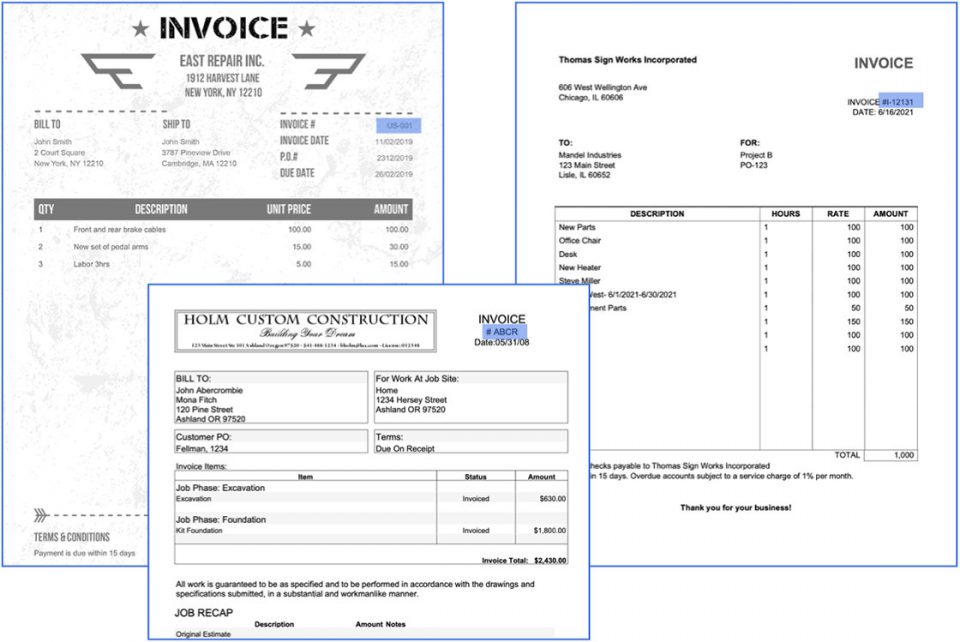
In an age where document-centric processes are central to business operations, the risk of fraud and manipulation looms large. Insurance fraud, for instance, is estimated to cost more than $308 billion annually, causing the average U.S. family between $400 and $700 per year in increased premiums1. And, with increased digitization, many changes have been deployed at the front end; however, back-end processes and systems remain untouched, which raises the question: have all changes been assessed for their vulnerability to fraud?
Similarly, return fraud is a growing concern for retailers, accounting for over 10% of total retail returns and costing U.S. retailers $761 billion2.
To combat these issues, Automation Hero has stepped up its game by introducing new capabilities for its intelligent document processing platform that supports intelligent document forensics. Our advanced AI-powered platform helps determine if documents involved in any process have been potentially manipulated, combating fraud and ensuring authenticity.
Types of document forgery
Document forgery encompasses a wide range of deceptive practices involving the manipulation of documents to deceive others into believing they are genuine. Some common types of document forgery include:
Signature forgery: Fraudsters alter or replicate signatures to misrepresent a document’s authenticity and authorization.
Altered content: Documents are tampered with to change critical information, such as dates, amounts, or terms.
Photocopy manipulation: Unauthorized alterations are made to photocopies of documents to present false information.
Common strategies in insurance fraud
Insurance fraud is a pervasive issue, and fraudsters adopt various strategies to deceive insurers. Some common strategies include:
False claims: Policyholders submit claims for damages or losses that never occurred.
Exaggerated claims: Legitimate losses are reported, but the claimant exaggerates the extent of damage or the value of lost items to receive a larger payout.
Challenges faced in fraud risk mitigation
While many insurers have dedicated fraud mitigation units, their effectiveness is often limited by various challenges:
Problems with data quality: Insurers face data quality issues, including errors, omissions, and inconsistencies across different systems, impacting analytical tools’ efficacy.
Limited use of analytical tools: The lack of advanced technology tools like predictive analytics and fraud detection systems hampers proactive and timely fraud detection.
Issues with data protection and privacy: Stringent data protection policies can lead to limited access to crucial data, making fraud risk mitigation a significant challenge.
Detecting document forgery with advanced AI capabilities
In the digital era, document forgery has become more sophisticated, making traditional detection methods insufficient. To combat this, leveraging advanced AI capabilities is crucial. Some cutting-edge techniques to detect document forgery include:
Image analysis: AI algorithms can scrutinize document images for irregularities, inconsistencies, and signs of tampering.
Pattern recognition: Advanced AI can identify unique patterns in signatures and handwriting, distinguishing between genuine and forged content.
Metadata examination: Analyzing metadata can unveil clues about a document’s origin and potential modifications.
Text analysis: AI-powered algorithms can detect copy-paste or other text alterations that may indicate forgery.
Automation Hero’s end-to-end platform seamlessly integrates document forensics, bolstering fraud risk mitigation. Some of the key methods utilized by the platform include:
EXIF and XMP data analysis: Metadata within document files provides vital information about post-scanning alterations and the software used for modifications.
Scan fingerprint analysis: Subtle patterns in document scans reveal manipulations that are barely visible to the human eye, exposing any anomalies.
Copy-paste detection: This method identifies instances of identical text, exposing fraudulent alterations made by copying and pasting text.
In a world riddled with document forgery and manipulation, Automation Hero’s intelligent document processing platform is a game-changer. By leveraging advanced AI capabilities for intelligent document forensics, they enable businesses to detect potential fraud and ensure the authenticity of documents within their processes. This helps combat insurance fraud, reducing its staggering annual costs, and protects retailers from return fraud, enhancing profitability.
You can also check out our video below, which provides a demo.
In the ever-evolving landscape of technology, businesses have consistently adapted to embrace transformative shifts that drive progress and competitiveness. From the transition from steam machines to electricity to the recent era of digital transformation, companies have continuously evolved to stay ahead of the curve. Now, as the era of Digital Transformation gives way to the era of Intelligent Transformation. Businesses are entering a critical phase – one that necessitates the adoption of an intelligent business operating system.
Digital transformation brought significant changes in how companies operated, leveraging digital technologies to streamline processes, enhance customer experiences, and drive growth. However, it became increasingly clear that digital transformation laid the groundwork to harness the real power – Artificial Intelligence (AI) – to drive operational efficiency, smarter decisions, and higher agility in fast-changing markets.
“Businesses are entering a critical phase – one that necessitates the adoption of an intelligent business operating system.”
Why “Intelligent Transformation” matters
The advent of AI brings forth a new wave of disruption, making it crucial for companies to prioritize intelligent transformation. AI has the potential to deliver unprecedented efficiency, productivity, and innovation across various industries. It empowers businesses to automate routine tasks, enhance customer experiences, optimize operations, and uncover hidden patterns and trends. By embracing AI, companies can gain a competitive edge, unlock new revenue streams, and propel themselves into the future.
The stages of adopting AI: A self-driving car metaphor
Photo by Brock Wegner (Unsplash)
To better understand the journey toward becoming an intelligent enterprise, we can draw parallels to the stages of self-driving cars, which have progressively evolved from human-controlled vehicles to fully autonomous machines. Similarly, companies can follow a phased approach to adopting AI:
Establish a solid foundation in digital transformation, including digital processes, data integration, and modern technologies.
Lay the groundwork for data-driven decision-making and a culture of innovation.
Stage 2: Assisted mode (AI-powered insights and automation):
Leverage AI and machine learning algorithms to gain actionable insights from data and drive automation.
Implement AI-powered analytics tools to enhance decision-making capabilities.
Stage 3: Semi-autonomous mode (intelligent automation and optimization):
Automate repetitive tasks and processes using AI technologies such as intelligent document processing (IDP).
Automate parts of business processes such as underwriting, claims processing, and supply chain management with “human in the loop” for final decision making.
Stage 4: Highly autonomous mode (AI-driven innovation and transformation):
Migrate manual processes to straight-through processing automations powered by AI.
Embrace advanced AI technologies such as advanced natural language processing to extract data trapped in documents to make smart decisions e.g. for underwriting.
Foster a culture of experimentation, encouraging employees to explore AI’s potential in all business units.
The need for an intelligent business operating system
Photo by Adi Goldstein (Unsplash)
As companies embark on their journey towards intelligent transformation, they often encounter various challenges, including the integration of AI models, scalability, fault tolerance, and the ability to process unstructured data efficiently without the need for sparse data science or IT resources. These challenges can hinder the adoption and implementation of AI at scale. An easy-to-use intelligent business operating system serves as a centralized platform that addresses these challenges.
Scaling AI and processing unstructured data
A key challenge for organizations is the ability to scale AI to reliably handle large volumes of data. The sheer amount of data generated by companies is staggering, with approximately 80% of it being unstructured in the form of documents. To fully leverage AI’s potential, companies need a platform that excels in processing unstructured data, custom model integration, data source integration, human into the loop and monitoring processes to handle processing data at scale and integrate the processing into critical business and decision processes.
Intelligent document processing for non-technical users
Intelligent document processing is a crucial capability that an intelligent business operating system must provide. It empowers non-technical users to easily extract information from documents, automate data entry, and streamline business processes. For example, in the banking and insurance industry, underwriting involves extensive document processing to assess risks and determine coverage. By leveraging intelligent document processing within the intelligent business operating system, underwriters can automate the extraction of relevant information from various documents, accelerating the underwriting process and improving win and loss rates.
IT monitoring and control for standardization
Implementing AI across diverse business units can be challenging without proper monitoring and governance mechanisms in place. An intelligent business operating system offers IT monitoring and control capabilities, allowing organizations to govern AI deployments, ensure compliance, and maintain standardization across the enterprise. This enables businesses to manage AI models, monitor performance, and enforce data security and privacy regulations effectively.
Fault tolerance for mission-critical business processes
In the age of intelligent transformation, businesses heavily rely on AI-powered systems for mission-critical processes. An intelligent business operating system must exhibit fault tolerance to ensure uninterrupted operations and prevent costly disruptions. By incorporating fault tolerance mechanisms, such as distributed computing and fault tolerance, self-healing, the system can withstand failures and maintain business continuity, even in high-stakes scenarios.
The transformative impact of an intelligent business operating system
By adopting an intelligent business operating system, organizations can unlock the full potential of AI and intelligent transformation. The system acts as a catalyst, enabling companies to implement AI quickly, efficiently, and in a standardized manner. Some transformative benefits include:
Enhanced efficiency and productivity: By automating repetitive tasks and streamlining document processing, companies can significantly improve operational efficiency and productivity.
Improved customer experience: Leveraging AI capabilities such as intelligent document processing enables organizations to provide faster and more accurate customer service, leading to enhanced customer experiences.
Accelerated decision-making: With advanced AI-powered analytics and insights, businesses can make data-driven decisions faster and more accurately, empowering teams across the organization.
Cost reduction and revenue growth: By automating processes, reducing errors, and optimizing operations, organizations can realize cost savings during inflation while exploring new revenue opportunities.
Future-proofing the organization: An intelligent business operating system ensures that companies are well-prepared to adapt to future technological advancements and market demands, staying ahead of the competition.
“As the era of Digital Transformation gives way to the era of Intelligent Transformation, it’s critical that businesses consider the importance of not just adopting AI but implementing an intelligent business operating system.”
This will provide the foundation for organizations to implement AI quickly, efficiently, and in a standardized manner across all business units for maximum ROI value and impact.
Speak with an expert — tell us about your specific use case.
Get a personalized demo — schedule a demo, and our Heroes will get in touch!
Companies are increasing their investments in AI due to the influence of ChatGPT. In this Fireside Chat, three industry experts led an in-depth discussion on the potential impact of AI on how we work and operate enterprises.
The panelists discussed the need to process unstructured data using enterprise-ready AI models, such as intelligent document processing (IDP), vs. popular generative AI tools known to compromise data security.
Jun 21, 2023 by Craig Woolard
If you are exploring enterprise-ready automation technologies for unstructured data, you will find this fireside chat a must-watch. The three participants from Automation Hero were:
You can read the full bios of the speakers at the end of the article, but in the meantime, here’s a quick summary recapping the discussion between these three industry veterans:
Automation Hero CEO Stefan Groschupf emphasized the increasing importance and availability of AI tools for businesses. The panelists discussed the widespread global use of artificial intelligence and highlighted recent advancements in AI models like Generative Pre-trained Transformers (commonly known as GPT).
They also explored the applications of AI in document processing and decision-making, highlighting the value of technology that can read and process documents with above-human accuracy, including the ability to “unlock” the business intelligence stuck in contracts, historical data, and more to improve business performance.
Concerns are raised about truthfulness and security with popular pre-trained large language models (LLMs), such as ChatGPT. The panelists stressed the need for organizations to adopt enterprise-ready AI tools quickly to stay competitive.
Watch the full recording below for more details.
Below, we captured the best questions that stood out and highlighted the key insights from the webinar:
Keep in touch
What are the potential economic impacts of AI?
Now that we can overcome nearly all of the obstacles that plagued the Big Data era through the revolutions in transformer technology, the time for large language models has arrived. According to Mark Stripp, ChatGPT, the fastest-growing app of all time, and Nvidia’s emergence as a trillion-dollar company are signs that AI is having its iPhone moment.
“ChatGPT, the fastest-growing app of all time, and Nvidia’s emergence as a trillion-dollar company are signs that AI is having its iPhone moment.”
Automation Hero CEO Stefan Groschupf set the scene by weighing in on AI’s potential business impacts over the next 20 years. According to a well known University of Oxford study, AI could eliminate 47% of US jobs over the next 20 years.
“47% of US jobs could be eliminated by AI over the next 20 years.”
On this, Stefan elaborated further, noting the potential impact AI will have on an organization’s ability to remain competitive in the future:
“I do really think that we are in an incredible time right now, and the landscape in how we do business will be disrupted within the next few years. I think that very, very quickly, the world will be divided by those that are using AI tools and those who don’t.”
Stefan highlighted the potential opportunities AI can bring to the table. According to the same Oxford University study:
“77% of global companies are either using or exploring AI in their businesses, and this is only going to accelerate.”
Stefan also called attention to the wide adoption of AI tools since ChatGPT’s 2022 introduction, noting that more business leaders are increasingly recognizing the importance of AI as a business strategy:
“45% of executives reported that the publicity of ChatGPT has prompted them to increase AI investments.”
Every time a new disruptive technology emerges, there are those who thrive and those who are disrupted. On this topic, Stefan reminded viewers of what happened when electricity eventually replaced the steam engine. By 1920, electricity had already replaced steam as the major source of automotive power, and in 1929, electric motors represented almost 78% of the total capacity for automotive machinery. Stefan emphasized the importance for business leaders to act by incorporating enterprise-ready AI technology now or be left behind:
“I really think that we really need to rethink how we run companies. The intelligent enterprise is a thing that needs to be achieved very quickly because, right now, AI is a competitive advantage, but very quickly, AI will be a competitive disadvantage to those who do not adopt it early enough…If you don’t have your AI story, your AI platform, and your AI use case together, you will be disrupted.”
What is the business value of technology that reads documents?
The panelists emphasized the value of technology that can read and process documents. When addressing this question, Stefan cited research conducted by the IDC, raising an interesting data point about the intelligence trapped inside business documents:
“By 2025, worldwide data will exceed 175 zettabytes. With most of this information locked inside emails, texts, PDFs, and scanned documents, it poses a real barrier to automation and digital transformation.”
IDC, “Intelligent Document Processing Demonstrates How AI Can Make a Practical Difference to Business Right Now”
The panel also discussed how the ability to “unlock” the hidden value in contracts and historical data can improve executive decision-making and business performance. However, without the help of enterprise-ready AI, the data we need to process is growing rapidly, causing significant challenges for organizations worldwide:
“The data we need to process is only getting bigger…the problem really here…is that 80 percent of your enterprise data is unstructured, and that is the massive treasure chest.”
Enterprise-ready AI that understands documents at the semantic level is needed to automate critical document-centric processes. Stefan explained how enterprise-ready intelligent document processing (IDP) technology helps organizations realize the full potential of their data:
“If you think about all your business intelligence [assets]…your ERP investments, your ETL data integration data, and your warehouse investments…all of that is only scratching the surface. You didn’t even get to the core yet because that’s only 20 percent structured data. So the big question is, really, how can you quickly turn these [unstructured data] assets that you have into structured data, but then what kind of business use cases are unlocked around that?”
What exactly is generative AI?
Automation Hero’s Chief Product Officer, Max Michel, gave a high-level definition of generative AI.
“Generative AI is basically the technology behind the tools that everybody is talking about right now, so the Midjourneys and the ChatGPTs that everybody wants to use. It takes an input, for instance, a text or a prompt…and then it generates the output, so it generates a new image…or an explanation, or a poem, or whatever you ask it to do. The special thing is…it can also do things in different styles, so you can ask it for a portrait to be very photorealistic or very abstract, and that’s basically up to the user…but there’s always an input, and then an output is generated based on what the AI has learned before.”
Max also explained how generative AI tools, which generate outputs based on inputs, contrast with discriminative AI, which provides specific answers based on given parameters:
“There’s also this other way to work with AI, and this would be the discriminative AI approach. With discriminative AI, you basically give some guidelines, so it can only group these few specific classifications, or it can only give you the answer based on the input that you gave it…this is really what you want to do in an enterprise setting…so discriminative AI is safer, but where I see the real power of generative AI is in creative work, of course.”
What is a large language model?
Max explained that language models are a way to make languages computable for machines to understand. On the topic of human and computer interactions, he says:
“In general, technology is really good at stuff that we are bad at, like multiplying big numbers, but technology is really bad at things that are easy for us, such as talking, picking up a glass of water, and stuff like that. This is really difficult for a robotic arm to do, so basically, all of the AI researchers are really focusing on closing this gap.”
To close the gap so that technology can become even better at performing tasks that humans traditionally excel at, Max explained the concept of large language models further:
“Large language models are the bigger version of it, so if the language model has over one billion parameters, we call it a ‘large language model.’ It can learn not only the syntax and grammar of language but also the semantic relationship between words, and especially the very large language models can go further than that and learn concepts about the world and how to work with longer inputs, so yeah, it’s basically a tool to make language computable.”
What does “GPT” stand for?
For the uninitiated, Mark Stripp asked Max to explain what “GPT” in ChatGPT means:
“Generative Pre-trained Transformers. Transformers are basically the technology for an AI to keep context over a long string of words. That was a big challenge before. Generative AI models that generate output based on text input and pre-trainers meant that ChatGPT was pre-trained on web-scale data to learn concepts about the world.”
Stefan provided an interesting metaphor on the topic, describing AI research as “simulating the human brain”:
“The human brain has neurons that fire when they get inputs and we’re just trying to find a mathematical representation for that…there are a lot of learnings that come from the AI research for understanding how the human brain works, but technically we are trying to simulate mathematically how the brain works.”
What are AI “hallucinations”?
Mark Stripp asked Max to explain the concept of AI hallucinations to the audience:
“When we think about hallucinations in general, it’s always your brain or your neural network creating a different output than the real world, so there’s a difference between the real world and [the output] you’re seeing, so that’s how I would define hallucination.”
What is the issue with generative AI for documents?
“I think it’s really interesting and creative work if the AI can come up with really creative things and hallucinate really great images and stuff like that, but for an enterprise setting where you want to know the truth about what’s actually inside your document, you don’t want the AI to make things up. This is a big danger that I saw very early on with generative text summarization models and stuff like that.”
Max described his own research into generative AI models and their limitations:
“For instance, I was working with a legal text generator that was trained on court orders to generate summaries of court orders, and I just tried it out on contracts, and it was always trying to create a victim and somebody who did something wrong, even though it was just a contract. Of course, really big generative AI’s have some guardrails about that, but there’s still the danger that the generative AI can hallucinate such information on top of what is actually in the document or in the input that you give it.”
What is the relationship between automation and AI, specifically with documents?
Responding to Mark’s question about the relationship between AI and automation, Stefan said:
“Automation is the killer use case for AI and Enterprises. I think the AI use cases in the consumer world are very clear, and that’s challenging Google’s dominance in the information retrieval arena. But clearly, the automation use case is the golden goose for AI in enterprises. If we think about how an enterprise works, there’s an opportunity here to really get what every enterprise strives for: economic efficiency with low-cost, high-efficiency rates.”
Stefan described self-driving cars and daily life in Silicon Valley as examples of autonomous business processes:
“In the Bay Area, San Francisco has given licenses to multiple self-driving car companies. We do see self-driving cars every single day; it’s creepy; nobody’s in there, but they are real. When the error rate is so low that we can truly license them in global cities, it’s not a question of whether we will have self-driving cars or not. So if we have self-driving cars, we will also have self-driving companies or business processes, and we will have them very quickly.”
When it comes to documents and the need for AI to streamline efficient document-centric business processes, Stefan said:
“Companies run on documents. If we’re talking about autonomous companies, companies interact with other entities—either other companies or their customers—through documents. So, if we think about self-driving businesses or business processes, we need to think about how we get there and what it needs.”
On what companies need, Stefan emphasized that companies need an operating system:
“We need an operating system for autonomous business processes, and we need it really quickly. If you want to peel that onion further, you need an all-tolerant platform that’s highly scalable and self-healing. One that is optimized for AI workloads that are quite different compared to traditional ETL or data warehousing workloads, with different AI capabilities available for less technical users to point and click. The key here is to quickly find technology that is purpose-built for these AI workloads, has these AI capabilities built-in, and allows people to almost curate business processes to get as close—and every day a little closer—to that autonomous business process. Those that do this will significantly outcompete the competition at scale, and with lower costs and higher customer satisfaction.”
Finally, as someone who discusses AI-driven automation technology daily with business leaders worldwide, Mark Stripp offers some concluding thoughts on AI’s business value:
“We’re seeing those impacts coming in from the changing nature of the workforce to some of the bigger trends out there that they need to address to handle productivity and so on. This all stems from the same underlying need: to make better access to information easier so you can do something with it.”
What should we learn from this AI moment?
Circling back to the original point on the potential economic impacts of AI, Stefan weighed in on a controversial topic with a sense of optimism:
“I’m not sure all jobs will be gone. If we look into the history books, there will be a redistribution of jobs. So there will certainly be a lot of jobs that will change in that sense. So should people on the call be afraid to lose their job? Well, maybe not a job, but maybe the job. The information worker will either scale up very quickly and become a person that is able to use a new generation of tools such as AI, or you might be pushed out or not receive that salary raise that you were looking for. That will be the reality—the reality is always that there will be people who can adapt to the new technology, and they will be more valuable to organizations. It will be people who once said, ‘Ah, who needs computers? I can do this all on a piece of paper much faster than typing it in this computer thing.’ We saw how that went, right?”
Unlock the intelligence in your documents with our AI-driven automation today
Regardless of the scale of your enterprise or use case, we can help you get there. Here are a few ways to get started:
Speak with an expert — tell us about your specific use case.
Get a personalized demo — schedule a demo, and our Heroes will get in touch!
Keep in touch
Who are the AI experts?
Stefan Groschupf, CEO, Automation Hero
When he started his previous company, Datameer, Stefan Groschupf saw firsthand the challenges financial institutions confronted as they navigated “unstructured” data. As founder and CEO of Automation Hero, Stefan focuses his data analytics experience on processing the diversity of data hiding in unstructured documents faster than ever using the most advanced and complete IDP platform.
Max Michel, Chief Product Officer, Automation Hero
As Chief Product Officer, Max Michel is focused on scaling the product organization by further delivering world-class innovations that address and delight customer needs while aligning with the company’s strategic goals. He also leads research and development in AI, machine learning, and data science. Previously, he was a data scientist at Datameer, where he built smart AI tools for big data analytics and helped the company leverage the power of machine learning to optimize sales operations.
He is a Bauhaus alumnus and holds a master’s degree in computer science and media. He spent four years publishing research on natural language processing and information retrieval.
Mark Stripp, Head of Global Sales, Automation Hero
As Head of Global Sales at Automation Hero, Mark Stripp develops sales teams across all regions and leads our GTM strategy, worldwide. He is passionate about technology and has an eye for strategies that help organizations accelerate their digital transformations. Mark brings nearly two decades of experience in multiple industries across the UK and North America.
Mark started his career at Automation Hero as Regional Sales Director of EMEA following a year of substantial growth and key wins, Mark is now leading the global go-to-market strategy. Prior to Automation Hero, Mark helped strategic clients in multiple sectors achieve their goals and digitally transform through optimizing IoT, business process automation, and integration capabilities.
In today’s digital age, data has become the lifeblood of modern business. Access to quality data is driving innovation, improving insight, and enhancing decision-making within the most agile organizations.
As more global enterprises harvest the vast amounts of data available, it’s crucial to understand the different types of data and the documents that store it.
Jun 21, 2023 by Craig Woolard
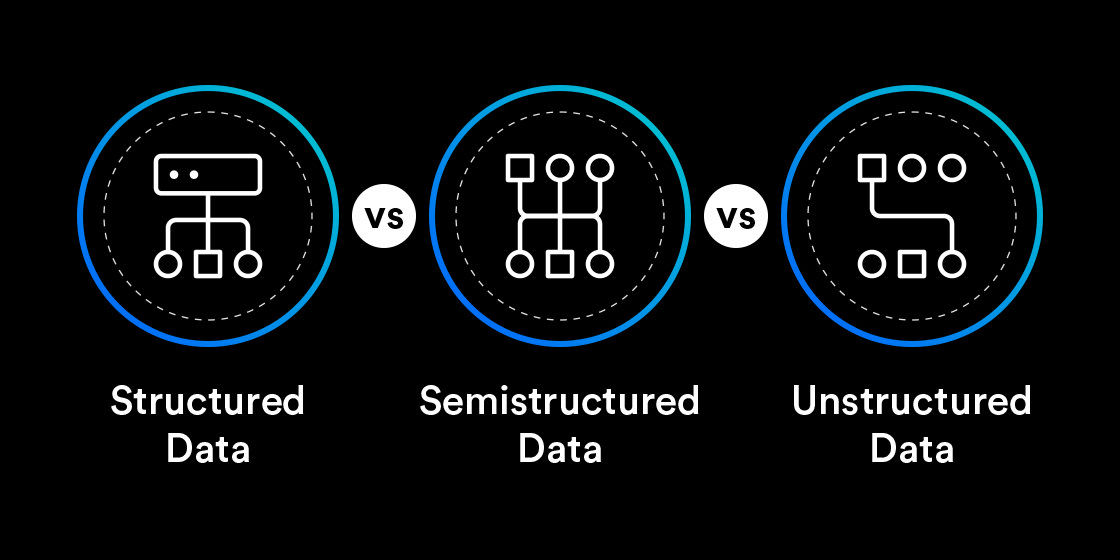
Structured, semi-structured, and unstructured data each possess distinct characteristics that impact how businesses operate. Each type can also impact decision-making differently, so having a deeper understanding of the nuances and implications is critical for modern business leaders to grasp.
This blog will explore the distinctions between structured, semi-structured, and unstructured data. We will explore each data type’s characteristics, challenges, and unique opportunities for businesses operating in the data-driven era. Finally, we will discuss how enterprises can use modern AI-driven intelligent document processing (IDP) to navigate the growth of unstructured data and “unlock” the intelligence “stuck” in documents.
Keep in touch
Structured data vs. semi-structured data vs. unstructured data
In the world of big data, information can be grouped into two distinct categories: “structured” and “less structured.” Structured data is information that follows predefined “rules” or “guidelines,” such as data points organized into a database. “Less structured” information is essentially everything else.
“Semi-structured” and “unstructured” data is information that can be grouped into the category of “less structured.” When information is locked away in documents, for example, these terms can often be confusing because all documents (structured, semi-structured, and unstructured) are generally considered “unstructured data.” Having said that, structured data (as in data in a database) is not considered “unstructured” data.
Unstructured data requires processing with AI before you can store or query its contents in structured formats like a database table or JSON. However, the key understanding to have is that “data,” no matter where it is stored, is your organization’s most valuable asset. There is valuable information in customer emails, social media posts, chat transcripts, competitor websites, invoices, contracts, and many other types of business documents. But the value within remains unobtainable if you can’t unlock the intelligence trapped in document-centric processes.
If you can’t unlock the intelligence trapped in document-centric processes, then the value within remains unobtainable.
Critical data points in business documents—whether “stuck” in structured, semi-structured, or unstructured documents—are the valuable intelligence your organization must “unlock.” Eliminating the “friction” in the way of potential business intelligence is the key to unlocking enhanced employee and stakeholder decision-making. In the next section, we’ll take a closer look at the differences between structured, semi-structured, and unstructured data types and investigate some common business use cases for each one.
The goal of intelligent document processing is to convert structured, semi-structured, and unstructured documents into structured data. Therefore, we will begin with the most accessible data type: structured data. This will deepen your understanding of the unique challenges and opportunities for each data type and the documents that store them.
What is structured data?
For all practical purposes, everything people try to extract from documents is “structured data.”
Structured data is any information organized into a format that’s easy for traditional machines to find. Documents with structured data typically follow a “fixed” layout and usually contain fields with text, values, and other organized data—such as fixed forms, spreadsheets, or databases.
Examples of documents with structured data
Structured data typically includes text and other values stored in tables or databases. For a comprehensive list of the most common examples of structured data in business documents, check out the table below:
Structured data
Relational database tables
Tables with predefined columns and rows representing attributes or fields containing individual data, such as text, numerical values, or code.
Spreadsheets (e.g., Excel)
Machine-printed text and numerical values are organized into cells, rows, and columns for easy sorting, filtering, and analysis.
SQL tables
Structured Query Language (SQL) tables are used in relational databases to organize and store structured data, enabling efficient querying and manipulation.
ERP system data
Structured data is captured and stored in Enterprise Resource Planning (ERP) systems and covers various business processes such as sales, inventory, finance, and human resources.
Inventory management systems
Data captured in Inventory Management Systems include product codes, quantities, prices, and physical warehouse locations that are structured and organized for efficient tracking and management of inventory.
Financial transaction records
Structured financial data that includes dates, amounts, account numbers, and transaction types, which are essential for financial analysis and reporting.
Advantages of structured data
The biggest advantage of documents with structured layouts is that the information is already designed and optimized for quick and easy processing by computer systems. This also makesthe data easily searchable with traditional “rules-based” automation tools.
Because the data is highly organized and “structured,” it’s easier for legacy automation software like robotic process automation (RPA) to find critical data points. This also makes it easier for widely accessible but outdated technologies, such as legacy Optical Character Recognition (OCR), to scan and capture the data faster than manual human effort.
Simply put, structured documents require less advanced technology, which can benefit organizations that are reliant on older heritage document processes and legacy data systems.
However, these are not the only organizations that reap the benefits. Because structured documents are easier to process, nearly every industry can benefit from the value they store.
Here are some more strategic advantages of structured data:
Structured data enables efficient data retrieval and querying.
Structured data is easy to store, organize, and access for further processing.
Structured data facilitates consistency and accuracy to ensure good data quality.
What are the limits of structured data?
Researchers at the IDC discovered that more than half of the documents enterprises process have structured layouts. However, most organizations cannot rely on structured data alone.
For example, what about handwriting? Fixed forms and other structured documents typically have additional fields reserved for signatures and handwritten checkmarks.
These documents may be easier for traditional automation tools to process, but they provide little flexibility. Plus, if they do contain unstructured elements, such as handwriting, then traditional “rules-based” technologies will struggle, which leads to critical information being missing.
When dealing with modern omnichannel data sources that lack a well-defined structure, such as social media, email, or even handwritten content, it’s crucial to understand the limits of traditional rules-based extraction techniques.
Understanding these limitations can help you make a more informed decision about the strategies that unlock the business value in structured and less structured documents.
What is semi-structured data?
Semi-structured data is information that does not exist in a structured or fixed format per se, such as a database or spreadsheet, but may have some attributes that make it easy to find. Some examples include XML documents, JSON files, and NoSQL databases. It’s also worth mentioning that there are no documents that contain “semi-structured data,” but there are plenty of examples of semi-structured documents.
Examples of documents with semi-structured data
When we talk about “semi-structured” in the context of intelligent document processing, we are referring to documents where the same pieces of information are present across a variable layout.
Documents with semi-structured data conform to a template, but the information layout is flexible and likely varies from document to document. In the context of IDP, we are not talking about documents that contain XML or JSON data. We are talking about business documents made up of plain text, tables, and other elements that are based on evolving templates.
Since semi-structured documents do not have “fixed” or standardized layouts, organizations handling them may need help predicting where the information of interest is located. Examples of semi-structured documents include invoices, purchase orders, bill-of-materials (BOM), receipts, and loan applications.
Check out the table below for a comprehensive list of semi-structured data examples:
NoSQL Databases
Flexible, schema-less data storage. Accommodates semi-structured or unstructured data. NoSQL databases, such as MongoDB, Cassandra, and CouchDB, store data in a flexible, schema-less format. This means that the data in NoSQL databases can have varying structures or fields across different documents or records. Semi-structured data in NoSQL databases can include diverse datasets such as user profiles, product catalogs, sensor data, social media feeds, and unstructured text documents.
JSON (JavaScript Object Notation) is a lightweight data-interchange format. It is commonly used for storing and transmitting structured data, making it suitable for representing complex objects, arrays, and various data types. It is widely used in web APIs, configuration files, and data storage. Examples of semi-structured data in JSON include user profiles, product catalogs, and social media posts.
XML (eXtensible Markup Language) is a markup language used for storing and transporting structured data. It uses tags to define elements and attributes to provide additional information about those elements. XML is versatile and allows for custom data structures. Semi-structured data in XML can include documents such as invoices, scientific data, and electronic health records. It is widely used for data interchange, configuration files, and data representation in various domains.
HTML (Hypertext Markup Language) is the standard markup language for creating web pages. HTML documents consist of tags and attributes that structure and present content on the web. HTML is primarily used for defining the structure and layout of web pages, the content within HTML documents can vary in structure, formatting, and data representation. Examples of semi-structured data in HTML include web scraping results, online articles, blog posts, and forum threads.
Advantages of semi-structured data
Semi-structured data bridges the gap between structured and unstructured data types. Understanding the distinct advantages can help business leaders appreciate the value of incorporating semi-structured data into their document processing workflows.
Here are some of the key benefits of semi-structured data:
1. Data analysis
Semi-structured data often contains more contextual information than traditional structured data. Examples of this include metadata or tags that provide additional context that can improve the accuracy and relevance of data analysis.
2. Flexibility
Semi-structured data is more flexible in data storage and data management scenarios compared to rigidly structured documents. Since semi-structured documents do not follow a strict, predefined template, incorporating new data types into existing databases or data pipelines is easier.
3. Scalability
Semi-structured data is more scalable than structured data. Semi-structured data can be stored and processed using distributed computing systems in a variety of locations, such as existing on-prem databases, data lakes, and cloud storage. This flexibility and scalability enable greater agility to handle massive amounts of data.
4. Integration
Semi-structured data easily integrates with other types of data, such as unstructured data, making it faster to combine and compare data from multiple sources.
Challenges of semi-structured data
While semi-structured data offers significant advantages, it also presents unique challenges that business leaders must consider when working with diverse data types. Understanding these challenges is essential to effectively managing and leveraging the potential of this data type.
Here are the key challenges with semi-structured data:
1. Data extraction and integration
Semi-structured data can be more challenging to extract and integrate than structured data. It often requires specialized tools such as intelligent document processing (IDP) with custom Context-aware OCR data extraction data extraction processes to capture the relevant information from various formats and sources. Because semi-structured documents have varying templates, their improved flexibility can make data integration more complex. Additional efforts and sophisticated AI tools are needed to harmonize and align the different data elements.
2. Data quality and consistency
Ensuring data quality is much more demanding in semi-structured data environments. The lack of strict data models and schemas can lead to inconsistencies, duplications, and discrepancies that compromise the quality of the data. Cleaning and standardizing semi-structured data requires either extra attention from humans or sophisticated AI technology to address variations in data formats, missing fields, and inconsistent datasets.
What is unstructured data?
Unstructured data is information that is not organized into any particular format and may be completely “free-form.” Examples of unstructured data might include photos, videos, emails, books, social media posts, health records, and legal contracts.
Examples of documents with unstructured data
Unstructured documents are “unfixed” and do not follow a templated design, a fixed layout, or “rules.”
Gartner defines unstructured data as machine-printed or handwritten content lacking predefined rules or guidelines that computers traditionally use to identify. Unstructured data could be free-form text, such as the body of an email, or non-textual, such as a photo containing handwriting—but it could also exist in a non-relational database—such as NoSQL.
The table below lists some of the most common examples of unstructured data in business documents:
Data Type
Handwritten text or documents that lack a predefined structure. Unstructured data includes personal notes, letters, signatures, and any other text produced by hand. Examples: handwritten letters, personal diaries, meeting minutes, and signatures.
Images, photographs, or graphics that contain handwriting, machine-printed text or important symbols. These data points are unstructured as they don’t adhere to a predefined format. Examples: logos, illustrations, and digital photos of handwritten notes or scanned images of business documents.
Text Documents
Unstructured textual data such as articles, books, emails, and reports. This data lacks a predefined structure and can vary in length, language, and formatting. Examples: PDF news articles, research papers saved as a Word document, and email messages.
Free-form Notes
Unstructured notes, memos, or annotations created by individuals. They can contain text, diagrams, sketches, or any other form of personal record-keeping. Examples: personal journals, meeting notes, brainstorming sessions.
Speech Transcripts
Transcriptions of spoken language, such as interview recordings or speech-to-text conversions. These data points capture spoken words, including dialogues, speeches, and conversations. Examples: interview transcripts, meeting minutes, voice recordings, and podcast episodes.
Unstructured email messages and their attachments. Emails can contain text, images, and various file attachments. They often exhibit varying structures and content types. Examples: personal emails, business correspondence, newsletters.
Social Media Posts
Unstructured data shared on social media platforms, encompassing text, images, videos, or a combination thereof. It includes user-generated content, hashtags, and engagement metrics. Examples: tweets, Facebook posts, Instagram stories.
Competitor Websites
Websites contain both structured and unstructured data. While the overall structure, using HTML and CSS, is semi-structured, the unstructured data within websites includes text content, tables, images, videos, and other media elements. Examples: web pages, blog sites, and online forums. Unstructured data extracted from websites using web scraping techniques includes product listings, customer reviews, and news headlines.
Sensor Data
Unstructured data captured by sensors or IoT devices, including raw measurements, signals, or streams of data. It often represents real-world phenomena and lacks a predefined structure. Examples: temperature readings, accelerometer data, air quality measurements.
Advantages of unstructured data
Understanding the distinct advantages of unstructured data can help business leaders “unlock” the business value stuck in unconventional documents.
Here are some of the key advantages you get when you leverage unstructured data:
1. Unlocked business value
You have a lot of unstructured data. Unstructured data is a business’s most valuable asset. It is the raw conceptual material and intellectual property that are a goldmine of untapped information for advanced analytics. The research estimates that unstructured data accounts for a whopping 80-90% of all new enterprise data. Yet only 18% of businesses are actually able to take advantage of it. The other 82% need help unlocking the business intelligence in this valuable resource.
2. Intent and sentiment analysis
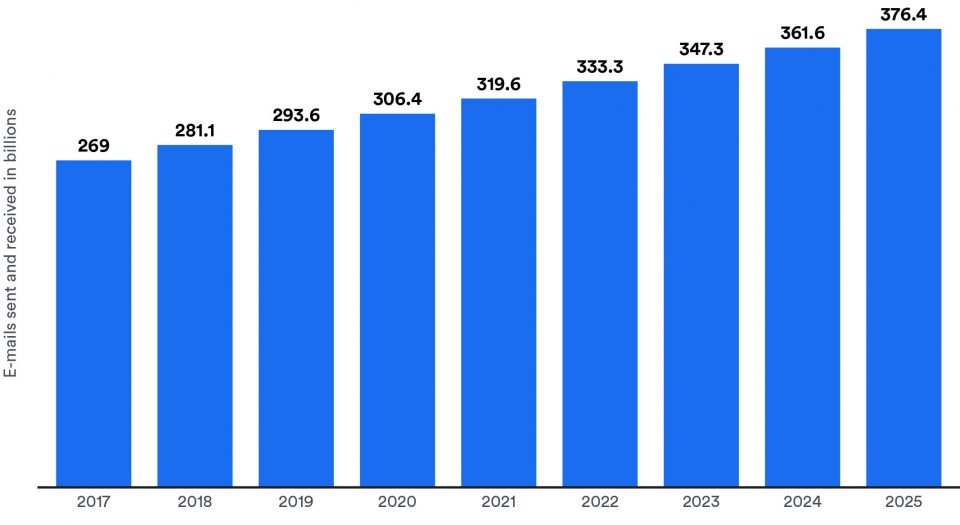
Unstructured data opens the door to advanced analytics techniques such as sentiment and intent analysis. For example, customers use email for all kinds of requests, and sometimes they have more than one request. It’s interesting to know that every 24 hours, there are more than 3 billion business emails sent and received worldwide. Intent classification detects customer intent in emails, and then it can automatically categorize emails based on intent to help automate email processing and triaging.
Sentiment analysis provides insights into customer opinions and emotions, allowing organizations to gauge brand sentiment, improve customer satisfaction, and address issues promptly.
3. A big competitive advantage
By leveraging advanced analytics techniques, businesses are able to uncover patterns, trends, and relationships that might go unnoticed. These invaluable insights enable organizations to make data-driven decisions that give them a competitive edge.
Challenges with unstructured data
Your unstructured data offers the most significant competitive advantages of all the data types. But it also presents the widest set of challenges to enterprise organizations. Understanding the challenges is essential to unlocking the business value stuck inside unstructured documents.
Here are the key challenges involved with unlocking unstructured data:
1. Data extraction
Since the information in unstructured documents does not follow a predictable pattern, their contents are entirely “hidden” from traditional data extraction methods.
2. Handwriting recognition
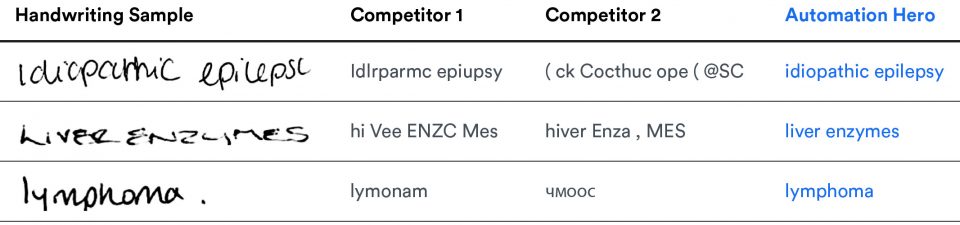
Standalone Optical Character Recognition (OCR) is a ‘rules-based” technology that recognizes machine-printed letters, numbers, symbols, and even some handwriting. However, traditional OCR technology still struggles to accurately process handwriting. If your OCR cannot “see” unstructured handwritten signatures, tables, and other nuances accurately, someone must manually review the documents to extract the information. This stops your automation.
3. Data accuracy and quality
OCR best suits high-quality scanned images with higher contrasts between texts and backgrounds. But if the text is splotchy or the scan is low-quality, OCR’s accuracy drops dramatically. Even with the best scanners and the best document quality, you only get 60% accuracy with traditional OCRat best. For enterprises looking to improve data processing speed, accuracy, and agility in unstable digital markets, rules-based approaches simply don’t cut it.
4. Data privacy and security
Unstructured data is the lifeblood of your business. It should never appear on public platforms. Proprietary data, such as chat transcripts, emails, multimedia content, patent applications, legal contracts, and even programming languages, can contain sensitive information with valuable intellectual property. Protecting data from unauthorized access, implementing proper encryption methods, and complying with relevant data protection regulations are essential.
5. Scalable storage concerns
Unstructured data, typically large in volume and diverse in formats, presents challenges in storing, processing, and retrieving the data efficiently. Traditional storage systems and analytical tools may need help to handle the scale and complexity of unstructured data, requiring businesses to invest in scalable storage solutions and advanced data processing technologies.
6. Integration challenges
Unstructured data often need more standardized formats and schemas, which may make integration with existing systems more challenging. Integrating unstructured data with structured or semi-structured data sources requires careful data mapping, transformation, and consolidation techniques to ensure seamless data flow and compatibility across systems.
Conclusion
Structured data facilitates efficient analysis and supports business intelligence by enabling organizations to derive crucial insights quickly.
Semi-structured data requires a more nuanced approach since businesses need to extract relevant information from various formats and sources before they can uncover potential insights.
Unstructured data presents both a challenge and an opportunity. Unlocking its potential provides the business intelligence that will give agile enterprises a real competitive advantage.
Structured data facilitates efficient analysis and supports business intelligence by enabling organizations to derive crucial insights quickly.
But how can enterprises truly know whether or not data has potential value if there’s too much “friction” to unlock it? The answer is Intelligent Document Processing (IDP).
Transform your unstructured documents into structured data with our AI-driven automation platform today
Learn how we helped Markerstudy reduce its claims processing time by 40%. Additionally, learn how we reduced total claim processing time by 80% for another multinational insurance partner — cutting down manual tasks from 10 minutes to just two minutes per claim.
Speak with an expert — tell us about your specific use case.
Get a personalized demo — schedule a demo, and our Heroes will get in touch!
By 2025, data-sphere experts forecast that worldwide data will exceed 175 zettabytes—and this trend is growing so fast that our global storage capacity cannot physically keep up with the payload.
This raises important questions: how much of this information should we store and save as “data”? But most importantly, how do enterprises “know” what data has value?
Jun 14, 2023 by Craig Woolard
In today’s digital age, unstructured data has become the lifeblood of modern business. Access to quality data is driving innovation, improving insights, and enhancing decision-making within the most agile organizations. But with the rise of unstructured data, modern organizations are faced with a new challenge: how to make sense of this massive data deluge.
This blog will answer the question, “What is unstructured data?” Then, we will examine the global challenges that modern enterprises are facing as they navigate the rapid growth of unstructured data and its unique opportunities.
Finally, we will discuss how data-driven enterprises can use next-gen AI-driven intelligent document processing (IDP) to “unlock” the business intelligence stuck in unstructured documents.
Keep in touch
What is unstructured data?
Gartner defines the data in unstructured documents as machine-printed or handwritten content lacking predefined “rules” or guidelines. Traditionally, computers have had to be programmed to follow rules in order to locate information of interest in structured databases and related formats.
However, unstructured data that lacks predefined rules is much more common in the real world. Unstructured data could be free-form text, such as the body of an email, or non-textual, such as a photo containing handwriting.
Unstructured data is also challenging to capture. Traditional “rules-based” approaches, such as the ones used in standalone Optical Character Recognition (OCR) and Robotic Process Automation (RPA), are limited when it comes to extracting data that lacks structure
For example, RPA “robots” are limited in their ability to learn from experience; the bots can only do what they are programmed to do and do not improve or adapt over time without human intervention.
Consequently, since legacy technologies like RPA can only handle rules-based, repetitive tasks, they struggle to extract information from unstructured documents, which leads to critical information being missing.
The global challenges of unstructured data
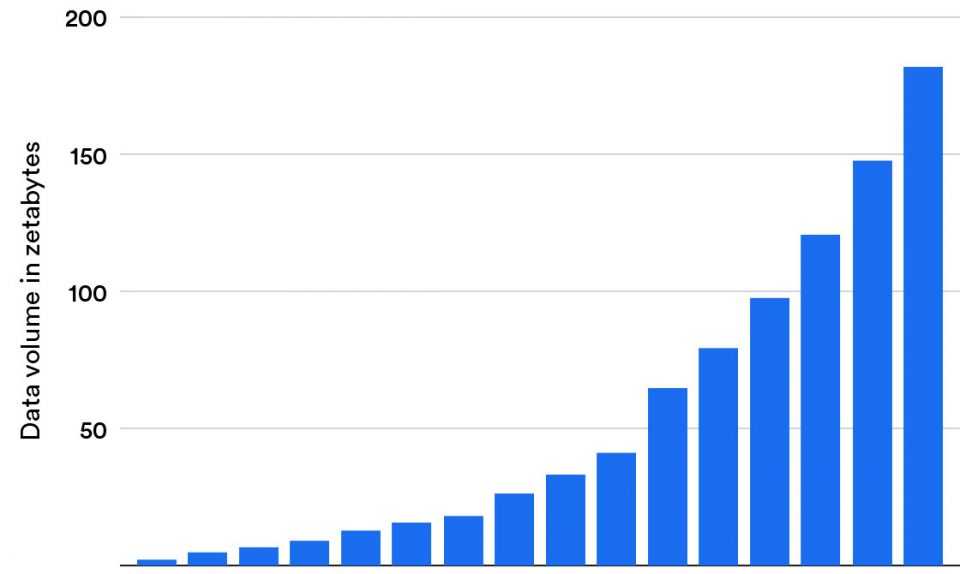
The IDC Global DataSphere analyzes global data trends and reports on the quantity of data created worldwide. It also looks at how much data is stored across various storage media. In 2020, IDC researchers determined that the world produced more than 64 zettabytes of data.
Since then, this global uptick in growth has skyrocketed so quickly that the amount of data we produce over the next five years is projected to outpace our global capacity to store it, meaning we save less of the data we create each year.
In 2020, IDC researchers determined that the world produced more than 64 zettabytes of data.
By 2025, data-sphere experts have forecast that worldwide data will exceed 175 zettabytes. This trend is growing so fast that our global storage capacity, physically, cannot keep up with the payload. In this current reality, it raises an important question: how much of this information should we store and save as “data”?
…this global uptick in growth has skyrocketed so quickly that the amount of data we produce over the next five years is projected to outpace our global capacity to store it, meaning we save less of the data we create each year.
Since the cloud increasingly determines how we store, consume, and engage with information, the rate at which enterprises produce data is double that of consumers. While not all data created is mission-critical or needs to be saved, how can enterprises determine what data has value?
Understanding the growth of unstructured data within organizations
Big data experts estimate that unstructured data accounts for 90% of all new enterprise data. This trend reveals that unstructured data is growing 55-65% every year—a rate three times faster than the growth of structured data. Yet only 18% of organizations are taking advantage of unstructured information.
The reality is that the bulk of an organization’s data today is “unstructured.” That’s because modern customer information comes in many forms:
emails
text messages
social media posts
PDFs
handwritten scanned documents, and more.
Without a method to mine valuable data from these documents, an organization is simply unable to adapt to changing conditions. So what about the other 82%? These organizations lack the technology to “unlock” business intelligence stuck in their most valuable resource: unstructured documents.
If you can’t unlock the business intelligence trapped in legacy document processes, then the value within remains unobtainable.
The capability to unlock valuable intelligence is severely blocked within organizations with highly regulated document-centric processes, such as banking institutions. Older heritage document processes are a real barrier to digital transformation. If you can’t unlock the business intelligence trapped in legacy document processes, then the value within remains unobtainable.
So what can be done about it?
How IDP overcomes the challenges of unstructured data
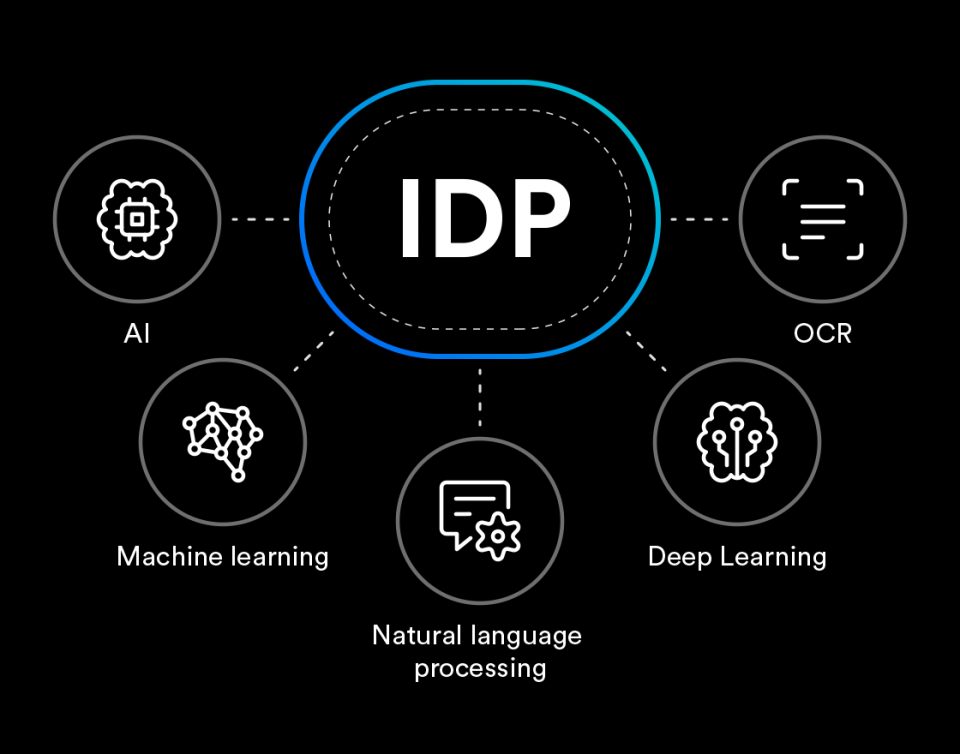
Intelligent document processing (IDP) is a type of business workflow automation that uses next-gen artificial intelligence (AI), machine learning (ML), and natural language processing (NLP) to read documents like humans.
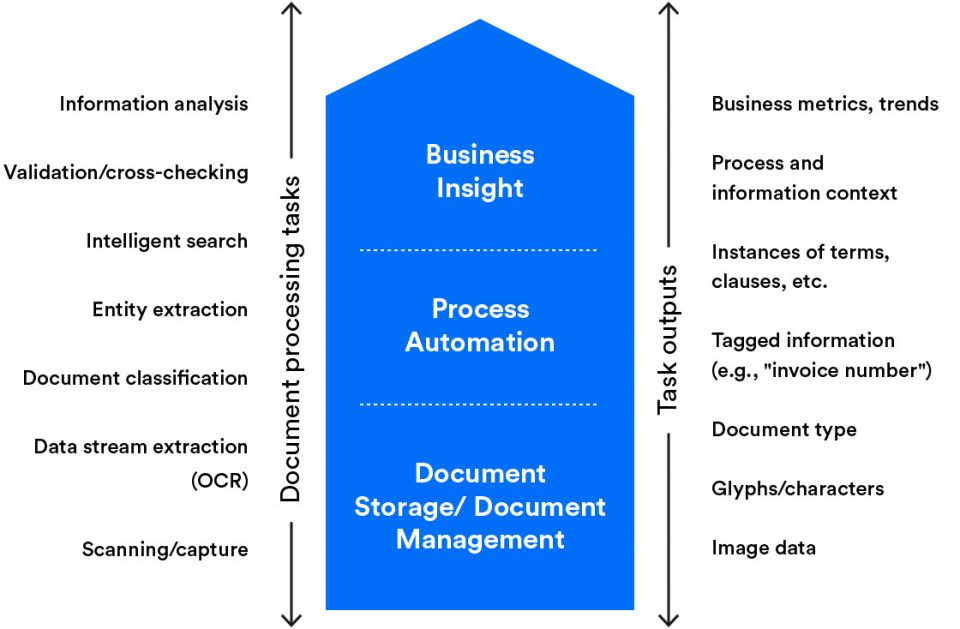
IDP brings modern AI/cognitive capabilities to workflow automation software, enabling organizations to reduce errors and improve the accuracy of their data. Many tasks, including data entry, automated document classification, and data extraction, can be successfully automated with IDP.
The main goal of IDP is to transform your organization’s semi-structured and unstructured documents into useful, structured data.
IDP can also integrate data with existing SAPs, ERPs, accounting software, databases, and legacy RPA tools—creating the most advanced solution for the global challenges of rapidly growing unstructured data.
The main goal of IDP is to transform your organization’s semi-structured and unstructured documents into useful, structured data. No matter what documents your organization handles, IDP scans content and interprets context—along with the author’s intent—to streamline the entire document workflow with above-human accuracy.
Since IDP aims to convert unstructured and semi-structured documents into structured data, intelligent document processing offers organizations the modern AI-driven automation technology they need to unlock the intelligence stuck inside any document. This leads to a wide range of business use cases, including invoice processing, contract automation, and automated email classification and processing systems.
Organizations that leverage next-gen IDP technology to transform unstructured data into accessible data that is easy to use will come with many competitive advantages—but the immediate benefits are:
faster processing speeds
more efficient business processes
streamlined document management workflows
improved data quality,
enhanced decision-making
For a complete understanding of intelligent document processing and the use cases that can help your organization, check out our Guide to Intelligent Document Processing for more.
Conclusion
Unstructured data presents both a challenge and an opportunity. Unlocking its potential provides the business intelligence that will give agile enterprises a real competitive advantage. But how can enterprises know whether or not data has potential value if there’s too much “friction” to unlock it? The answer is Intelligent Document Processing (IDP).
Transform unstructured data into business value with our AI-driven automation platform today
Learn how we helped Markerstudy reduce its claims processing time by 40%. Additionally, learn how we reduced total claim processing time by 80% for another multinational insurance partner — cutting down manual tasks from 10 minutes to just two minutes per claim.
Speak with an expert — tell us about your specific use case.
Get a personalized demo — schedule a demo, and our Heroes will get in touch!
Over the years, many organizations have been navigating the automation landscape, seeking to leverage its potential to drive efficiency and gain a competitive advantage.
However, this relies on more than just adopting software tools; it also depends on the strategic orchestration of technologies to meet business objectives. This necessitates a well-considered and structured approach to automation. In other words, this calls for an automation strategy.
Jun 13, 2023 by Automation Hero
Many of the resources available here from our team at Automation Hero feature specific technologies and use cases. While these resources are instructive in understanding how automation can work for your business, they don’t often dive deep into the strategy of deploying automation in your own business.
In this comprehensive discussion, we venture into the strategic realm of automation. By analyzing its various aspects and benefits, we aim to help you develop an automation strategy that improves efficiency, optimizes ROI, and unlocks the latent business value stuck in vital document-centric operations.
As we dissect the components of a carefully planned automation strategy, we will discover how an automation strategy incorporating intelligent document processing (IDP) can drive your business goals forward with the agility to respond quickly to an ever-evolving business environment.
What is an automation strategy?
An automation strategy is a comprehensive plan that guides an organization’s deployment and utilization of automation technologies. This plan should align with the organization’s overarching business objectives, ensuring that automation initiatives contribute effectively to the achievement of those goals.
An effective automation strategy identifies processes that are suitable for automation, selects appropriate automation tools, considers the potential impact on the workforce, and establishes metrics for assessing the success of the automation efforts. It also incorporates plans for managing change and up-skilling employees to work effectively with new technologies.
In essence, an automation strategy provides a clear roadmap for an organization’s automation journey, helping to ensure a successful transition and maximize the benefits of automation.
In essence, an automation strategy provides a clear roadmap for an organization’s automation journey, helping to ensure a successful transition and maximize the benefits of automation.
Keep in touch
Understanding Automation
Automation, in a business context, refers to the use of technology to execute repetitive tasks, processes, or policies, replacing manual effort. The simplest form of software automation can range from simple scripting programs that run “on top” of other software tools, automated basic web scraping tasks, to sophisticated artificial intelligence algorithms that handle evolving complex workflows.
Meanwhile, an automation strategy is essentially a roadmap for implementing and using automation technologies with existing software tools. Rather than “ripping and replacing” existing processes and systems with newer technologies, an automation strategy helps an organization determine which processes and tasks are ripe for automation. A carefully planned automation strategy includes:
Identification of processes ripe for automation.
Selection of appropriate automation tools.
Training of employees to handle new systems.
Setting key performance indicators (KPIs) for assessing the effectiveness of automation.
The need for an automation strategy stems from the essential understanding that technology alone cannot guarantee success. While automation has immense potential to drive efficiency and growth, adoption and implementation can be the difference between a business that reaches its full potential and one that heads in the wrong direction while the competition gets ahead.
While automation has immense potential to drive efficiency and growth, adoption and implementation can be the difference between a business that reaches its full potential and one that heads in the wrong direction while the competition gets ahead.
A clear, well-thought-out automation strategy prevents disjointed automation efforts that can lead to inefficiencies, duplication, or even process gaps. It ensures a comprehensive, harmonized approach to automation, making certain that every piece of technology adopted serves a specific purpose aligned with the organization’s overall business objectives.
Benefits of automation: efficiency and productivity
Automation drives efficiency by taking over repetitive tasks, allowing businesses to accomplish more in less time. Improved velocity for processes is but one benefit. Automation also unlocks the potential of employees, giving them the freedom to focus on more complex tasks that require human judgment and creativity. This has a significant effect on overall productivity levels within an organization.
Take, for example, the automation of data entry tasks. Automated systems can process data much faster than a human could, and they can do it round-the-clock without breaks or downtime. This shift leads to faster turnaround times and a substantial increase in productivity levels.
Automation also ensures consistency in business processes, which contributes to improved service delivery. Automated processes are less prone to variations, ensuring that the quality of output remains high regardless of the volume of work.
Furthermore, automation enables 24/7 operations, allowing businesses to increase their productivity levels beyond traditional working hours. With automated systems in place, businesses can continue to provide services or generate output, giving them a competitive edge in today’s digital, always-on world.
Benefits of automation: accuracy and compliance
With automation, businesses can achieve a high degree of accuracy in their operations. Automated systems are not prone to the errors that can occur with manual processes, thus ensuring the reliability of business operations. This level of accuracy is particularly beneficial in areas where mistakes can lead to significant consequences, such as financial reporting or data management.
Moreover, automation can be a key tool for regulatory compliance. Automated systems can be programmed to follow regulations to the letter, reducing the risk of non-compliance due to human error. They also maintain detailed logs of their operations, providing an audit trail in the event of a compliance review. For example, Environmental, Social, and Governance (ESG) has become indispensable in our global economy. ESG reporting is a complex process, but ESG reporting automation systems that leverage AI can help enterprises reach their ESG goals faster.
Environmental, Social, and Governance (ESG) has become indispensable in our global economy. ESG reporting is a complex process, but ESG reporting automation systems that leverage AI can help enterprises reach their ESG goals faster.
In sectors where compliance is heavily regulated, such as finance and healthcare, automation helps businesses adhere to complex regulations and guidelines. Through automation, businesses can ensure the consistent application of rules, maintain accurate records, and reduce the risk of costly non-compliance penalties.
Furthermore, automation can streamline compliance processes by eliminating the need for humans to perform time-consuming and error-prone tasks like record-keeping and reporting. Human errors are expensive to fix and sometimes cost millions of dollars in operational losses. Automation not only saves time and resources; it also allows businesses to focus more on their core operations.
Benefits of automation: employee empowerment and satisfaction
Automation offers significant potential for employee empowerment. By relieving employees of mundane, repetitive tasks, automation allows them to concentrate on more strategic, creative roles that add greater value to the business.
This re-orientation towards more strategic roles can enhance job satisfaction, as it empowers employees to make more substantial contributions towards achieving the organization’s objectives. It can foster a sense of achievement, improve morale, and increase employee retention rates.
Additionally, adopting automation often necessitates up-skilling employees, offering them opportunities to learn and grow professionally. This can lead to a more engaged workforce that is prepared to take on the challenges of the future workplace.
…the adoption of automation often necessitates up-skilling employees, offering them opportunities to learn and grow professionally. This can lead to a more engaged workforce that is prepared to take on the challenges of the future workplace.
Finally, the adoption of automation signifies an organization’s commitment to innovation and efficiency, aspects that can enhance an organization’s image among its employees. A reputation for innovation can make an organization more attractive to prospective and current employees, helping it attract and retain top talent.
Developing an automation strategy: key considerations
A well-defined automation strategy starts with identifying the right processes for automation. Not all processes are good candidates for automation; typically, those that are highly repetitive, rule-based, and time-consuming offer the best immediate returns when automated.
Next, an integral part of crafting a successful automation strategy involves assessing your organization’s readiness for automation. This step encompasses several key factors that will influence how smoothly automation can be implemented and integrated into your business processes.
1. Don’t rip and replace: examine your current tech stack
Examining your existing technology infrastructure is paramount. Understanding what technologies you currently have in place, their capabilities, and how they might interact with new automation tools will provide insight into what changes might need to be made. This can range from ensuring you have sufficient server capacity to handle the additional load to verifying compatibility between different software systems.
For example, what existing databases do you need to connect with? Does your organization already have an RPA automation system in place that needs to be augmented with AI? Rather than “ripping and replacing” existing automation implementations, select an automation solution that connects existing systems and workflows together, such as Automation Hero’s intelligent document processing (IDP) platform.
Identifying these issues early allows you to avoid a “rip and replace” approach. Instead, planning ahead for necessary upgrades or adjustments helps prevent disruptive last-minute changes.
2. Evaluate your organization’s readiness
Secondly, evaluating the skills and capabilities of your employees is essential. Are your employees ready to work with new technologies? Do they have the necessary digital skills to interact with automation tools? If not, you may need to consider training programs to help up-skill your staff and prepare them for the changes automation will bring.
In the same vein, considering your organization’s culture towards change is a critical yet often overlooked aspect. It’s important to gauge how receptive your organization is to new technologies and different ways of working.
Is there a culture of innovation and adaptability, or is change typically met with resistance? You may need to develop strategies to manage change and mitigate any resistance, such as communication campaigns to explain the benefits of automation or involving employees in the implementation process to foster a sense of ownership.
…considering your organization’s culture towards change is a critical yet often overlooked aspect. Is there a culture of innovation and adaptability, or is change typically met with resistance? You may need to develop strategies to manage change and mitigate any resistance, such as communication campaigns to explain the benefits of automation or involving employees in the implementation process to foster a sense of ownership.
3. Partnerships matter: select partners who understand your business goals
Selecting the right automation tools and technology partners is another key aspect of developing an automation strategy. The market is flooded with various automation tools, and selecting ones that align with your business needs and goals is crucial. Similarly, choosing a trusted and experienced technology partner can help guide your automation journey, providing the necessary support and expertise.
…choosing a trusted and experienced technology partner can help guide your automation journey, providing the necessary support and expertise.
4. Get your people involved early in the process
Finally, an automation strategy should include plans for training and supporting employees through the transition. This involves providing necessary training to help employees adapt to new systems and roles and ongoing support to ensure they can effectively utilize the new tools and processes. After all, your people are your greatest asset, and you’ll need their help along the way. The institutional knowledge of your business employees have acquired over years in the field will help you identify critical processes that need automation.
…your people are your greatest asset, and you’ll need their help along the way. The institutional knowledge employees have of your business acquired over years in the field will help you identify critical processes that need automation.
Embracing the future with automation
The development of a robust automation strategy is critical for businesses seeking to leverage automation for increased efficiency, accuracy, compliance, and employee satisfaction. As we have explored in this post, automation holds significant potential for business improvement, but it’s strategic planning and effective implementation that ensure these benefits are fully realized.
Developing an automation strategy doesn’t have to be a daunting task. By starting with a clear understanding of your business goals, processes, and readiness for automation, you can create a roadmap that aligns with your objectives and paves the way for a successful automation journey.
Developing an automation strategy doesn’t have to be a daunting task. By starting with a clear understanding of your business goals, processes, and readiness for automation, you can create a roadmap that aligns with your objectives and paves the way for a successful automation journey.
We encourage all business leaders to consider the numerous potential benefits of developing an automation strategy. With the right approach, the right tools, and the right partner, your organization can harness the power of automation to drive growth, innovation, and resilience.
We invite you to reach out to us to explore how automation can propel your business into the future. Schedule a demo today to learn more about how Automation Hero can bring your automation strategy to life.
Customize your path to automation success with our AI-driven automation platform today
If you are looking to streamline document processes for your organization, intelligent document processing (IDP) may be the automation solution your team needs. However, sometimes it’s unclear which vendor can deliver the results your organization needs. So, how do you choose the right one?
No matter where you are on your automation journey, Automation Hero is here to make sure that you have the information you need to make the right decision for your organization.
Learn how to evaluate IDP vendors like a pro from three AI and automation experts. Our on-demand webinar identifies the best business processes for automation and provides the initial implementation steps that will help you scale up your digital transformation strategy.
Every 24 hours, more than 3 billion business emails are sent and received around the world. Just let that sink in… By 2025, global data experts forecast daily email traffic will grow to over 4.5 billion emails.
Modern enterprises need an automated email classification and processing system to manage the overload of incoming customer emails and triage messages more than ever.
Jun 13, 2023 by Craig Woolard
How many emails does your team receive each day? Hundreds? Maybe thousands? How many emails include attachments of unstructured documents, such as PDFs, or even images of handwritten text? If emails continue growing steadily at a 4% rate yearly, global data experts forecast daily email traffic will grow to over 4.5 billion emails in 2025.
Global data experts forecast daily email traffic will grow to over 4.5 billion emails in 2025.
For many businesses, the volume of emails to manually read and sort gums up internal systems and leads to losses in productivity and revenue. As a result, an effective email processing system to manage modern omni-channel customer communications is needed more than ever.
What is email processing automation?
Email processing automation reads and handles emails just like a human would. It uses advanced artificial intelligence (AI) algorithms to automatically process incoming and outgoing emails—helping companies respond quickly with the right message at the right time.
This specific type of business process automation (BPA) leverages natural language processing (NLP) and other AI technologies to automate the routine tasks of email management. Some common examples of email processing automation include:
Reading, classifying, and routing emails to the appropriate individual or team.
Extracting data from the body of emails or their attachments.
Automating responses and pulling in additional information if needed.
Any combination of the above.
Automating email processing can help teams manage large volumes of incoming emails, streamlining communication and workflows. But what about the essential information “locked away” in attachments containing “hard-to-reach” unstructured data?
How does email processing automation work?
These days, email attachments run the gamut of unstructured documents. They include critical information stuck inside unstructured PDFs, semi-structured forms, attached spreadsheets, infographics, presentation slides, text files, and even photos of handwritten text. So how do businesses extract essential data from these unstructured email attachments?
How do businesses extract essential data from these unstructured email attachments?
A well-designed email processing platform can help companies completely automate these emails, so employees are free to focus on more mission-critical opportunities. Automated email processing consists of several parts:
Unlocks critical data in emails and attachments.
Understands intent and categorizes emails.
Automates email triaging to the right department.
Streamlines customer communication with the appropriate response.
Transforms unstructured data into action.
Why is automated email processing more efficient?
Let’s say you’re a shipping company receiving hundreds of customer emails daily with requests—from price quotes to package statuses. Those emails may come in with attached jpegs or even relevant information that could be related to multiple requests—making it hard to build rules that sort things reliably.
Figuring out who should see each type of information and responding with the right message takes hours of precious time from the shipping company’s staff.
Figuring out who should see each type of information and responding with the right messagetakes hours of precious time from the shipping company’s staff. Furthermore, it slows down response times when customers know their requests can be answered quickly by the competition with first-class round-the-clock, 24/7 support.
Streamlines internal processes
Email overload significantly reduces productivity, morale, and company revenue. Industries worldwide are dealing with new complicating factors that have sent email volumes soaring, and the rapid growth in email traffic is far-reaching. Freeing your employees from these distractions is critical to maintaining high productivity levels. Email processing automation and AI can help you streamline so everyone wins.
Email processing automation and AI can help you streamline so everyone wins.
Subscribe to Content
Efficiency boost equals more sales
Streamlined business processes directly impact your team’s ability to focus on higher-value tasks, such as generating more revenue. For example, a claims adjuster juggles dozens of insurance claims when a natural disaster strikes. Automatically classifying incoming emails with photos of receipts and other unstructured policyholder data boosts efficiency when time is critical.
Streamlined business processes directly impact your team’s ability to focus on higher-value tasks, such as generating more revenue.
Likewise, sending incoming RFP emails to the correct departments during the initial stage of the Request For Proposal process cuts down the work of generating price quotes—improving competitiveness against new industry players who have digital-only processes.
Enhances the customer experience
Customer service teams face an ever-increasing amount of pricing requests, address changes, complaints, and many other inquiries. Automating email classification with intent detection cuts down on the emails your team needs to manually review and reply to so customers get help faster. The reduced workload also saves time for higher-value tasks that improve the customer experience.
…intent detection cuts down on the emails your team needs to manually review and reply to so customers get help faster.
How Automation Hero can help you with email processing
Automation Hero’s Hero Platform_ is an end-to-end intelligent document processing (IDP) platform with native, next-gen AI and enterprise-grade email processing built-in. Hero Platform_ uses advanced AI models for each step of the automated email process.
Hero Platform_ understands, classifies, and manages any document—including incoming emails and attached files—such as scanned forms with handwritten text locked away inside invoices or pictures of receipts.
Additionally, our platform can even triage emails and extract essential information from the email content directly, along with the data locked inside unstructured email attachments.
Say hello to Hero Platform_
When a new email comes in, Hero Platform_ uses a classification AI model to classify the intent of the message. Is the email a quote request, a shipment update, or a request for support? Hero Platform_ detects the intent and intelligently sorts the email into an appropriate category.
Hero Platform_ then automatically collects key information from the message—such as the customer’s name, order details, or key dates mentioned, and generates a summary of the issue.
The captured data is then used to verify the relevant customer account and order information stored in an internal database, saving your team time and effort. The extracted information could then go into a support ticket system that creates a new case—allowing your staff to focus on providing top-notch customer service instead of shuffling digital envelopes.
Industry-leading AI reads, classifies, & extracts data from emails
Hero Platform_ has an advanced AI model that scans and understands the intent of emails. Our platform can automate fast responses or route emails to the proper departments based on intent. Hero Platform_ then automatically sorts and selects emails and can even send an automated response if additional clarification or supporting documents are needed.
Email attachments come in various formats—from PDFs to printed receipts to scanned paper images of handwritten text and jpeg files. Our AI-powered Context-aware OCR extracts the critical information from these documents in seconds.
Powered by industry-leading AI, our all-in-one Hero Platform_ comes equipped with the most accurate OCR on the market that reads documents like a human—especially handwriting.
End-to-end automation
Hero Platform_ is an end-to-end intelligent document processing platform that reads documents—even handwriting and tables—the same way as humans. It uses advanced AI to extract essential data locked away in emails and transforms it into business value. Once unlocked, Hero Platform_ can even read the data in multiple languages, allowing other departments operating in different countries to reuse it.
Once unlocked, Hero Platform_ can even read the data in multiple languages, allowing other departments operating in different countries to reuse it.
Likewise, IDP can enter the data into accounting software or an internal database—such as an ERP, ECM, or CRM system. With the data extracted, Automation Hero can look up information in another system, verify it, and automatically compose and send replies to customers with the appropriate responses.
Accelerate responses—with a human touch
Plus, humans can interact with the automation as needed. Hero Platform_’s attended automation flags all remaining emails for employees to review using a human-in-the-loop interface for quick batch review. Our no-code environment is highly configurable and provides all relevant information employees need to make decisions quickly.
With Automation Hero, no more emails can slip through the cracks. So say goodbye to mishandled requests and hello to human-in-the-loop.
Industry-leading intent detection—built in
The faster your teams can detect and respond to leads that might signal an intent to purchase, the greater the odds of making a sale. Hero Platform_ automatically extracts key data points from the email—such as the customer’s name, order details, or dates—and generates a summary of the issue. Our flexible AI intent classifiers rapidly identify interested clients, equipping sales teams with the valuable business intelligence they need to close a deal.
The faster your teams can detect and respond to leads that might signal an intent to purchase, the greater the odds of making a sale.
Automatic email routing and triaging
Email triage—quickly sorting through a clogged inbox—is daunting no matter what business you’re in. What is the email’s main topic? What type of request is the customer making? Does the information need to be validated by an internal database or an employee? With an accurate understanding of the sender’s intent, these are instantly turned into actions.
Unclog the shared inbox and say goodbye to mishandled requests for good.
Unclog the shared inbox and say goodbye to mishandled requests for good. Our automated email classification system instantly triages emails with above-human accuracy, so employees aren’t constantly in over their heads.
Email processing automation case study
A large global logistics and shipping company wanted to improve its customer experience when responding to price quote requests. For years, the company previously handled these requests manually, but as requests shifted to fax, email, and other digital communications, the company was swamped.
Due to the variety of unstructured data contained in these requests, the company needed a way to keep up with the volume of inquiries from multiple channels. Using Hero Platform_, the company automated responses for 60% of the incoming inquiries, which reduced the workload by 80%—streamlining faster responses that increased customer satisfaction.
Automation and AI can help you streamline too. For example, see how we helped this global logistics company streamline email processing down to mere seconds in response time—all with Hero Platform_.
Unclog the shared inbox with an AI-driven email classification and processing system today
Learn how we helped Markerstudy reduce its claims processing time by 40%. Additionally, learn how we reduced total claim processing time by 80% for another multinational insurance partner—cutting down manual tasks from 10 minutes to just two minutes per claim.
Speak with an expert — tell us about your specific use case.
Get a personalized demo — schedule a demo, and our Heroes will get in touch!
In today’s rapidly evolving digital landscape, three key technologies have risen to prominence: Intelligent Process Automation (IPA), Hyper-automation, and Intelligent Document Processing (IDP).
Each offers distinct advantages, all united by a shared objective: to revolutionize and automate business processes, enabling organizations to function at optimal efficiency and deliver unparalleled value.
Jun 08, 2023 by Automation Hero
Consider IPA as an advanced scholar with the capability of automating and enhancing tasks, while continuously learning and adapting. Hyper-automation, on the other hand, can be seen as an adept orchestrator, coordinating a spectrum of sophisticated technologies to construct a harmonized network of interconnected, automated processes. Lastly, visualize IDP as an adaptable interface, integrating seamlessly with existing automation tools, augmenting their functionality, and extending their applications.
Keep in touch
In this analysis, we will delve into the specifics of these significant components of automation. We will explore their individual capabilities, their unique roles in the broad context of business automation, and how platforms like Automation Hero’s IDP can bridge the gaps and create synergies between these varied forms of automation, thereby constructing an intelligent and robust automation ecosystem.
Exploring Intelligent Process Automation (IPA)
Intelligent Process Automation (IPA) refers to a collection of new and legacy automation technologies coming together to manage, integrate, and automate efficient business processes. IPA combines new technology, such as artificial intelligence (AI), with traditional automation technologies like Robotic Process Automation (RPA), to go beyond the limitations of legacy software automation tools.
This combination of technologies not only automates routine tasks similar to traditional RPA “bots,” but also adds a “cognitive” feature to RPA that allows it to learn and adapt to evolving circumstances. For businesses seeking an efficiency boost, IPA can be a powerful tool. IPA incorporates elements of Machine Learning (ML), Natural Language Processing (NLP), and AI, creating a more sophisticated system that can streamline and enhance existing business operations.
IPA incorporates elements of Machine Learning (ML), Natural Language Processing (NLP), and AI, creating a more sophisticated system that can streamline and enhance existing business operations.
IPA works harmoniously with existing tools to provide businesses with insights enabling proactive decision-making. IPA also facilitates the automation of more complex tasks than standalone RPA robots can automate, freeing human workers to focus on tasks that require creativity, critical thinking, and a human touch.
Businesses across sectors are leveraging IPA to achieve operational excellence. From optimizing customer service with more intelligent bots to enhancing supply chain management with predictive analytics, IPA is transforming how businesses operate. However, like any other technology, the implementation of IPA also comes with its challenges, including data privacy concerns, the need for workforce re-skilling, and the requirement of significant upfront investment.
Despite these challenges, the benefits of IPA often outweigh the costs. Companies implementing IPA successfully have reported higher operational efficiency, improved customer satisfaction, and significant cost savings. With continuous technological advancements, IPA will continue to become more accessible and beneficial for businesses of all sizes.
Unraveling hyper-automation
Hyper-automation is an implementation strategy and a giant leap forward compared to IPA. As a strategy, it seeks to automate as many business and IT processes as possible, creating a network of automated tasks that work in orchestration to interact with each other seamlessly.
Similar to IPA, hyper-automation encompasses a range of intelligent and traditional automation tools, including Intelligent Document Processing (IDP), Robotic Process Automation (RPA), business management software, and AI. However, the main intent of a hyper-automation strategy is to automate every business process that can be automated in an organization.
Central to hyper-automation is the idea of orchestrating multiple automation technologies to work together and create a more integrated, streamlined, and sophisticated system. This approach aims to eliminate silos, enhance the scalability of automation efforts, and maximize the return on investment.
Businesses across various industries are deploying hyper-automation to enhance their operational efficiency and agility.
Businesses across various industries are deploying hyper-automation to enhance their operational efficiency and agility. By combining different automation technologies, companies can create a more resilient and adaptable infrastructure better to meet the demands of the rapidly evolving digital economy.
Despite its potential, hyper-automation also has its challenges. It requires a significant investment in technology and skills, as well as a comprehensive change management strategy. However, for those companies that can navigate these challenges, hyper-automation offers an opportunity to transform their business processes and achieve a significant competitive advantage.
The role of intelligent document processing (IDP)
IDP sits at the intersection of several key technologies and has emerged as a critical component in the broader automation landscape. In short, IDP uses artificial intelligence to process and manage documents efficiently. By using IDP, businesses can streamline document-heavy processes, reduce manual labor, and improve accuracy.
One of the key benefits of IDP is its ability to integrate seamlessly with other automation tools, such as RPA. This ability to ‘play nicely’ with existing technologies allows companies to augment their current automation strategies, enhancing the overall efficiency and scope of their operations.
This ability to ‘play nicely’ with existing technologies allows companies to augment their current automation strategies, enhancing the overall efficiency and scope of their operations.
Automation Hero’s full-service IDP platform is an excellent example of this end-to-end integration capability. With a keen focus on complementing and enriching existing automation systems rather than directly competing with them, Automation Hero’s Hero Platform_ offers organizations the flexibility and agility needed to scale up their automation.
Hero Platform_ uses an Application Programming Interface (API) to transform existing systems, software, and databases into a “business intelligence fabric.” Our industry-leading native AI is built into the platform, so it can intelligently process any document, providing a valuable service within a wider automation strategy.
Automation Hero’s vision is to complement and coexist with broader automation strategies. This philosophy is fundamental to our approach to automation and the value we aim to bring to our customers.
IPA, Hyper-automation, and how IDP factors in
IPA, Hyper-automation, and IDP share a fundamental goal: to streamline business processes, boost efficiency, and reduce the potential for human error. They leverage common technologies like artificial intelligence and machine learning to automate tasks that traditionally required human intervention. This use of technology represents a significant shift from traditional business process management, emphasizing the ever-increasing role of digital technology in business operations.
All three aspire to automate tasks, but they each apply technology in unique ways to achieve this. From IDP’s focus on document-centric business processes to IPA’s workflow automation system and Hyper-automation’s comprehensive, enterprise-wide approach, each offers a unique take on automation.
While IDP and IPA are examples of automation technologies that can operate independently, their true power is realized when used in tandem.
While IDP and IPA are examples of automation technologies that can operate independently, their true power is realized when used in tandem. For example, IDP systems like those offered by Automation Hero can integrate seamlessly with existing IPA and RPA systems, enhancing their efficiency and expanding their operational scope.
Distinguishing IPA, hyper-automation, and the uniqueness of IDP
Though IPA, Hyper-automation, and IDP share common objectives, they differ in several key aspects. IPA focuses on automating specific business processes and incorporates a degree of machine learning and decision-making into older, legacy automation software tools. In contrast, Hyper-automation seeks to automate as many processes as possible across the business and uses a range of technologies to achieve this goal.
While IDP can certainly automate document processing tasks, its real strengths lie in its ability to enrich other automation technologies and transform unstructured data into business value.
IDP occupies a unique position within this landscape. Rather than competing with existing automation technologies, it integrates your existing software automation tools to enhance their functionality. Since IDP plays nicely with other tools, it can augment your existing RPA robot with the AI/cognitive capabilities you need. While IDP can certainly automate document processing tasks, its real strengths lie in its ability to enrich other automation technologies and transform unstructured data into business value.
These differences in focus and approach reflect the varying degrees of sophistication, autonomy, and scope offered by each of these automation strategies. They underscore the value of having a diverse automation portfolio and highlight the potential of technologies like IDP to contribute to this diversity.
Conclusion
IPA, Hyper-automation, and IDP each play a unique role in the evolving landscape of business automation. As businesses continue to grapple with the demands of the digital age, these technologies offer valuable tools for boosting efficiency, enhancing accuracy, and staying competitive. Companies can choose between these tools depending on their specific needs, resources, and strategic objectives.
As we move into the future, we can expect these technologies to continue to evolve, offering even greater potential for automation and efficiency. With the ability to integrate and augment other automation technologies, IDP solutions like Automation Hero will play a critical role in this future, helping businesses navigate the complexities of digital transformation and achieve their automation goals.
With the ability to integrate and augment other automation technologies, IDP solutions like Automation Hero will play a critical role in this future, helping businesses navigate the complexities of digital transformation and achieve their automation goals.
To learn more about how Automation Hero can augment your current automation strategies with its IDP solutions, please visit our website or contact us directly. We welcome your comments, questions, and discussion on this topic. Let’s explore how we can work together to bring the benefits of automation to your business.
Unlock the intelligence in your business documents with our AI-driven automation today
Learn how we helped Markerstudy reduce its claims processing time by 40%. Additionally, learn how we reduced total claim processing time by 80% for another multinational insurance partner — cutting down manual tasks from 10 minutes to just two minutes per claim.
Speak with an expert — tell us about your specific use case.
Get a personalized demo — schedule a demo, and our Heroes will get in touch!
In the world of enterprise data management, business documents come in all shapes and sizes—each with its own characteristics and challenges.
But the differences between structured, semi-structured, and unstructured documents cause a world of confusion. This blog article unravels the distinctions between these document types.
Jun 01, 2023 by Craig Woolard
Understanding the differences between “structured,” “semi-structured,” and “unstructured” documents is crucial for effective information processing and decision-making.
In this article, we delve into the distinctions among these document types, shedding light on their unique attributes and the implications they have for businesses. You will also learn that “less structured” documents require significantly more advanced technology.
That’s where IDP comes in. With Intelligent Document Processing (IDP), businesses can at last “unlock” the business value “stuck” in unstructured documents. Gain a clear understanding of the many types of documents and harness the power of structured data. Let’s dive in.
Keep in touch
“Structured” vs. “less structured” documents
Essential data can be organized in a variety of ways, and this presents all kinds of challenges.
For one, the terminology and industry jargon cause a lot of confusion. To simplify it, there are two ways information can be organized in a document: “structured” or “less structured.” The table below breaks down the most common business documents by type:
Structured documents
Semi-structured documents
Unstructured documents
Printed forms
Social Media posts
Tax Documents
For example, there’s a lot of “unstructured data” packed away in business contracts.
You might be unable to stick a contract into a database and run queries against it. But you can use AI to extract data points—such as “supplier name,” “supplier address,” “contract termination date,” and other pieces of critical information—from those documents.
But how can enterprises know if documents have potential value or not? That’s the other challenge to address with business documents.
The challenges with structured, semi-structured and unstructured documents
These terms can often be confusing because all documents (structured, semi-structured, and unstructured) are generally considered “unstructured data.”
They all require processing with AI before you can store or query their contents in structured formats. Let’s quickly examine the major challenges businesses confront with each document type:
1. Structured documents
With “structured” documents, such as a fixed form, you already know what you will find and where to find it within the document.
You already know what you will find and where to find it within the document.
2. Semi-structured documents
On the other hand, the layout is a lot more flexible and prone to change in a “semi-structured” document, such as an invoice. Even though you may already know what you will find in a semi-structured document, you will have no idea where to find it or how to predict the location of the essential data.
Even though you may already know what you will find…you will have no idea where to find itor how to predict the location of the essential data.
3. Unstructured documents
To make matters worse, “unstructured” documents, such as emails, social media posts, and contracts, are completely “free-form” and massive in volume. These documents are the most challenging to predict. You have no idea what you will find or where to find it. Just by sheer volume, unstructured documents need rich language understanding to “unlock” the potential business intelligence they likely have.
You have no idea what you will find or where to find it.
How does intelligent document processing overcome these challenges?
In intelligent document processing (IDP), documents are categorized based on their structure (or lack thereof) and by the predictability of their content.
Flexible documents require flexible AI models to understand and extract the data. Fixed forms are easy to predict and require less flexible AI. The more flexible documents you have, the more sophisticated AI you need.
No matter what type of document your organization processes, IDP can help you unlock the business value in any document. In the next section, we’ll take a closer look at the differences between structured, semi-structured, and unstructured documents.
1. Examples of “structured” documents
Nearly every industry heavily relies on structured documents in one form or another.
These include documents containing machine-printed text designed to be scanned by computers, such as identification records, passports, ID cards, and driver’s licenses.
Structured documents also typically involve fixed forms, including tax forms, questionnaires, surveys, tests, medical records, and insurance forms. For a comprehensive list of the most common examples of structured data in business documents, check out the table below:
Document type
Structured documents designed for collecting specific information, often used for applications or surveys.
Official identification cards issued to individuals, containing structured data such as name and photo.
Travel documents issued by governments, containing structured data including personal and travel details.
Documents used for filing taxes, containing structured fields for reporting income, deductions, and more.
Structured documents containing the patient’s medical history, diagnoses, treatments, and other healthcare data.
Simply put, structured documents require less advanced technology, which can benefit organizations that are reliant on older heritage document processes and legacy data systems.
However, these are not the only organizations that reap the benefits. Because structured documents are easier to process, nearly every industry can benefit from the value they store.
It’s also worth mentioning that even with very structured documents, there are still many areas where AI can help. Those include detecting thefixed elements in a larger page (like finding the ID card scan as part of a larger page), image cleanup, and processing difficult input such as handwriting.
2. Examples of “semi-structured” documents
Since semi-structured documents do not have “fixed” or standardized layouts, organizations handling them may need help predicting where the information of interest is located. Examples of semi-structured documents include invoices, purchase orders, bill-of-materials (BOM), receipts, and loan applications.
Check out the table below for a comprehensive list of common business documents with semi-structured data:
Document type
Invoices often contain structured fields along with unstructured information. They typically include structured data such as invoice number, date, and amount, while also incorporating unstructured information such as item descriptions and billing notes.
Purchase orders typically have structured fields for order number, quantity, and price, but may also include unstructured information like special instructions or terms and conditions.
Surveys may have predefined questionnaires but allow for open-ended responses. They provide structured data through predefined questions and response options, along with unstructured data through customers’ open-ended feedback and comments.
Financial statements consist of structured financial data, such as balance sheets and income statements, but may also include narrative sections with qualitative information that provide insights into the financial performance of a company.
Product Safety Data Sheets (SDS) provide information about the hazards, handling, storage, and emergency response measures for specific chemical products. While SDS documents have a defined structure, the content within each section can vary based on the specific chemical and regulatory requirements. This allows manufacturers to accommodate the varying properties and hazards of different chemical substances.
Formal documents providing detailed information about the quality and composition of a product or material, typically including structured data such as batch/lot numbers, test results, specifications, and analytical information.
Legal contracts have structured sections for parties, terms, and conditions, but may also contain unstructured clauses and appendices. Contracts include structured data with legal obligations and agreements between parties, while unstructured clauses and appendices provide specific details, exceptions, or additional terms that may vary from contract to contract.
3. Examples of “unstructured” documents
Unstructured documents are “unfixed” and do not follow a templated design, a fixed layout, or “rules.”
The table below lists some of the most common business documents with unstructured data:
Document type
Emails contain unstructured data such as free-form text conversations, attachments, and metadata.
Customer feedback documents, including surveys, comments, and reviews, contain unstructured data expressing opinions, suggestions, and experiences shared by customers.
Support tickets in customer service systems often contain unstructured data in the form of customer inquiries, problem descriptions, and support agent responses.
Social media messages, including direct and private messages, contain unstructured data consisting of customer inquiries, feedback, complaints, and other interactions with a business on social media platforms.
Voice transcripts provide unstructured data by converting recorded phone calls or voicemail messages into text, capturing customer inquiries, sales discussions, or support interactions in a text-based form.
How IDP transforms any document into structured data
Legacy technologies like robotic process automation (RPA) and optical character recognition (OCR) can find the same data points in the same place every time (structured documents), but they struggle to do anything else.
When it comes to more flexible semi-structured and unstructured documents, RPA and OCR’s “brittle” interfaces are incapable of “seeing” the data points—so they simply break down, which stops your automation dead in its tracks.
Intelligent document processing (IDP) is a type of workflow automation that goes beyond the limitations of traditional RPA and OCR. It uses next-gen artificial intelligence (AI), machine learning (ML), and natural language processing (NLP) to “read” documents like a human and transform unstructured documents into structured data.
Flexible documents require flexible AI models to understand and extract the data. The more flexible documents you have, the more sophisticated AI you need.
IDP can also integrate structured data with existing software, databases, and legacy RPA tools—creating the most advanced hyper-automation solution for the global challenges of rapidly growing unstructured data.
Intelligent document processing to the rescue
No matter which business document your organization handles, IDP scans content and interprets context—along with the author’s intent—to streamline the entire document workflow with above-human accuracy. Here are the key IDP use cases to know about:
1. Different file formats
Business documents come in every format, including paper forms, PDFs, images, and emails. The AI deployed in intelligent document processing can read all of them—with a clear understanding of every word—and with greater accuracy and speed than traditional automation software can offer.
2. Scanned documents
Companies around the globe struggle to extract information from scanned PDFs. This is especially the case with handwriting. However, IDP can intelligently classify, capture, and process stockpiles of business-critical data locked away in archives of scanned unstructured documents, regardless of the quality of the scan, file type, language, or handwriting legibility.
3. Handwriting & signatures
Optical character recognition (OCR) recognizes characters, letters, and numbers, regardless of the font. But as a standalone technology, OCR does not recognize handwriting accurately. But, when integrated with AI, cursive and signature detection improve significantly with IDP.
4. Invoice processing
Every vendor uses a unique invoice, and companies receive thousands of invoices with different requirements—each with critical data that must be manually keyed into an AP system. An invoice automation platform with sophisticated AI, can analyze invoices, find key data points, and automatically update existing systems.
5. Email processing
Emails have some fixed properties, so they could be considered semi-structured documents. But the valuable information is contained in the body of the email and in the attachments. This essential data is generally unstructured. An email automation platform with intent analysis can analyze incoming emails, detect the sender’s intent, extract the data, automatically update relevant systems, and notify the sender about the outcome.
6. Contract automation
Contracts are data-packed documents with critical business intelligence. Automation Hero’s IDP unlocks the business value in contracts with a certified, secure environment driven by industry-leading AI. Only Automation Hero’s sophisticated AI recognizes styles of handwriting and goes beyond plain text to extract all critical data points stuck in contracts in just seconds.
Conclusion
Structured data facilitates efficient analysis and supports business intelligence by enabling organizations to derive crucial insights quickly.
The real challenge is extracting the unstructured information and making it actionable. This is the only way to discover the intelligence locked away in unstructured business documents.
Structured data facilitates efficient analysis and supports business intelligence by enabling organizations to derive crucial insights quickly.
How can enterprises know whether or not data has potential value if there’s too much “friction” to unlock it? The answer is Intelligent Document Processing (IDP).
Unlock the business intelligence in your documents with an AI-driven automation platform now
Learn how we helped Markerstudy reduce its claims processing time by 40%. Additionally, learn how we reduced total claim processing time by 80% for another multinational insurance partner — cutting down manual tasks from 10 minutes to just two minutes per claim.
Speak with an expert — tell us about your specific use case.
Get a personalized demo — schedule a demo, and our Heroes will get in touch!
In an era defined by rapid digital transformation, automation has become a cornerstone of modern business. Automation aims to streamline processes, reduce manual effort, and increase efficiency and accuracy.
Automation software is central to this mission, enabling businesses to automate routine tasks and processes like never before.
May 23, 2023 by Automation Hero
Automation software tools are applications or platforms that use technology to automate manual tasks. Some of the more traditional tools work by following pre-set rules to perform tasks that typically require human intervention.
Others have advanced AI/cognitive capabilities to read documents like humans and automate critical business processes. Benefits of using automation software include reduced errors, improved productivity, increased speed, and lower operational costs.
In this post, we will explore four types of automation tools. This exploration will provide you with an understanding of not just the types of automation tools available to you but also the use cases for each tool.
The different types of automation software
Intelligent Document Processing (IDP)
Intelligent Document Processing (IDP) represents the pinnacle of contemporary automation technology. As the “best of breed,” it is designed to streamline complex business processes by leveraging cutting-edge technologies such as AI, machine learning, and natural language processing. IDP surpasses traditional automation methods by intelligently understanding and processing unstructured data within documents.
This capability is a game-changer, given that most business data is unstructured. Companies are often overwhelmed by vast amounts of data locked in emails, PDFs, handwritten notes, and other document formats. IDP software tools alleviate this challenge by extracting and interpreting this data accurately and swiftly.
Here are four examples of how IDP can be used:
1. Invoice processing
In financial departments, IDP can be used to extract relevant information from invoices, such as supplier details, invoice numbers, and the total amount due. It helps reduce manual data entry errors and accelerates the entire accounts payable process.
2. Insurance policies
In the insurance sector, IDP expedites claims processing and improves customer communication. When a customer is facing a crisis, every minute matters. By processing a claim in a fraction of the time, IDP delivers outsize value for the carrier and the customer alike. If you’re looking to step up efficiency inside your company, whether it’s an insurance agency, carrier, consultancy, or related entity, intelligent automation can streamline your business processes.
3. Contract management
Contracts are data-packed documents with critical business intelligence. In legal departments or businesses dealing with numerous contracts, IDP can be used to extract critical data points from contracts and get them all into existing tools for further analysis. It can extract key details, such as contract duration, parties involved, terms and conditions, and renewal dates. This facilitates better contract management and risk mitigation.
Robotic Process Automation (RPA) is a fundamental automation tool that has served businesses well over the years. RPA works by mimicking human actions to perform simple, repetitive tasks involving structured data.
RPA shines in scenarios that involve data entry, form filling, and straightforward data manipulation tasks. While this makes it a valuable tool for many businesses, RPA is less equipped to handle complex scenarios involving unstructured data or requiring adaptive decision-making.
“RPA is less equipped to handle complex scenarios involving unstructured data or requiring adaptive decision-making.”
RPA’s “rule-based” operation means it lacks the ability to learn and adapt to changing environments or processes. In this regard, while RPA is a useful legacy system, it falls short compared to more dynamic and intelligent automation software tools like IDP.
Here are a few examples of how RPA can be implemented:
1. Invoice processing
Businesses can use RPA to automate the process of receiving, reviewing, and paying invoices. The software robots can The software robots can automate simple “copy and paste” functions that can support data extraction from incoming invoices, validate the information against purchase orders, and even trigger responses in other software tools that can initiate payments.
However, since every vendor uses a unique invoice, the software robots must be programmed to recognize each invoice format. Unfortunately, RPA’s brittle interface makes it incredibly difficult to update and maintain each vendor’s uniquely semi-structued invoice.
“Unfortunately, RPA’s brittle interface makes it incredibly difficult to update and maintain each vendor’s uniquely semi-structued invoice.”
2. Data migration and data entry
Organizations often deal with large volumes of data that need to be entered into their systems or migrated from one platform to another. RPA can handle these tasks effectively, eliminating human error, reducing time spent, and improving data accuracy.
3. Customer service
RPA can be used to support customer service agents by automating rote “busy work,” such as, processing refund requests, or updating customer records. This helps speed up resolution times, enhances customer satisfaction, and allows a business’s human resources team to focus on more complex issues.
Unfortunately, RPA is not the right solution for automating responses to common customer inquiries. RPA is designed to handle repetitive, highly regimented tasks. Going beyond RPA and truly providing a more holistic solution that can improve the customer experience requires an intelligent AI-driven automation software. For this, businesses need to look for a dynamic tool that incorporates automated Email classification and processingcapabilities.
“RPA is designed to handle repetitive, highly regimented tasks. Going beyond RPA and truly providing a more holistic solution that can improve the customer experience requires an intelligent AI-driven automation software.”
4. IT operations
Routine IT tasks such as system monitoring, issue resolution, and maintenance tasks can be automated using RPA. This increases efficiency, reduces the chances of system downtime, and allows IT personnel to focus on more strategic tasks.
Keep in touch
Business Process Automation (BPA)
Business Process Automation (BPA) takes a holistic approach to automation. BPA is an implementation strategy (not a specific technology) that typically involves combining more than one automation tool together, such as legacy RPA with dynamic intelligent automation tools like IDP.
Rather than focusing on individual tasks, BPA aims to automate entire business processes and can be deployed throughout the organization for streamlined collaboration between different departments. This scope extends to areas such as the CRM, supply chain management, and enterprise resource planning.
The broad focus of BPA can lead to impressive efficiency gains. For example, in supply chain management, BPA can automate processes from order placement to delivery, reducing delays and errors. However, implementing BPA can be a complex undertaking. It often requires significant planning, change management, and technological infrastructure. Despite these challenges, when implemented correctly, BPA can drive significant value and efficiency.
Consider these examples of how BPA can be utilized:
1. Human resources onboarding
HR departments can use intelligent automation tools like IDP to implement a BPA strategy that streamlines the onboarding process. From collecting necessary employee information to ensuring they receive necessary training and resources, automation can help reduce the workload on HR and improve the new employee experience.
2. Supply chain management
In supply chain operations, AI-driven automation tools like IDP can be combined with other automation solutions to automate order processing, inventory tracking, supplier management, and delivery scheduling. This reduces the possibility of human error, boosts efficiency, and enhances supplier-customer relationships.
3. Customer relationship management
BPA strategies that use intelligent document processing and RPA can automate many aspects of CRM, including data entry, lead generation, email marketing, customer segmentation, and customer service responses. This allows businesses to maintain consistent and personalized communication with customers, leading to improved customer satisfaction and loyalty.
4. IT service management
IT departments can leverage BPA strategies that incorporate RPA and IDP for tasks like ticketing system management, system updates, incident management, and routine maintenance. This improves response times, reduces downtime, and enhances the overall IT service quality.
Artificial intelligence (AI) as automation software
Artificial Intelligence Automation represents the convergence of AI and automation, ushering in a new era of intelligent automation. With AI, automation tools don’t just follow rules—they learn from patterns and make decisions, adding a layer of intelligence to the automation process.
“With AI, automation tools don’t just follow rules—they learn from patterns and make decisions, adding a layer of intelligence to the automation process.”
Artificial Intelligence (AI) automation is paving the way for smart operations across various domains. By learning and improving from experience, AI can perform tasks that typically involve human intelligence, such as understanding natural language or recognizing patterns.
Here are four examples of how AI automation can be implemented:
1. Predictive maintenance in the energy & utility industry
AI-driven automation solutions such as Automation Hero’s intelligent document processing platform can help maintenance professionals predict equipment failure by analyzing patterns and identifying anomalies in operational data. This allows businesses to schedule maintenance proactively, avoiding unexpected downtime and reducing maintenance costs.
2. Automation for manufacturing
Many manufacturers still use manual data entry, but this slows down the turnaround time, stifles innovation, and creates quality control issues that are costly to fix. An AI-driven automation technology, such as IDP, revolutionizes document processing for manufacturers.
“An AI-driven automation technology, such as IDP, revolutionizes document processing for manufacturers.”
Since IDP can read and process documents with above-human accuracy, the AI can help manufacturers streamline Certificate of Analysis (COA) workflows, Product Safety Data Sheet (PSDS) workflows, invoice processing, inventory management, customer service and vendor communication, and other document-heavy processes.
3. Personalized marketing
AI algorithms can help marketing decision-makers analyze customer behavior and preferences to tailor marketing messages and recommendations. This not only improves customer engagement but also increases the effectiveness of marketing campaigns.
4. Fraud detection in finance
By recognizing unusual patterns and behaviors, AI can detect potential fraudulent activities in real-time. This helps financial institutions reduce losses and protect their customers’ assets.
5. Virtual assistants and chatbots
AI algorithms such as the mult-model flexible AI models in Automation Hero’s IDP platform can help customer service teams save hours by automatically classifying email intentand automating replies to common customer questions.
Additionally, AI-powered virtual assistants and chatbots can understand and respond to human language, providing 24/7 customer service, assisting with tasks, and even providing personalized recommendations. This enhances customer service and improves efficiency. Learn why AI is critical to automating the call center of the future in this white paper.
Transitioning from legacy automation software to advanced IDP
Given the limitations of RPA and the superior capabilities of IDP, businesses are urged to make the transition. Transitioning from RPA to IDP is not merely about adopting a new tool; it is also about evolving the business process for better productivity and efficiency. Automation Hero plays a pivotal role here, providing the technology and support necessary for businesses to make this transition smoothly.
“Transitioning from RPA to IDP is not merely about adopting a new tool; it is also about evolving the business process for better productivity and efficiency.”
The future of automation software
The automation landscape is undergoing a rapid and profound transformation. As businesses across all industries increasingly recognize the benefits of automation, they are investing heavily in automation tools to streamline operations, enhance productivity, and foster innovation.
The future of automation holds immense promise and is bound to evolve in three primary directions: increased intelligence, seamless integration, and democratization of technology.
Increased intelligence
We are poised on the brink of a new era of intelligent automation. Thanks to advancements in artificial intelligence and machine learning, future automation tools will be able to learn from data, adapt to changing environments, and make predictive decisions. We are already witnessing the initial stages of this trend with AI-powered IDP and AI automation.
Seamless integration
The future will also witness the seamless integration of different automation tools. As businesses increasingly deploy a range of automation tools, the ability to integrate these tools into a cohesive whole will be critical. By enabling these tools to communicate and collaborate, businesses can unlock greater efficiency and effectiveness from the untapped potential of unstructured data.
“By enabling these tools to communicate and collaborate, businesses can unlock greater efficiency and effectiveness from the untapped potential of unstructured data.”
Automation Hero, for instance, is already pushing the boundaries in this area. Our platform allows for seamless integration of different automation tools, ensuring that your entire automation ecosystem works in harmony.
Democratization of technology
Automation technologies are becoming increasingly accessible, even for non-technical users. This trend, known as the democratization of technology, will significantly shape the future of automation. Through user-friendly interfaces and no-code or low-code platforms, a wider range of people within organizations will be able to deploy and manage automation tools.
“Through user-friendly interfaces and no-code or low-code platforms, a wider range of people within organizations will be able to deploy and manage automation tools.”
As a result, automation will not just be the purview of IT departments but will permeate all levels of the organization. This democratization can lead to more innovative uses of automation, as those closest to the work can automate their tasks.
Bringing IDP into your organization
Automation software tools, such as IDP, RPA, BPA, and AI automation, play a pivotal role in modern businesses. While each has its own unique benefits and limitations, advanced tools like IDP offer more comprehensive solutions. With their ability to process unstructured data and adapt to changing environments, they significantly outperform legacy systems like RPA and traditional OCR.
We encourage you to explore Automation Hero’s robust and dynamic full-service automation platform. Our technology and support can help your business navigate the transition to IDP. To see a demo of the Automation Hero platform in action, click here.
Unlock the intelligence in your documents with our AI-driven automation today
Learn how we helped Markerstudy reduce its claims processing time by 40%. Additionally, learn how we reduced total claim processing time by 80% for another multinational insurance partner — cutting down manual tasks from 10 minutes to just two minutes per claim.
Speak with an expert — tell us about your specific use case.
Get a personalized demo — schedule a demo, and our Heroes will get in touch!