Author: Jessica Munday

  • The AI-IA and how it will impact the AI market | Automation Hero

    Jun 11, 2019 by Jessica Munday

    There’s a new bill that’s up for discussion in the Senate involving artificial intelligence. It’s called the Artificial Intelligent Initiative Act (AI-IA). It was introduced on May 21 and is considered a “bipartisan” bill as three senators from across the aisle brought it to life.

    The AI-IA bill would put $2.2 billion federal funds to work organizing a national AI strategy and fund new developments in the space. This would be distributed over the next five years to build an AI-ready workforce for the next 10 years.

    The money would establish committees of federal and nonfederal leaders to develop a national plan for AI research and development. And between 2020 and 2024, $20 million per year would fund the creation of five AI research centers, one of which would focus solely on K-12 education around AI.

    This follows other trends in government participation around the AI industry. The most notable is President Donald Trump’s executive order in February. This order asked for federal agencies to allocate existing funds for AI projects and dedicated a White House committee to using AI to expand opportunities for American workers.

    The AI-IA bill is being proposed specifically to help America keep up with the innovative pace of competing global economies and prevent the future of AI from being decided by forces outside of U.S influence.

    So how will this impact the AI industry? Let’s go through some rough pros and cons of how this bill and overall government influence in AI development will impact the market.

    Pros

    One of the hot topics up for discussion for these committees will be the ethics involved with developing AI. Likely these will be discussions around how to keep humans in the loop as AI enters the workforce. The AI-IA requires the National Science Institute to perform research around data bias, privacy and the societal and ethical implications of AI.

    Because AI will be so involved in politics, it’s likely that it will be applied to old and inefficient government processes. This will put taxpayer dollars toward more productive tasks and create faster-moving government processes.

    The main focus for these government initiatives will be sustainability and job creation, which is an extremely positive goal for future generations of workers. This will allow AI to help people, rather than hinder their success. And with one of the funded research centers focused solely on educating students about AI, these children will grow up with the right skills and knowledge set to work in tandem with this new technology.

    Cons

    With government involvement, one of the inevitable downsides will be the decreased pace of innovation.  The committees established by the AI-IA will likely create regulatory and compliance standards, which can prevent new technologies from innovating at their current pace.

    Another criticism is that the bill doesn’t put money toward vocational education or training programs. While in theory, the main focus is future generations, the bill doesn’t help with the change management that companies will face in order to remain competitive.

    This national strategy also comes a bit late. About 30 other countries already have a national AI strategy, and nearly every other global economic power has launched these plans over the past four years.

    More and more government involvement in AI is on the horizon, especially as AI becomes more visible, democratized and impacts public safety and privacy. We see examples at the local level too, such as San Francisco banning the use of facial recognition software and 29 states enacting legislation related to autonomous vehicles.

    It’s unclear if the AI-IA bill will affect the market positively or negatively, should it pass. But it is certain that governments will increase their involvement with this technology as it becomes more commonplace and makes an impact on the economy.

  • Call Center Automation: Saving Your Customers | Automation Hero

    May 23, 2019 by Jessica Munday

    Ever heard of the term “serial switchers?” If you’re a call center manager you may want to become familiar with it. It’s a new breed of customers who aren’t afraid to take their business elsewhere if a company gives them a bad customer experience and will switch multiple times until they find the right fit.

    Seventy-six percent of customers say it’s easier than ever to switch service providers based on their experience. According to a NewVoice Media report, bad customer service costs U.S. businesses more than $75 billion a year — all from loss of customers.

    Call centers are the primary way customers contact businesses – so it’s extremely critical that they provide a positive experience.

    Most call centers see productivity problems resulting in long wait times, high call abandonment rates and poor average handle times. This has less to do with the productivity of the agents but more the inefficiency of their processes.

    Learn How to Improve your Customer Experience with Call Center Automation

    Download eBook Now

    Here are three ways to apply call center automation:

    1. Reduce application switching and clicks

    Call center agents work with five or more tools depending on the industry the call center serves. Shifting between applications to copy and paste data requires several clicks and window switches, which lengthens the customer call.

    Automation allows agents to easily transfer data between systems without having to perform these tasks manually.

    For example, an incoming request for a lost credit card at a bank call center would require an agent to work with the banks online portal, a CRM system and a third-party application to order the new card. With call center automation integrations, the data needed (such as the reason for card replacement, card number, address) can easily be pulled and auto-populated into missing fields.

    2. Repeat requests

    Lots of call center agents are stuck in boring, repetitive processes due to repeat call requests that waste tons of time when automation could get them done much faster and more efficiently.

    Call center automation tools can easily integrate with current systems and assist in completing repeat processes. For example, automation can pull data from one system to another with just the click of a button.  

    For example, service provider call center agents get calls about scheduling cable or internet repairs all the time, which requires manually scheduling the appointment and describing the technical issue for the repair person. Automation could create an appointment and transfer appointment details into a secondary system easily without making the agents do it manually.

    3. Post-call work

    After call work (ACW) lengthens wait times as it prevents newly available agents from picking up a new call right away. Some of these tasks include inputting customer interactions into a CRM system or finishing up the final details of a customer request. Many of these ACW tasks can be completed through automation.

    One example is automating the generation of a confirmation letter. Often when someone renews or cancels their service, agents create a letter confirming the change manually. Automation can pull the information from the call centers CRM system and autofill it within a template.

    These are some of the general tasks that automation can perform in call centers, more specific use cases depend on the industry served and types of requests received.

  • Decoding Intelligent Automation & Document Processing

    May 15, 2019 by Jessica Munday

    At Automation Hero, we hear the question “what is intelligent automation?” pretty often. So, as an introduction to the term, here’s an overview on what intelligent automation is and just what this technology can help your enterprise accomplish.

    Keep in touch

    Before IA, there was RPA

    Before intelligent automation was possible, there was robotic process automation (RPA). RPA is a software that automates repetitive computer tasks and processes usually done by humans like processing, manipulating data, and triggering responses. Most traditional RPA automation tools must be manually programmed to complete a task on a user’s computer screen, in the same way a human would.

    RPA has been around since the late 2000s and has been making repetitive click tasks much easier for business workers. It can be applied to various manual tasks to increase efficiency and accuracy. Some use cases include: screen scraping data collection, document generation, process mapping, and other basic workflows. 

    However, RPA is vastly limited in its capabilities. It performs one action repeatedly without considering exceptions. For example, if an RPA system was programmed to sort red and blue balls, it would be unable to react in the case of a yellow ball. Another downside is that every step within an RPA automation must be programmed, making changes to the automation difficult. While there are areas in which RPA can be advantageous, RPA alone is not intelligent enough to adapt and learn from tasks in real time.

    What is intelligent automation? RPA + AI

    Now is the time to revamp traditional RPA into the more capable technology that is intelligent automation. Intelligent automation combines artificial intelligence, robotic automation, and mass amounts of data to automate complex tasks and perform more adaptable workflows.

    Intelligent automation goes beyond automating simple, repetitive click work. It can perform tasks that require cognitive processing and complexity, making it ideal for the tasks that are too intricate for RPA but too boring and time consuming for humans. This technology is finally intelligent enough to assist in performing sophisticated human tasks.

    Curious about the impact of this technology? Think about how much time you spend at your computer. If you’re an executive, you spend much of your time writing emails, scheduling meetings, creating slide decks, and analyzing reports. Intelligent automation reduces the time you spend on all those items you “need” to do so you can spend more time on tasks that drive your company forward.

    Now, think about this on a wider scale. Employees in the U.S. spend as much as 39% of their time on repetitive work. Taking away their important but most repetitive and time-consuming tasks will allow them to be more productive.

    It frees employees from their mundane computer tasks by handing off the robotic processes to the robots, allowing the human workforce to focus on tasks that drive value for the business.

    Advanced use cases

    As humans waste less time, the benefits of using this technology pile up. Overall productivity improves, operating costs are reduced and tasks are done more efficiently. Below are some examples of intelligent process automation in action:

    Natural language processing (NLP)

    The ability for a computer to understand, interpret and manipulate human language as it is spoken or written. This can be used to understand human speech in channels like email, phone conversations, and documents.

    Intent detection

    When a system predicts the intention of a human message using NLP. This can be used to assist in automating a customer request, routing the message to the right department or responding to a message.

    Predictive analytics

    When a machine can make predictions about the future using current and historical data. This can assist with sales or other types of forecasting models, or when making important business decisions.

    What role does intelligent document processing (IDP) play?

    Intelligent document processing (IDP) has emerged as a critical component in the wider automation landscape. IDP technology was born out of the need for organizations to accurately extract data from documents. In essence, IDP leverages artificial intelligence (AI) and natural language processing (NLP) to effectively handle and oversee document-centric business processes.

    Through the adoption of IDP, organizations can optimize heritage document processes involving a large volume of documents to reduce manual effort, enhance precision, and reach their digital transformation goals.

    A notable advantage of IDP is its seamless integration capability with other automation tools like robotic process automation (RPA). This compatibility with existing technologies enables companies to enhance their current automation strategies, leading to improved overall efficiency and expanded operational scope.

    Optical character recognition (OCR)

    Another advantage of intelligent document processing is its integration with OCR (optical character recognition). Optical character recognition is the technology that can read text within documents the same way humans do.

    However, unlike humans, OCR can recognize characters, numbers, letters, and words — in any font or language. As you might expect, the most significant impact of OCR is on manual data entry tasks. OCR speeds up this essential business process and makes it convenient to turn words from scanned PDFs or images into text that can be edited or copied without manual retyping.

    Standalone OCR technology is not good at deciphering handwriting. However, even with the limitations of legacy OCR technology, it can help organizations streamline the digitalization of structured documents. According to performance benchmarks, Automation Hero’s patent-pending Context-aware OCR is 68% more accurate than ABBY’s Flexicapture and delivers 281% greater accuracy in terms of handwriting recognition.

    It’s a hot market

    The demand for automation continues to heighten as companies grow wise to the benefits. Gartner calculated global RPA revenue on this technology would hit nearly $2 billion in 2021, with expectations that the market will continue to grow at double-digit rates through 2024. 

    By 2025, the economic impact of implementing RPA into organizations is expected to reach $55 billion, with 35 million employees interacting with the technology regularly. This makes the intelligent automation market even more promising, with enterprise spend on automation expected to grow exponentially to nearly $120 billion by 2026.

    Now that we’ve addressed the question of “what is intelligent automation,” it’s time to explore how your company can start implementing it. As spending increases, this will mean more and more companies are applying this technology to their processes, including your competitors.

    It’s important to move quickly; whichever company enhances its productivity through automation first will have a competitive edge — we call this the “first automator advantage.” Don’t miss your chance to be the first in your industry to intelligently automate.

    Unlock the intelligence in your documents with our AI-driven automation today

    Learn how we helped Markerstudy reduce its claims processing time by 40%. Additionally, learn how we reduced total claim processing time by 80% for another multinational insurance partner — cutting down manual tasks from 10 minutes to just two minutes per claim.

    • Speak with an expert — tell us about your specific use case.
    • Get a personalized demo — schedule a demo, and our Heroes will get in touch!

  • What is intelligent automation? | Automation Hero

    start new section

    May 15, 2019 by Jessica Munday

    At Automation Hero, we hear the question “what is intelligent automation?” pretty often. So, as an introduction to the term, here’s an overview on what intelligent automation is and just what this technology can help your enterprise accomplish.

    Before IA, there was RPA

    Before intelligent automation was possible, there was robotic process automation (RPA). RPA is a software that automates repetitive computer tasks and processes usually done by humans like processing, manipulating data, and triggering responses. Most traditional RPA automation tools must be manually programmed to complete a task on a user’s computer screen, in the same way a human would.

    RPA has been around since the late 2000s and has been making repetitive click tasks much easier for business workers. It can be applied to various manual tasks to increase efficiency and accuracy. Some use cases include: screen scraping data collection, document generation, process mapping, and other basic workflows. 

    However, RPA is vastly limited in its capabilities. It performs one action repeatedly without considering exceptions. For example, if an RPA system was programmed to sort red and blue balls, it would be unable to react in the case of a yellow ball. Another downside is that every step within an RPA automation must be programmed, making changes to the automation difficult. While there are areas in which RPA can be advantageous, RPA alone is not intelligent enough to adapt and learn from tasks in real time.

    What is intelligent automation? RPA + AI

    Now is the time to revamp traditional RPA into the more capable technology that is intelligent automation. Intelligent automation combines artificial intelligence, robotic automation, and mass amounts of data to automate complex tasks and perform more adaptable workflows.

    Intelligent automation goes beyond automating simple, repetitive click work. It can perform tasks that require cognitive processing and complexity, making it ideal for the tasks that are too intricate for RPA but too boring and time consuming for humans. This technology is finally intelligent enough to assist in performing sophisticated human tasks.

    Curious about the impact of this technology? Think about how much time you spend at your computer. If you’re an executive, you spend much of your time writing emails, scheduling meetings, creating slide decks, and analyzing reports. Intelligent automation reduces the time you spend on all those items you “need” to do so you can spend more time on tasks that drive your company forward.

    Now, think about this on a wider scale. Employees in the U.S. spend as much as 39% of their time on repetitive work. Taking away their important but most repetitive and time-consuming tasks will allow them to be more productive.

    It frees employees from their mundane computer tasks by handing off the robotic processes to the robots, allowing the human workforce to focus on tasks that drive value for the business.

    Advanced use cases

    As humans waste less time, the benefits of using this technology pile up. Overall productivity improves, operating costs are reduced and tasks are done more efficiently. Below are some examples of intelligent process automation in action:

    Natural language processing (NLP)

    The ability for a computer to understand, interpret and manipulate human language as it is spoken or written. This can be used to understand human speech in channels like email, phone conversations, and documents.

    Intent detection

    When a system predicts the intention of a human message using NLP. This can be used to assist in automating a customer request, routing the message to the right department or responding to a message.

    Predictive analytics

    When a machine can make predictions about the future using current and historical data. This can assist with sales or other types of forecasting models, or when making important business decisions.

    It’s a hot market

    The demand for automation continues to heighten as companies grow wise to the benefits. Gartner calculated global RPA revenue on this technology would hit nearly $2 billion in 2021, with expectations that the market will continue to grow at double-digit rates through 2024. 

    By 2025, the economic impact of implementing RPA into organizations is expected to reach $55 billion, with 35 million employees interacting with the technology regularly. This makes the intelligent automation market even more promising, with enterprise spend on automation expected to grow exponentially to nearly $120 billion by 2026.

    Now that we’ve addressed the question of “what is intelligent automation,” it’s time to explore how your company can start implementing it. As spending increases, this will mean more and more companies are applying this technology to their processes, including your competitors.

    It’s important to move quickly; whichever company enhances its productivity through automation first will have a competitive edge — we call this the “first automator advantage.” Don’t miss your chance to be the first in your industry to intelligently automate.

  • Security and Compliance Automation with IDP | Automation Hero

    May 09, 2019 by Jessica Munday

    Data has been coined as the new oil during recent years — and just like oil, it’s essential to keep this unrefined, valuable material safe. Intelligent automation (IA) can help keep your enterprise’s sensitive data under tight lock-and-key.

    The impacts of data breaches hit the U.S. harder than any other country with average customer losses hitting an all-time high in 2021 at $4.24 million per company. When companies fail to keep data safe, they lose customers, revenue, and public trust.

    Nearly every large enterprise manages sensitive data, regardless of the industry. When it comes to properly handling this data, businesses must protect themselves from security threats as well as comply with regulatory protocols.

    Intelligent automation further ensures data security and compliance through automating many of the manual tasks that are part of security and compliance processes.

    Keep in touch

    What is intelligent document processing (IDP)?

    Intelligent document processing (IDP) has emerged as a crucial element within the wider automation landscape. IDP technology was born out of the need for organizations to accurately extract data from documents. In essence, IDP leverages artificial intelligence (AI) and natural language processing (NLP) to effectively handle and oversee document-centric business processes.

    Through the adoption of IDP, banking institutions, governments or any industry adhering to strict ESG reporting regulations can optimize heritage processes involving a large volume of documents to reduce manual effort, enhance precision, and reach their digital transformation goals.

    A notable advantage of IDP is its seamless integration capability with other automation tools like robotic process automation (RPA). This compatibility with existing technologies enables companies to enhance their current automation strategies, leading to improved overall efficiency and expanded operational scope.

    Security automation

    Security automation can increase the safety of your enterprise’s confidential data by preventing data breaches.

    Some of the most sensitive data gets routed through complex processes, which can pose a high security risk. Intelligent process automation solutions perform tasks within your security applications that typically are performed by a human; minimizing human handling and viewing of your sensitive user, customer, or client data. IA cloud solutions add security through user authentication that only allows verified users to see sensitive data.

    IA also reduces the potential for human error — which in this field can be enormous. As many as 43% of employees have acknowledged making mistakes at work that compromised cybersecurity. IPA has much more precise and accurate data handling capabilities, making enterprise data much safer in the face of error-prone tasks.

    For your most important security needs, consider backend or server process automation. Data processed in the backend is isolated, centralized and in a highly controlled environment ensuring your data, your processes, and your business are protected.

    In the case of a potential threat, automation leads to faster response times, better predictions and analyses of potential threats and more accurate predictions with machine learning technology.

    Intelligent document processing for compliance

    Government regulations place heavy burdens on industries to meet legal guidelines and government agencies themselves have complex regulatory mandates as well. Automation can ensure your organization, whether it be public, private or for-profit, is complying with all regulations without pulling your human workers away from other tasks.

    Intelligent automation does this in a few ways:

    • Generates audit trails for changes made during product development or with legal documentation.
    • Ensures that role-based access measures are met by allowing limited access to certain data to authorized groups.
    • Creates documentation about how a company or machine made a decision.

    These are tasks typically performed by a compliance officer. When handled by an automation system, these tasks are done more efficiently and with higher accuracy than when performed by a human.

    Let’s use mortgage lending as an example. Banks must ensure that bankers are not discriminating against applicants but also must reduce their loan risk. IPA can create an audit trail of events that happened with a customer’s loan application, ensure that only authorized users can access that person’s sensitive data and create a document that shows how the bank came to its non-discriminatory decision approving or denying the loan.

    The mortgage industry and other financial services are already reacting and preparing for the use of AI with nearly half expecting to use the technology for fraud prevention within the next three years.

    Security and compliance in AI is paramount to its implementation and use in your organization.

    Unlock the intelligence in your documents with our AI-driven automation today

    Learn how we helped Markerstudy reduce its claims processing time by 40%. Additionally, learn how we reduced total claim processing time by 80% for another multinational insurance partner — cutting down manual tasks from 10 minutes to just two minutes per claim.

    • Speak with an expert — tell us about your specific use case.

    Get a personalized demo — schedule a demo, and our Heroes will get in touch!
  • Security and Compliance Automation with IPA | Automation Hero

    May 09, 2019 by Jessica Munday

    In a world where data is as valuable as oil, it’s becoming ever more important to keep that data safe. Intelligent automation (IA) can help keep your enterprise’s sensitive data under tight lock-and-key.

    The impact of data breaches hits the U.S. harder than any other country. With average customer losses adding to $4.13 million per company for American businesses. When companies fail to keep data safe, they lose customers, revenue and public trust.

    Nearly every large enterprise manages sensitive data, regardless of industry. When it comes to properly handling this data, businesses must protect themselves from security threats as well as comply with regulatory protocols.

    Intelligent automation further ensures data security and compliance through automating many of the manual tasks that are part of security and compliance processes.

    Security automation

    Security automation can increase the safety of your enterprise’s confidential data by preventing data breaches.

    Some of the most sensitive data gets routed through complex processes which can pose a high security risk. Intelligent process automation solutions perform tasks within your security applications that typically are performed by a human; minimizing human handling and viewing of your sensitive user, customer or client data. IA cloud solutions add security through user authentication that only allows verified users to see sensitive data.

    IA also reduces the potential for human error. At least 25 percent of data breaches are caused by a human mistake. IPA has much more precise and accurate data handling capabilities making enterprise data much safer in the face of error-prone tasks.

    For your most important security needs, consider backend or server process automation. Data processed in the backend is isolated, centralized and in a highly controlled environment ensuring your data, your processes and your business are protected.

    In the case of a potential threat, automation leads to faster response times, better predictions and analyses of potential threats and more accurate predictions with machine learning technology.

    Compliance automation

    Government regulations place heavy burdens on industries to meet legal guidelines and government agencies themselves have complex regulatory mandates as well. Automation can ensure your organization, whether it be public, private or for profit is complying with all regulations without pulling your human workers away from other tasks.

    Intelligent automation does this in a few ways:

    • Generates audit trails for changes made during product development or with legal documentation.
    • Ensures that role-based access measures are met by allowing limited access to certain data to authorized groups.
    • Creates documentation about how a company or machine made a decision.

    These are tasks typically performed by a compliance officer. When handled by an automation system, these tasks are done more efficiently and with higher accuracy than when performed by a human.

    Let’s use mortgage lending as an example. Banks must ensure that bankers are not discriminating against applicants but also must reduce their loan risk. IPA can create an audit trail of events that happened with a customer’s loan application, ensure that only authorized users can access that person’s sensitive data and create a document that shows how the bank came to its non-discriminatory decision approving or denying the loan.

    According to a 2016 survey by Accenture, 73% of the surveyed compliance officers believed that automation could be a key enabler in compliance within the next three years.

  • AI Implementation: 10 Critical Questions to Ask | Automation Hero

    May 08, 2019 by Jessica Munday

    The year 2019 has been dubbed the “year of AI,” with many publications saying that this will be the year it gains mainstream prominence. Specifically, we will see AI implementation in the workplace.

    AI has already made its way into our personal lives as virtual assistants, smart homes and partially autonomous cars (just to name a few examples). Because this technology has done so much to improve our personal productivity, many have grown curious about how this exciting new tech can ramp up business productivity.

    More than half of business AI implementation efforts in 2018 were stalled due to a lack of organizational readiness. To prevent your AI implementation efforts from getting delayed, it’s important to be prepared and pragmatic when looking for an AI solution.

    Being properly prepared means asking the right questions. You’ll need to have an understanding of the product, processes, ROI and implementation/installation steps as you begin to narrow down the potential solutions. Here are 10 questions to ask every provider on your short list.

    1. “What use cases does your product offer?”

    Before you get too far along in your decision making, you’ll need to know if a solution you’re considering solves your specific business problems. There are hundreds of sales AI tools out there with varying use cases, but no tool can do it all. Pinpoint your largest problems and ask the shortlisted vendors if they can solve it. Don’t waste your time trying to fit a square peg into a round hole.

    2. “What types of PoC/trials do you offer?”

    You need to ensure that any potential product can deliver before you decide to implement it, whether that means using a free trial, a PoC or a short-term contract. Make sure the provider allows you to see the ROI for yourself before committing to a long-term contract. Don’t implement blindly without metrics.

    3. “How will this affect my current sales process?”

    Does this add a new step to your sales reps’ process or does it eliminate one? The goal with AI implementation is to streamline and make your reps’ job easier. If a tool will add a step to your process, really evaluate the other value it will bring your organization and if it is worth changing your current processes.

    4. “How will this product integrate with my current sales tools?”

    Will this product work with the tools that you already have? If you need a certain CRM or external tool in order for it to work, you’ll need to know that up front. Implementing just one new tool can greatly affect a sales team, but if your reps will need to change how they work with multiple tools in order to use an AI solution, consider overall ROI and if it’s valuable enough to adjust your entire tech stack.

    5. “What is the installation process?”

    Is it easy to install? Does IT need to be involved? Who needs to service the product? Does each unit need to be set up individually and/or independently? It’s important to know what it will take to get the product up and running. Identify the stakeholders and teams who will need to assist in installation and get a rough timeline on how long this step will take.

    6. “What is the learning curve for the end user?”

    Will your teams need to be formally trained or is the solution simple and straightforward to use? It’s important that you know the complexity, how user-friendly the UI is and how much effort and time it will take for your team to be productive. Also, ask if they offer any training or onboarding programs.

    7. “What types of data or tools will your product need to operate successfully?”

    As you narrow down your shortlist to one or two solutions, it’s important to ask your potential provider what they’ll need from you in order to get the trial or PoC up and running. Most AI tools require data sets to learn from, and to demonstrate results. Here are some follow-up questions that will give you a better idea of what you might need:

    • “Which types of data does this solution need to have access to?”
    • “Which existing sales tools need to be integrated with this tool?”
    • “Do I need to perform a data audit/clean up ahead of AI implementation?”

    Asking these critical questions before your sales AI system is installed will save you lots of trouble later.

    8. “What security measures are built into your product?”

    Ensure that both your confidential business data and the data of your customers are under tight lock and key. There are all kinds of security measures that a company could take, whether it be unique encryption keys, blockchain or blind data. Make sure you fully understand their security measures, that no human will have access to your information (unless explicitly granted by you) and that the AI system will not pull data into external systems or databases unless requested.

    9. “What are the next steps for implementation?”

    Every solution has a different implementation process and steps that need to be taken to get the ball rolling. For example, at Auto Hero we ask for a point of contact, host a Use Case Discovery workshop and then agree to PoC terms based on that workshop. Having an understanding of what comes next helps your organization quickly adjust and adopt this technology and you start seeing results sooner rather than later.

    10. “Can the solution be customized to my company’s needs?”

    If your organization has very specific needs, it’s important to ask if the solution provider can meet them. Do you need particular workflow models or system integration? Who is responsible for setting up the custom function or feature? Make sure you see the full depth of possibilities before making a final decision.

  • BPA vs RPA: Know Which Is Best For Your Business | Automation Hero

    May 08, 2019 by Jessica Munday

    Technology is constantly changing and innovating, making it easier to navigate the world around us while increasing human productivity in the process. However, it can be challenging to keep up with the ever-changing landscape.

    There’s an acronym for nearly everything these days (AI, RPA, BPA, IA, DL, ML, the list goes on and on). It’s tough to differentiate business technologies to ensure you’re getting the exact capabilities you need.

    We’ve created a series of content pieces to help you learn the key differences between various types of automation and intelligent technologies, and show you some possibilities for how they can be implemented.

    First, we’re comparing BPA vs RPA.

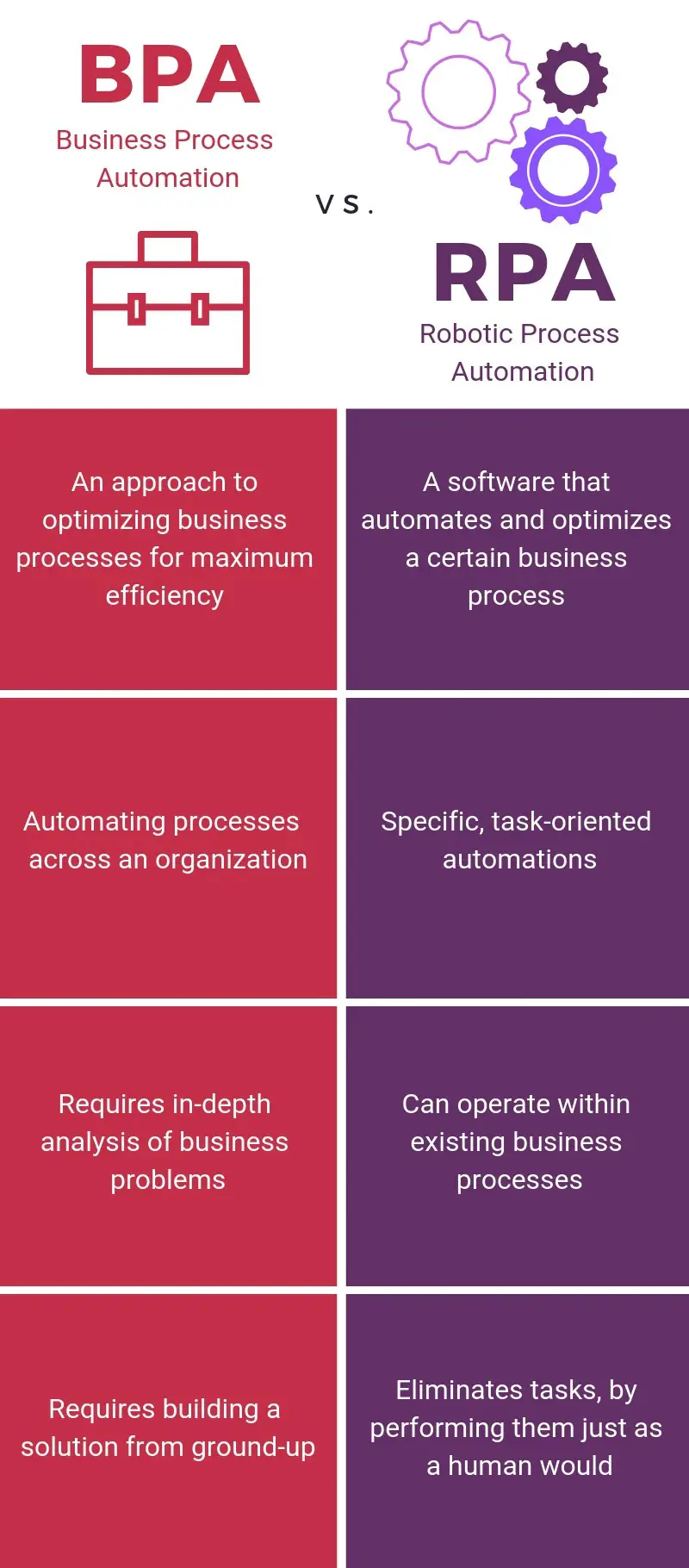
    business process automation vs robotic process automation

    What is business process automation?

    Business process automation (BPA) is an approach to optimizing entire business processes with automation. The goal is to eliminate repetitive workflows to improve efficiency and productivity.

    Business process automation doesn’t focus on one department or process, but rather looks at the organization on a holistic level to see which processes could be improved through automation. BPA covers end-to-end automation of a certain process or workflow.

    With business process automation, typically an in-depth analysis of the business’s inefficiencies is required to assess the largest problems the organization is facing. It usually also involves building a solution from the ground up, rather than adjusting and optimizing existing processes.

    What is robotic process automation?

    Then there’s robotic process automation, which is software that enables business process automation. Rather than attempting to automate an entire workflow, its task-oriented automations eliminate an existing process or co-exist within current processes to perform them more efficiently.

    A key differentiator of RPA is that the technology automates and completes tasks. However, RPA is not a machine or robot — it’s a software or application that replicates employee behavior by interacting with a user/web interface the same way a human would.

    RPA can be applied to various computer tasks to accelerate the speed and efficiency they are performed. Some use cases include: website scraping, payroll processing, document generation, underwriting loans, claims processing, membership renewals, order processing, and shipping notifications.

    The market for RPA is quite promising. Gartner recently calculated global RPA revenue on this technology to hit nearly $2 billion in 2021, with expectations that the market will continue to grow at double-digit rates through 2024.

    By 2025, the economic impact of implementing RPA into organizations is expected to reach $55 billion, with 35 million employees interacting with the technology regularly.

    BPA vs RPA

    Recently, robotic process automation has stepped into the spotlight. This is likely due to the simplicity of implementing and adopting it compared to BPA, which requires much more legwork.

    While RPA has become the more popular of the two, this doesn’t mean BPA isn’t important. In fact, when looking at BPA vs RPA, many will find they are just two different approaches to reaching the same goal.

    They both aim to drive efficiency and productivity throughout an organization by automating processes, and often these two types of automations can work in tandem. The key is knowing the difference and identifying which technology (or combinations of technologies) is best for your organization.

    If your business has major automation needs and requires a deep analytical assessment, then BPA may be the best bet. If you’re looking to optimize existing processes or just continue operations until you can do a major automation fix, use RPA.

  • Intelligent Automation: Bringing AI and RPA together | Automation Hero

    May 08, 2019 by Jessica Munday

    Optimization — it’s what differentiates successful, market-leading companies from the rest. Without it, companies would be operating with the most expensive, inefficient, and slowest means possible.

    Our world thrives on optimization. Every day there’s a new company pushing the boundaries and setting higher standards for the world as we know it. There are no finish lines when it comes to who can do it best.

    This next industrial wave will make business optimization more important than ever. It will put AI alongside the human workforce to produce more, waste less, and do so faster and better than ever imagined.

    Keep in touch

    Building blocks of business optimization

    Business process automation (BPA) is not new. It stems from business process management (BPM) that was brought about during the 1990s. BPM focused on simplifying and optimizing processes for businesses on a broad scale. BPA is an aspect of BPM that uses automation to eliminate repetitive workflows using a machine, software, tool or system with little-to-no human interference.

    The goal of BPA is to rapidly improve the efficiency and productivity of an organization by getting rid of the mundane tasks that waste the valuable time of a company’s human workforce. It’s holistic technology that covers end-to-end automation of a certain process.

    Historically, BPA tools were limited in what they could do, understand, and the tasks they could perform. Most tools often automated precise, rule-based processes like manipulating data or triggering automated responses.

    Then there is robotic process automation (RPA), which is the software that enables BPA. It’s the physical technology that does the automating and completes these tasks. While BPA focuses on widespread automation of processes, RPA focuses on more narrowed automations.

    Gartner calculated global RPA revenue on this technology to hit nearly $2 billion in 2021, with expectations that the market will continue to grow at double-digit rates through 2024. This explosion saw little-to-no signs of slowing down even in the face of economic downturn from the COVID-19 pandemic.

    The future of this technology continues to impress. By 2025, the economic impact of implementing RPA into organizations is expected to reach $55 billion, and 35 million employees are expected to interact with the technology regularly. 

    That type of growth within the RPA industry wouldn’t be possible without the advanced technology that’s now becoming increasingly available to businesses, which leads us to the next generation of business optimization: intelligent automation.

    The next generation of intelligent automation

    AI is now more advanced, more capable, and more easily accessible than ever before.

    The developments in recent years have made it so machines can perform much more than previously imaged. For example, virtual assistants can now understand language and complete requests by humans. Other AI can recognize facial images and automate based on its detection (e.g. iPhone’s face unlock feature). These examples are merely the tip of the iceberg for the potential of AI and related technologies on business optimization.

    This technology is also steadily becoming more available to the masses. What was previously only reserved for academia, the elite or science fiction is now in the majority of the global population’s pockets.

    When these advanced AI technological capabilities are combined with RPA software, the possibilities are endless. RPA automates repetitive tasks that bog people down while AI analyzes, learns, and solves problems. The next generation of business tools will use technology enabled with both RPA and AI to accelerate productivity to unseen heights.

    This generation of tech is called intelligent automation. Intelligent automation can be easily defined as a mixture of automation and AI to perform work processes, augment decision making or solve problems.

    Intelligent automation is incredibly powerful. Some real applications include:

    • Using text mining and natural language processing to generate documents such as insurance claims, medical forms, and invoices from email text or other unstructured formats.
    • Analyzing the behavior of financial customers and recommending best next steps for a banker to close a mortgage loan deal.
    • Optimizing logistics routes, manufacturing workflows, or packaging warehouse output to increase speed efficiency and automatically alert proper departments or representatives involved in process handlings.

    The above are tasks that would take workers hours of cognitive effort to strategize, plan, and execute, while it only takes an intelligent automation platform a fraction of that time.

    This frees up employees to spend time on more productive work. For a doctor, this means more availability for seeing patients. For a banker or insurance provider, this means more availability for helping customers. With intelligent automation, people can spend more time on the tasks they enjoy and excel at.

    As humans waste less time, the benefits of using business optimization technology pile up. Overall productivity improves, operating costs are reduced, and tasks are done more efficiently.

    The global spend on intelligent automation hit $10.9 billion in 2021, with continued growth anticipated for the industry to surpass $13 billion during the next two years.

    Where does intelligent document processing (IDP) fit in?

    Intelligent document processing (IDP) has emerged as a crucial element within the wider automation landscape. IDP technology was born out of the need for organizations to accurately extract data from documents. In essence, IDP leverages artificial intelligence (AI) and natural language processing (NLP) to effectively handle and oversee document-centric business processes.

    Through the adoption of IDP, companies can optimize business processes involving a large volume of documents to reduce manual effort, enhance precision, and reach their digital transformation goals.

    A notable advantage of IDP is its seamless integration capability with other automation tools like robotic process automation (RPA). This compatibility with existing technologies enables companies to enhance their current automation strategies, leading to improved overall efficiency and expanded operational scope.

    Hero Platform_ uses an Application Programming Interface (API) to transform existing systems, software, and databases into a “business intelligence fabric.” Our industry-leading native AI is built into the platform, so it can intelligently process any document, providing a valuable service within a wider automation strategy.

    Why use IDP in your IA strategy for sales

    In 2021, a major challenge for B2B businesses centered on qualifying leads and generating high sales performance. Without a well-oiled, highly productive sales organization, businesses fail to scale, grow, or remain successful and profitable in their market. Yet, the sales process is riddled with inefficiencies that prevent representatives from being productive and bringing revenue into the company.

    Sales teams spend hours writing emails, scheduling meetings, entering data, filling out forms, and copy and pasting information. In total, this burden amounts to 64% of a sales team’s time spent on non-revenue generating activities. 

    Eliminating these excessive processes that prevent sales productivity should be an initiative on any company’s agenda. Using intelligent automation will give companies a competitive advantage.

    In 2021, intelligent automation was the automation technology companies considered investing in most, according to a survey of digital transformation leaders across industries, with 48% of participants looking to allocate resources to the growing field within the next year.

    Businesses, now more than ever, rely on tech to optimize their processes. This is especially the case as a new generation of business optimization approaches with artificial intelligence and automation at the helm.

    Unlock the intelligence in your documents with our AI-driven automation today

    Learn how we helped Markerstudy reduce its claims processing time by 40%. Additionally, learn how we reduced total claim processing time by 80% for another multinational insurance partner — cutting down manual tasks from 10 minutes to just two minutes per claim.

    • Speak with an expert — tell us about your specific use case.
    • Get a personalized demo — schedule a demo, and our Heroes will get in touch!
  • Yes, you really do need enterprise automation | Automation Hero

    May 08, 2019 by Jessica Munday

    One of the biggest lies business leaders tells themselves is that their business processes“aren’t that bad.” And certainly not bad enough to introduce enterprise automation. Let me stop you there: Yes, they are.

    You may not realize it, but the processes in place in your company are massively inefficient, expensive and frankly, make your employees want to pull their hair out.

    Let’s take your legacy systems as one example. What’s inside that system? Research shows that 41% of IT and business users say data is “trapped” in legacy systems. If data is needed in multiple systems within your business process, and the legacy system is unable to sync with those external tools directly, your employee must manually port that data from one system to another.

    The average employee spends between 4 to 10 hours a week on repetitive computer tasks (up to 350 hours per year). Often these processes aren’t even directly related to their primary job function.

    These inefficient processes exist at every level of an organization, costing your business money and wasting several hours of each worker’s day. It’s time for management to face the facts; your business processes are inefficient and enterprise automation is the solution.

    How bad are my ineffective processes?

    Inefficient processes cost organizations up to 20-30% of their annual revenue, according to IDC research. Here are a few examples of processes costing your company:

    • IT departments spend 30% of their time on basic low-level tasks.
    • 50% of companies spend $5-25 per manually processed invoice.
    • 64% of sales reps’ time is spent on non-revenue generating activities, with 25% being administrative work.

    Regardless of industry or job function, there are ineffective processes in your organization preventing your employees from completing valuable work. And as your employees waste time on these tasks, your company is wasting money as they perform them.

    Solutions for enterprise automation

    When it comes to enterprise automation, there are actually a few options for enterprises depending on your needs and level of inefficiency.

    If you’re looking for a reduction of repetitive, rule-based and high-volume work tasks that specifically deal with web interfaces, look into robotic process automation (RPA).

    Our specialty at Automation Hero is the next generation of RPA: intelligent process automation. Intelligent process automation is the powerful combination of artificial intelligence, RPA and mass amounts of data to automate complex tasks and perform more adaptable workflows.

    The key difference between intelligent process automation and traditional RPA is that RPA is unadaptable. RPA performs one action repeatedly without considering nuances or exceptions. For example, if you asked an RPA system to sort red and blue balls, it wouldn’t be able to react in the case of a yellow ball. RPA also can’t learn, so every process must be programmed and changed manually by a developer.

    However, when you add AI to RPA, the possibilities for optimization are endless. Intelligent process automation systems can learn, making them flexible in the face of complex processes.  It’s the first technology intelligent enough to handle tedious, yet complicated human processes.

    For example, it would recognize that this ball is unlike the others and classify it separately on its own, or alert a human that there is a third category of balls.

    According to research by KPMG, implementing intelligent process automation results in cost savings of 40-75% depending on the company with payback ranging from several months to several years.

    It’s estimated that about half of automation opportunities are being missed. By finding these automation opportunities, you can cut the time your employees spend on busy work in half. Bringing on intelligent process automation benefits both your company when it comes to cost savings and your employees by automating the tasks they hate performing.